

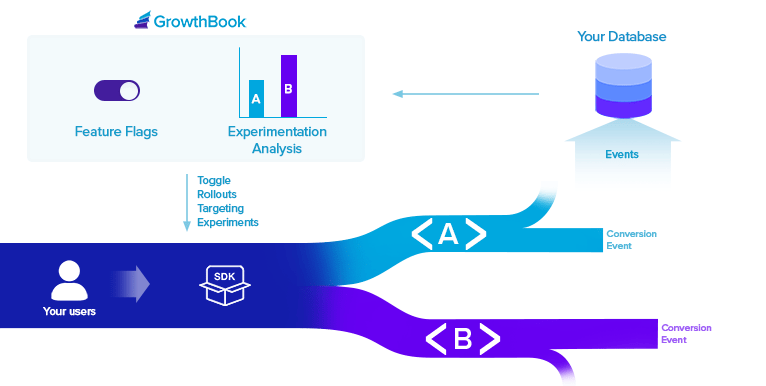
Feature Flags
Feature flags are a very powerful developer tool. They give you deep control over how and when new functionality is released to your users. GrowthBook supports 4 types of features:- Boolean (on/off)
- Number
- String
- JSON (with JSON Schema validation)
- Forced Value - Choose a subset of users based on targeting attributes and assign them all the same value
- Percentage Rollout - Use random sampling to roll out a new feature value to a percent of users
- Safe Rollout - Gradually ramp up traffic while monitoring guardrail metrics and automatically roll back if things go wrong
- Experiment - Run a controlled hypothesis test between 2 or more feature values
- Multi-Arm Bandit - Dynamically allocate traffic to different feature values based on performance
Experiment Analysis
GrowthBook needs to connect to your SQL Data Warehouse in order to query experiment results. GrowthBook is extremely flexible and can support almost any schema structure with a little bit of configuration.
- Proportion - A simple conversion rate (e.g.
signed up,purchased). - Mean - The average value across experiment units (e.g.
revenue,page views). Supports several different aggregation types: sum, count, max, and count distinct. - Ratio - A ratio of two values (e.g.
pages per session,revenue per order). - Quantile - The value at a specific percentile (e.g.
P99 Latency). - Retention - The percentage of experiment units who return after a delay (e.g.
day 7 retention). - Funnel - The percentage of experiment units who complete a series of steps, with a per-step breakdown of where units drop off (e.g.
signup funnel conversion).
- Frequentist or Bayesian - Choose the statistical framework that best fits your needs
- Sequential Testing - Always-valid p-values that allow you to safely peek at results as often as you like
- CUPED - Use pre-experiment data to reduce variance and improve sensitivity
- Sample Ratio Mismatch (SRM) - Automatically detect when experiment traffic is not being properly split between variations
- Multiple Comparison Corrections - Control for either false positive rate (Holm-Bonferroni) or false discovery rate (Benjamini-Hochberg)
- Different Baselines - Choose any variation as the baseline for comparison, not just control
- Custom Priors - For Bayesian stats, set custom prior distributions for each metric
- Power Calculator - Estimate the required runtime based on historical data before launching your experiment
- Difference Types - View metric differences as either relative lift, absolute lift, or scaled impact

Use Cases
There are typically three reasons that teams use GrowthBook.1. Full Experimentation Platform
In this use case, companies use Feature Flags and our SDKs to run experiments in their applications. Then they use our Experiment Analysis to look at the results and decide on a winner. This is best for companies that want an all-in-one solution and seamless developer experience.2. Feature Flags Only
In this use case, companies don’t run experiments at all and just use GrowthBook feature flags within their engineering team. This is best for companies that don’t have enough traffic to run full experiments, but still want all of the benefits that feature flags provide. It’s also good for companies that know they will want to run experiments in the future and want to start instrumenting their applications today to get ready.3. Experiment Analysis Only
In this use case, companies are already running experiments and analyzing results usually with either a home-built reporting system or by manually creating Jupyter notebooks. They use GrowthBook to automate and improve the analysis process to save time and make better decisions. This is best for companies that already have a robust process for running experiments and just need a little help analyzing results at scale.Next Steps
Quick Start Guide
Learn how to get started with GrowthBook
Self-Host
Learn about running GrowthBook on your own infrastructure
SDK Docs
Learn about the GrowthBook SDKs