> ## Documentation Index
> Fetch the complete documentation index at: https://docs2.growthbook.io/llms.txt
> Use this file to discover all available pages before exploring further.

# AI Integrations

> Learn about AI integrations with GrowthBook.

export const CommercialFeature = ({feature, description}) => {
  const commercialFeatures = {
    "adv-presentations": {
      plan: "enterprise",
      displayName: "Adv Presentations"
    },
    "advanced-permissions": {
      plan: "pro",
      displayName: "Advanced Permissions"
    },
    "ai-byok": {
      plan: "enterprise",
      displayName: "Ai Byok"
    },
    "ai-suggestions": {
      plan: "enterprise",
      displayName: "AI Suggestions"
    },
    archetypes: {
      plan: "pro",
      displayName: "Archetypes"
    },
    "audit-logging": {
      plan: "enterprise",
      displayName: "Audit Logging"
    },
    "cloud-proxy": {
      plan: "pro",
      displayName: "Cloud Proxy"
    },
    "code-references": {
      plan: "pro",
      displayName: "Code References"
    },
    "contextual-bandits": {
      plan: "enterprise",
      displayName: "Contextual Bandits"
    },
    "custom-hooks": {
      plan: "enterprise",
      displayName: "Custom Hooks"
    },
    "custom-launch-checklist": {
      plan: "enterprise",
      displayName: "Custom Launch Checklist"
    },
    "custom-markdown": {
      plan: "enterprise",
      displayName: "Custom Markdown"
    },
    "custom-metadata": {
      plan: "enterprise",
      displayName: "Custom Metadata"
    },
    "custom-roles": {
      plan: "enterprise",
      displayName: "Custom Roles"
    },
    dashboards: {
      plan: "enterprise",
      displayName: "Dashboards"
    },
    "decision-framework": {
      plan: "pro",
      displayName: "Decision Framework"
    },
    "encrypt-features-endpoint": {
      plan: "pro",
      displayName: "Encrypt Features Endpoint"
    },
    "environment-inheritance": {
      plan: "enterprise",
      displayName: "Environment Inheritance"
    },
    "events-forwarder": {
      plan: "pro",
      displayName: "Events Forwarder"
    },
    "experiment-impact": {
      plan: "enterprise",
      displayName: "Experiment Impact"
    },
    "feature-configs": {
      plan: "enterprise",
      displayName: "Feature Configs"
    },
    "funnel-metrics": {
      plan: "pro",
      displayName: "Funnel Metrics"
    },
    "hash-secure-attributes": {
      plan: "pro",
      displayName: "Hash Secure Attributes"
    },
    "historical-power": {
      plan: "pro",
      displayName: "Historical Power"
    },
    holdouts: {
      plan: "enterprise",
      displayName: "Holdouts"
    },
    "incremental-refresh": {
      plan: "enterprise",
      displayName: "Incremental Refresh"
    },
    "json-validation": {
      plan: "enterprise",
      displayName: "JSON Validation"
    },
    "large-saved-groups": {
      plan: "enterprise",
      displayName: "Large Saved Groups"
    },
    learnings: {
      plan: "enterprise",
      displayName: "Learnings"
    },
    livechat: {
      plan: "pro",
      displayName: "Livechat"
    },
    "manage-official-resources": {
      plan: "enterprise",
      displayName: "Manage Official Resources"
    },
    "metric-correlations": {
      plan: "enterprise",
      displayName: "Metric Correlations"
    },
    "metric-effects": {
      plan: "enterprise",
      displayName: "Metric Effects"
    },
    "metric-groups": {
      plan: "enterprise",
      displayName: "Metric Groups"
    },
    "metric-populations": {
      plan: "pro",
      displayName: "Metric Populations"
    },
    "metric-slices": {
      plan: "enterprise",
      displayName: "Metric Slices"
    },
    "multi-armed-bandits": {
      plan: "pro",
      displayName: "Multi Armed Bandits"
    },
    "multi-metric-queries": {
      plan: "enterprise",
      displayName: "Multi Metric Queries"
    },
    "multi-org": {
      plan: "enterprise",
      displayName: "Multi Org"
    },
    "multiple-sdk-webhooks": {
      plan: "pro",
      displayName: "Multiple Sdk Webhooks"
    },
    "no-access-role": {
      plan: "enterprise",
      displayName: "No Access Role"
    },
    "override-metrics": {
      plan: "pro",
      displayName: "Override Metrics"
    },
    "pipeline-mode": {
      plan: "enterprise",
      displayName: "Pipeline Mode"
    },
    "post-stratification": {
      plan: "enterprise",
      displayName: "Post Stratification"
    },
    "precomputed-dimensions": {
      plan: "pro",
      displayName: "Precomputed Dimensions"
    },
    "prerequisite-targeting": {
      plan: "enterprise",
      displayName: "Prerequisite Targeting"
    },
    prerequisites: {
      plan: "pro",
      displayName: "Prerequisites"
    },
    "product-analytics-dashboards": {
      plan: "pro",
      displayName: "Product Analytics Dashboards"
    },
    "project-admin-role": {
      plan: "enterprise",
      displayName: "Project Admin Role"
    },
    "quantile-metrics": {
      plan: "pro",
      displayName: "Quantile Metrics"
    },
    "ramp-schedules": {
      plan: "pro",
      displayName: "Ramp Schedules"
    },
    redirects: {
      plan: "pro",
      displayName: "Redirects"
    },
    "regression-adjustment": {
      plan: "pro",
      displayName: "CUPED"
    },
    releases: {
      plan: "enterprise",
      displayName: "Releases"
    },
    "remote-evaluation": {
      plan: "pro",
      displayName: "Remote Evaluation"
    },
    "require-approvals": {
      plan: "enterprise",
      displayName: "Require Approvals"
    },
    "require-project-for-features-setting": {
      plan: "enterprise",
      displayName: "Require Project For Features Setting"
    },
    "require-project-for-sdk-connections-setting": {
      plan: "enterprise",
      displayName: "Require Project For Sdk Connections Setting"
    },
    "retention-metrics": {
      plan: "pro",
      displayName: "Retention Metrics"
    },
    "safe-rollout": {
      plan: "pro",
      displayName: "Safe Rollout"
    },
    saveSqlExplorerQueries: {
      plan: "pro",
      displayName: "Save SQL Explorer Queries"
    },
    "schedule-feature-flag": {
      plan: "pro",
      displayName: "Schedule Feature Flag"
    },
    "scheduled-revisions": {
      plan: "enterprise",
      displayName: "Scheduled Revisions"
    },
    scim: {
      plan: "enterprise",
      displayName: "SCIM"
    },
    "sequential-testing": {
      plan: "pro",
      displayName: "Sequential Testing"
    },
    "share-product-analytics-dashboards": {
      plan: "enterprise",
      displayName: "Share Product Analytics Dashboards"
    },
    simulate: {
      plan: "pro",
      displayName: "Simulate"
    },
    sso: {
      plan: "enterprise",
      displayName: "SSO"
    },
    "sticky-bucketing": {
      plan: "pro",
      displayName: "Sticky Bucketing"
    },
    teams: {
      plan: "enterprise",
      displayName: "Teams"
    },
    templates: {
      plan: "enterprise",
      displayName: "Templates"
    },
    "unlimited-managed-warehouse-usage": {
      plan: "pro",
      displayName: "Unlimited Managed Warehouse Usage"
    },
    "visual-editor": {
      plan: "pro",
      displayName: "Visual Editor"
    }
  };
  const {plan, displayName} = commercialFeatures[feature];
  const isEnterprise = plan === "enterprise";
  const defaultDescription = isEnterprise ? "is available on Enterprise plans." : "is available on Pro and Enterprise plans.";
  const planLabel = isEnterprise ? "Enterprise" : "Pro";
  const containerStyle = isEnterprise ? {
    backgroundColor: "color-mix(in srgb, var(--indigo-a3) 60%, transparent)"
  } : {
    backgroundColor: "color-mix(in srgb, var(--amber-a3) 60%, transparent)"
  };
  const badgeStyle = isEnterprise ? {
    boxShadow: "inset 0 0 0 1px var(--indigo-a8)",
    color: "var(--indigo-a11)"
  } : {
    boxShadow: "inset 0 0 0 1px var(--amber-a8)",
    color: "var(--amber-a11)"
  };
  return <div className="flex items-start gap-2 mb-4 p-3 text-sm leading-[1.4] rounded-lg" style={containerStyle} role="note">
      <span className="inline-flex items-center justify-center px-1.5 h-5 text-xs font-medium rounded-full shrink-0 leading-none" style={badgeStyle}>
        {planLabel}
      </span>
      <div className="flex-1 leading-[1.3]">
        <strong className="font-semibold">{displayName}</strong>{" "}
        {defaultDescription} {description}
      </div>
    </div>;
};

GrowthBook supports AI integrations to enhance your experimentation and feature management capabilities. These integrations allow you to leverage AI models for various tasks, such as generating insights, automating decisions, and improving user experiences.

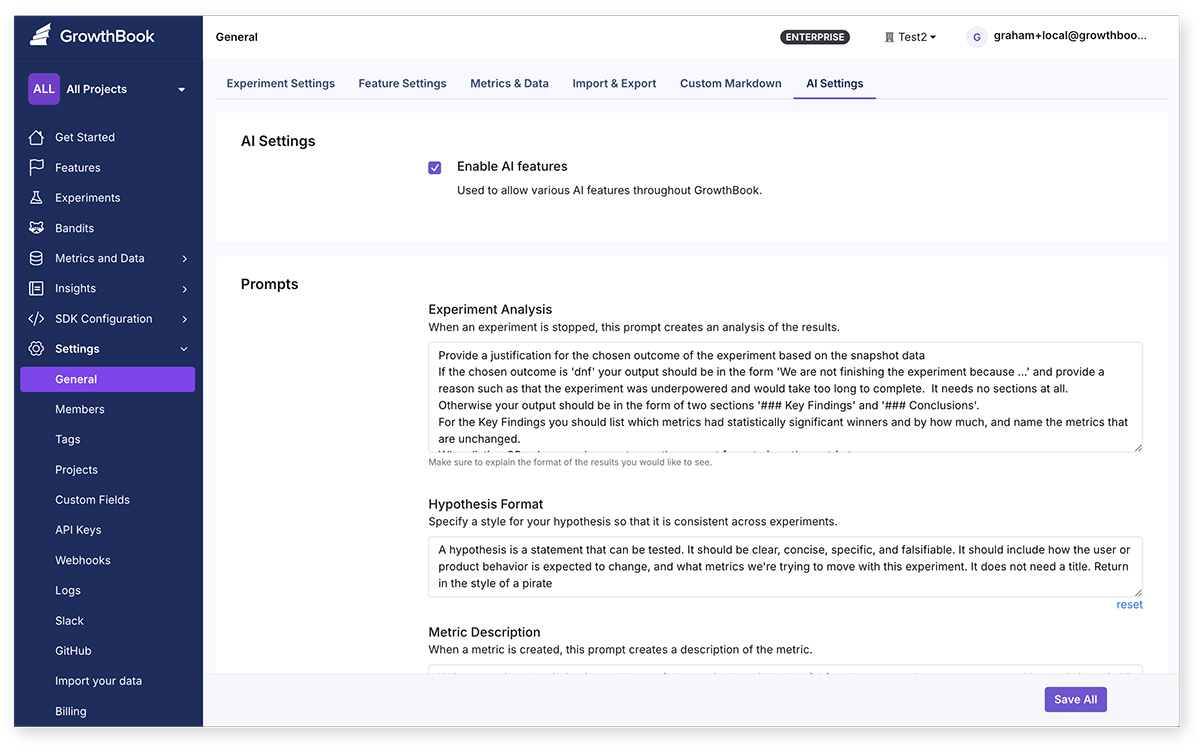
AI features in GrowthBook are optional and can be enabled or disabled in the AI settings page. You can also configure the prompts used by the AI models to better suit your needs.

<Frame>
  <img src="https://mintcdn.com/growthbook-ea15456d/hKkmiLOwhH6E2xcD/static/images/integrations/ai/ai-settings-cloud.png?fit=max&auto=format&n=hKkmiLOwhH6E2xcD&q=85&s=8ff04e2b4fc62f9d33b95b95d5c67190" alt="AI Settings" width="800" data-path="static/images/integrations/ai/ai-settings-cloud.png" />
</Frame>

<Tip>
  **Prompts customization**

  Many of the prompts used in AI integration in GrowthBook can be adjusted from the AI settings page. You can customize the prompts to better suit your needs and the context of your experiment program.
</Tip>

## Available AI Features

### Generate experiment results summaries

When you stop an experiment, you can generate a summary of the results using OpenAI's language models. This summary can
help you quickly understand the impact of the experiment and make informed decisions.

The prompt for generating this summary can be adjusted from the settings page of the OpenAI integration.

#### Data sent:

* Experiment variation names
* Experiment metrics and their values for this experiment
* Experiment metadata (e.g., start date, end date, etc.)
* Experiment results (e.g., p-value, confidence level, etc.)
* Experiment description and hypothesis
* Experiment tags and attributes

### Generate SQL for SQL Explorer

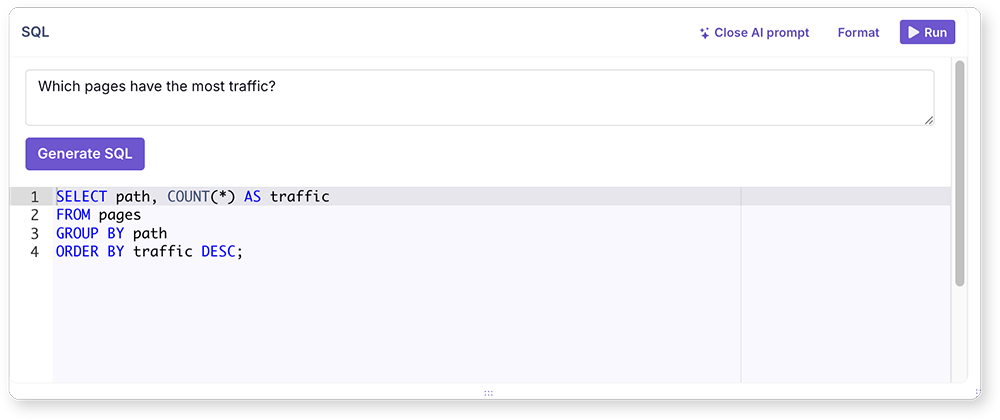
You can use AI to generate SQL queries for the SQL Explorer in GrowthBook. Add you provide a natural language description of the data you want to query, and the AI will generate the SQL query for you.

<Frame>
  <img src="https://mintcdn.com/growthbook-ea15456d/hKkmiLOwhH6E2xcD/static/images/integrations/ai/sql-generation.png?fit=max&auto=format&n=hKkmiLOwhH6E2xcD&q=85&s=f4baf0554299e6fac19af30653a049d9" alt="SQL Generation" width="800" data-path="static/images/integrations/ai/sql-generation.png" />
</Frame>

#### Data sent:

* Table names and columns in your database
* Your description of the query you want to generate
* Current SQL query (if any)

### Generate Metric Descriptions

You can also use AI to generate descriptions for your metrics. This can help your team better understand what a metric
is used for when adding a metric to an experiment. It will take the metric SQL and meta information and generate a description.

#### Data sent:

* Metric name
* Metric SQL
* Metric attributes (e.g., type)
* Metric tags

### Hypothesis checking

Experiment hypothesis are crucial for guiding your experiments. With this AI integration, you can check the validity
of your experiment hypothesis to ensure consistency across your experiment program. This feature analyzes the hypothesis
against an adjustable prompt and provides feedback and suggestions for improvement.

#### Data sent:

* Experiment hypothesis text

### Similar Experiment Detection

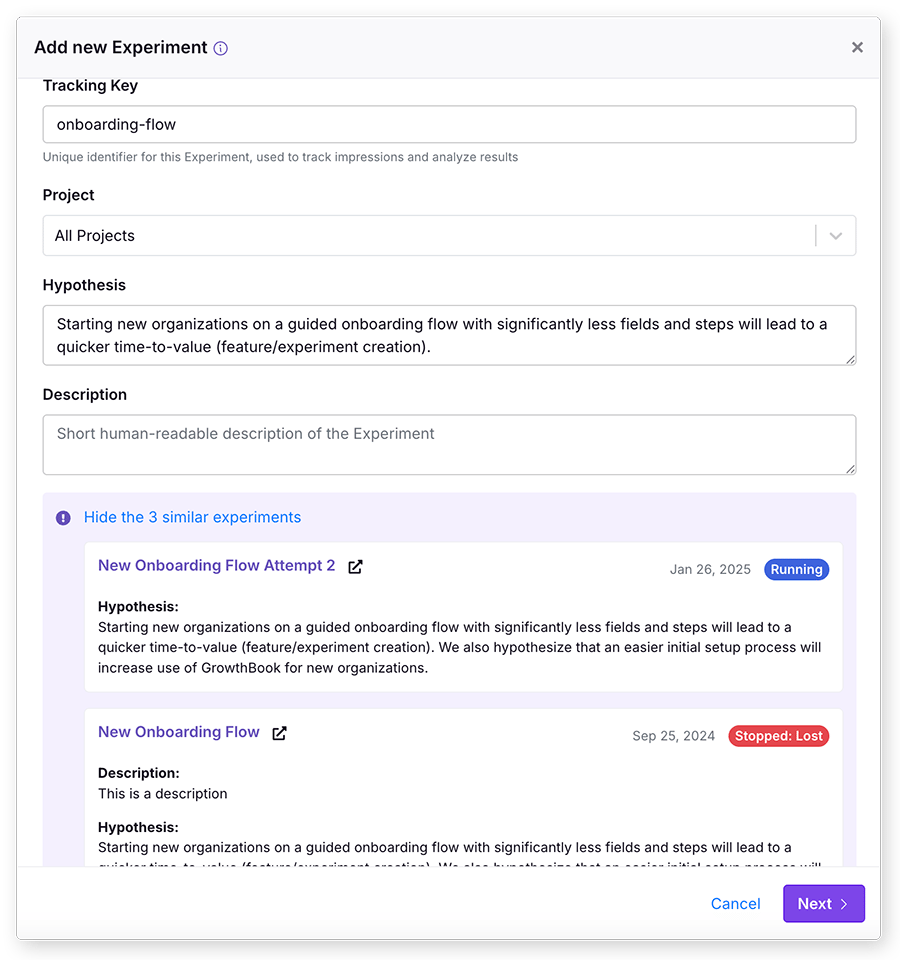
You can use AI to detect similar experiments in your GrowthBook project. This feature helps you identify experiments
that may redundant, ensuring that you don't waste resources on testing similar ideas. The AI model analyzes the experiment
metadata and provides a list of similar experiments.
<Frame>
  <img src="https://mintcdn.com/growthbook-ea15456d/hKkmiLOwhH6E2xcD/static/images/integrations/ai/similar-experiments.png?fit=max&auto=format&n=hKkmiLOwhH6E2xcD&q=85&s=6d7183649e9df3b006f0b96dfdc3c544" alt="Similar Experiment Detection" width="600" data-path="static/images/integrations/ai/similar-experiments.png" />
</Frame>

This feature is available from the "new experiment" modal when you create a new experiment. It will search the description and hypothesis and show you a list of
similar experiments.

This similar experiment detection is based on vector embeddings, which means it can find similar experiments even if
they don't share the exact same words. The embeddings will update automatically when the experiment meta information
changes, however, you can regenerate the embeddings for your experiments at any time from the AI settings page.

#### Data sent:

* Experiment description
* Experiment hypothesis
* Experiment name

## Self-Hosted AI Integrations

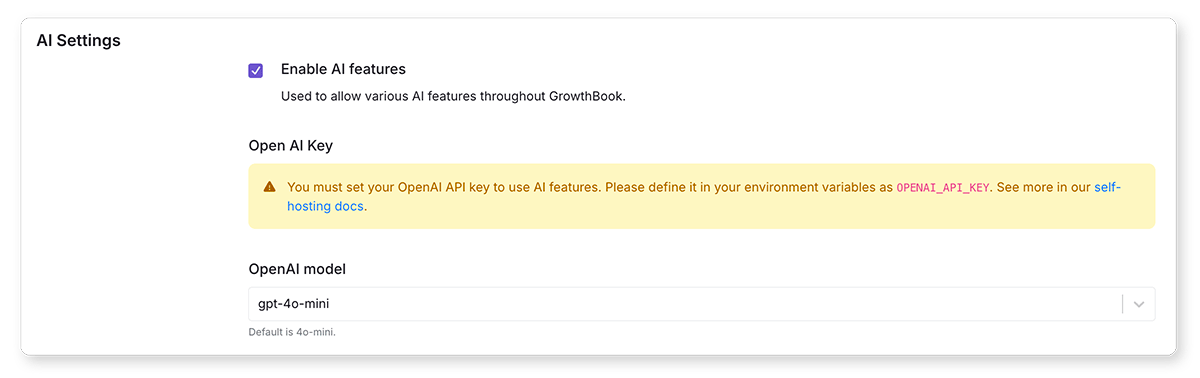
Self-hosted GrowthBook instances can enable these AI features, by adding a OpenAI API key to the AI settings page.

To get started with the OpenAI integration in GrowthBook, follow these steps:

1. **Create an OpenAI Account**: If you don't have an OpenAI account, sign up at [OpenAI](https://www.openai.com/).

2. **Obtain API Key**: After creating your account, obtain an API key from the OpenAI dashboard. This key will be used to authenticate your requests to the OpenAI API.

3. **Add environment variable**: Add the OpenAI API key to your GrowthBook instance as an environment variable. The variable should be named `OPENAI_API_KEY`.

   For example, if you are using Docker, you can add the following line to your `docker-compose.yml` file:

   ```yaml theme={null}
   environment:
     - OPENAI_API_KEY=your_openai_api_key_here
   ```

   If you are running GrowthBook in a different environment, refer to your platform's documentation on how to set environment variables.

4. **Configure GrowthBook**: In your GrowthBook settings, navigate to the AI settings tab and enable AI OpenAI integration, and configure any additional prompts as desired.

From the settings page you can also select the AI model you want to use. The default is `gpt-4o-mini`.
<Frame>
  <img src="https://mintcdn.com/growthbook-ea15456d/hKkmiLOwhH6E2xcD/static/images/integrations/ai/ai-settings-self-hosting.png?fit=max&auto=format&n=hKkmiLOwhH6E2xcD&q=85&s=c10952bbb8b44386f6530078069a29f5" alt="AI Settings Self-hosting" width="800" data-path="static/images/integrations/ai/ai-settings-self-hosting.png" />
</Frame>

<CommercialFeature feature="ai-suggestions" description="AI features for self-hosted GrowthBook instances are available on Enterprise plans." />

You can learn more from the [OpenAI Documentation](https://platform.openai.com/docs/).
