> ## Documentation Index
> Fetch the complete documentation index at: https://docs2.growthbook.io/llms.txt
> Use this file to discover all available pages before exploring further.
# Migrate from Statsig
> Everything you need to know to quickly migrate existing features, experiments, SDKs, and more from Statsig to GrowthBook, the largest open source experimentation platform.
This guide walks through migrating feature flags, experiments, and SDKs from Statsig to GrowthBook.
## Import Your Statsig Data
Use GrowthBook's import tool to migrate your Statsig configuration and experiments.
The Statsig import tool is currently in a private beta. Please contact [support@growthbook.io](mailto:support@growthbook.io) if you're interested in using it.
### Step 1: Generate Statsig API Key
* In Statsig, go to **Settings** → \*\* Key & Environments\*\*
* Create a new "Console" key with read-only permissions
* Copy the key (it starts with `secret-`)
### Step 2: Run the Import
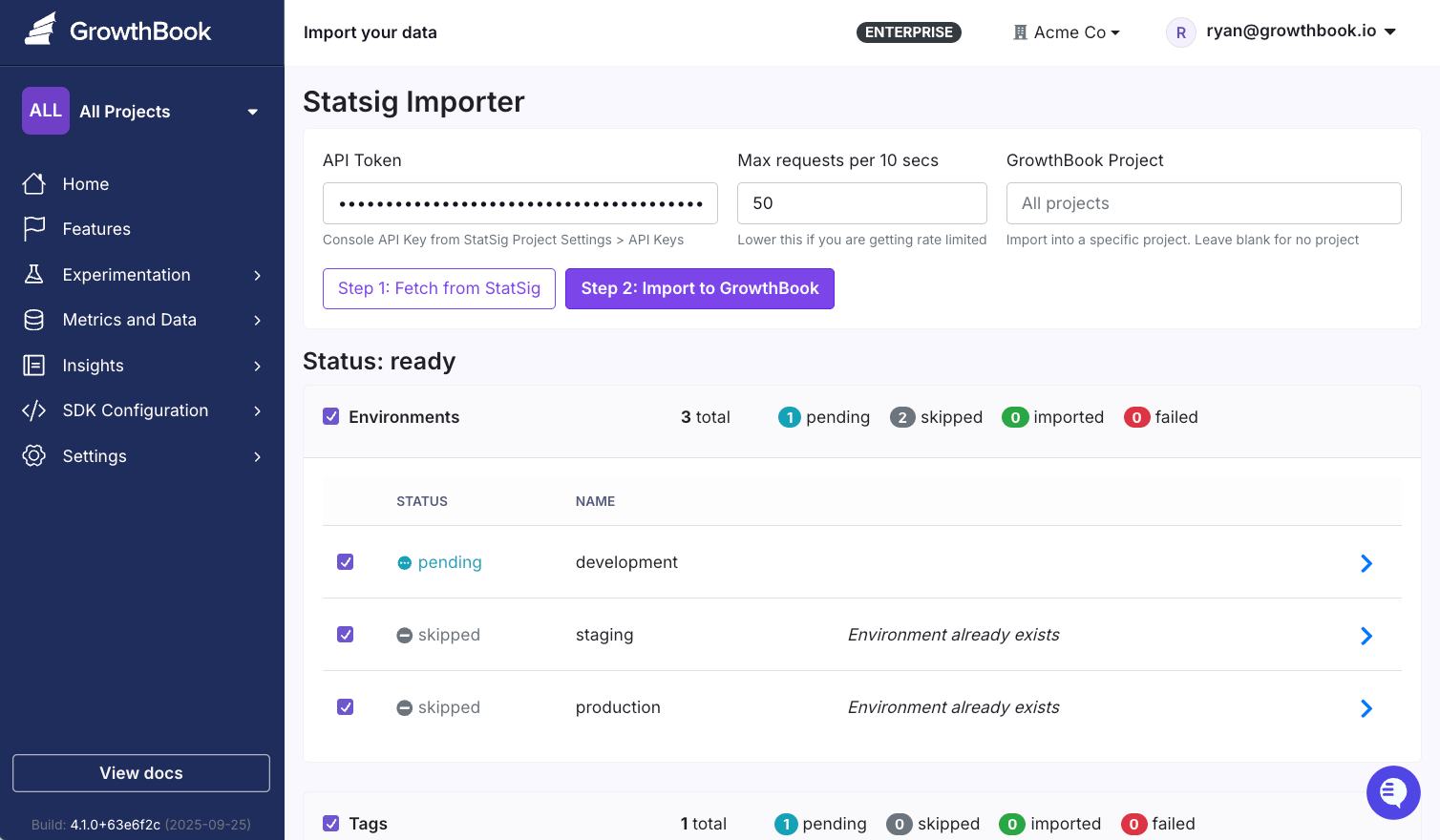
* In GrowthBook, go to **Settings** → **Import your data**
* Select Statsig
* Enter your Statsig API key
* Click **Fetch from Statsig**
The import tool will retrieve:
* Environments (production, staging, etc.)
* Tags
* Segments
* Feature Gates
* Dynamic Configs
* Experiments
### Step 3: Review and Confirm
Items will show as:
* **Pending**: Will be imported
* **Skipped**: Already exists in GrowthBook
You can:
* Uncheck items to remove them from the import
* Click the arrow (>) to view item details
* Click **Import to GrowthBook** when ready
When **Status** is marked as complete, your data is available in GrowthBook 🎉
## Migrate Your SDKs
**Automated SDK Migration**
Use our AI-powered migration assistant to automatically refactor your code from Statsig to GrowthBook SDKs.
**Supported SDKs**
* JavaScript
* Typescript
* React (client-side)
Looking for another language? Reach out to [support@growthbook.io](mailto:support@growthbook.io). We're happy to help!
### Installation
Download the subagent to your Claude Code agents directory:
```bash theme={null}
# Create the agents directory if it doesn't exist
mkdir -p ~/.claude/agents/
# Download the agent file
curl -o ~/.claude/agents/statsig-to-growthbook-sdk-migrator.md \
https://raw.githubusercontent.com/growthbook/claude-statsig-to-growthbook-sdk-migrator/main/.claude/agents/statsig-to-growthbook-sdk-migrator.md
```
### Using the Subagent
In Claude Code, simply ask:
> "I need to migrate this code from the Statsig SDK to the GrowthBook SDK: (@filename or directory)"
The subagent will:
* Convert import statements to GrowthBook SDK
* Transform feature gates to boolean flags
* Migrate dynamic configs to feature values
* Flatten `StatsigUser` objects to GrowthBook attributes
* Generate a migration report with any manual steps needed
🔗 See the [GitHub repo](https://github.com/growthbook/claude-statsig-to-growthbook-sdk-migrator) for more details.
## Terminology Mapping
| Statsig | GrowthBook |
| --------------- | ------------ |
| Segments | Saved Groups |
| Feature Gates | Features |
| Dynamic Configs | Features |
## Next Steps
1. Test your imported features in a development environment
2. Set up your data source connections for metrics
3. Configure webhooks and integrations
4. Review team permissions and access controls
Questions or issues? [Join our Slack community](https://join.slack.com/t/growthbookusers/shared_invite/zt-2xw8fu279-Y~hwnfCEf7WrEI9qScHURQ).