> ## Documentation Index
> Fetch the complete documentation index at: https://docs2.growthbook.io/llms.txt
> Use this file to discover all available pages before exploring further.
# Feature Flags and A/B Tests with Deno, Hono, and GrowthBook
> This guide shows you how to integrate GrowthBook with Deno and Hono to manage server-side feature flags and experiments.
The only requirement for this tutorial is to [install Deno](https://docs.deno.com/runtime/getting_started/installation/). The installation process is straightforward, and you'll be ready to follow along easily.
## Introduction
In this guide, we’ll use **Deno**, **Hono**, and **GrowthBook** to build a landing page for a fictional FinTech app called **Bayes Bank**. With this setup, we can use feature flags and A/B testing on a server-rendered landing page to test and deliver different experiences to users.
All tutorial code is available in our [Examples repo](https://github.com/growthbook/examples/tree/main/deno-hono).
### What are Deno, Hono, and GrowthBook?
* [**Deno**](https://deno.com/) is a JavaScript and TypeScript runtime developed by Ryan Dahl (creator of Node.js) that simplifies the development process and resolves many limitations from Node.
* [**Hono**](https://hono.dev/) is a fast, lightweight web framework that works like an updated, modernized Express, optimized for Deno and other runtimes.
* [**GrowthBook**](https://growthbook.io/) (that’s us!) is an open-source platform for feature flags and A/B testing. We offer a user-friendly interface for creating and managing flags, running tests, and analyzing results.
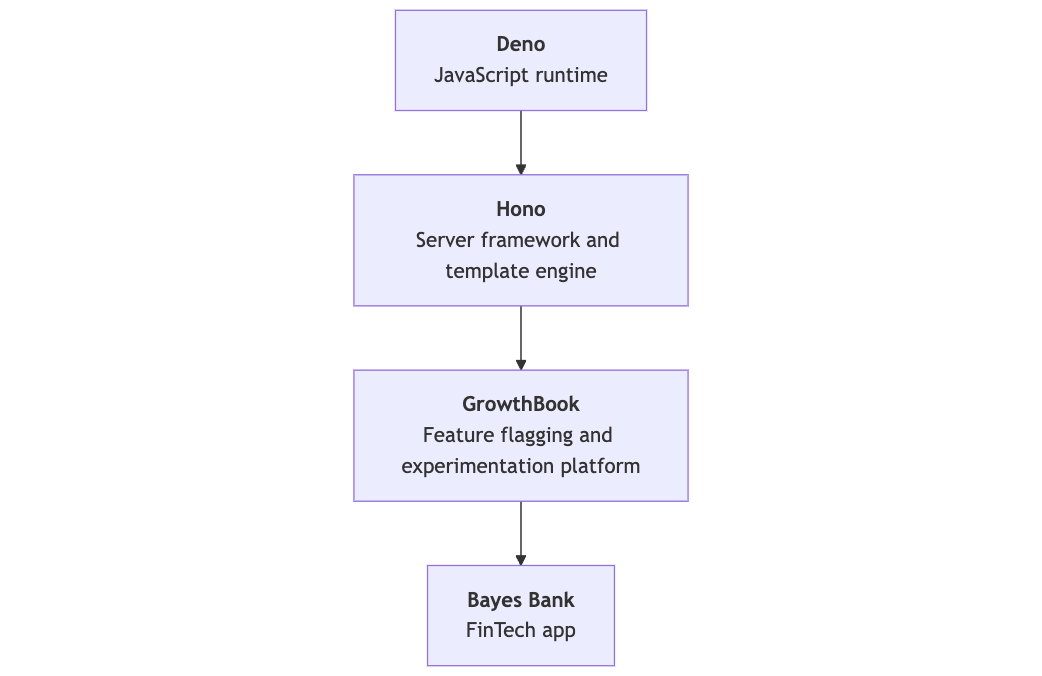
In this tutorial, learn how to use these technologies to build a feature-flagged landing page. Here’s a diagram that shows how these technologies fit together:
## Project setup
### Initialize Hono
Run the following command to create a new Hono project, selecting **Deno** as your runtime. (Optionally, substitute `my-app` for your project’s name.)
```bash theme={null}
deno run -A npm:create-hono@latest my-app
```
This command creates a new directory with the following files:
* **`README.md`**: Contains basic instructions for starting the server.
* **`deno.json`**: Defines project dependencies and configuration.
* **`main.ts`**: The core file where your application logic will reside.
Let’s take advantage of the fact that [Hono can support JSX](https://hono.dev/docs/guides/jsx) out of the box and rename `main.ts` to `main.tsx`.
### Install dependencies
Next, install **GrowthBook** and **Tailwind CSS**:
```bash theme={null}
deno add jsr:@growthbook/growthbook npm:tailwindcss
```
The `deno add` command registers dependencies via your import map in `deno.json`. The prefix before package names indicates which registry the package comes from.
**GrowthBook on the JSR**
The GrowthBook JS SDK is now available on the JSR. Learn more in our [announcement post](https://blog.growthbook.io/announcing-growthbook-on-jsr/).
## Configure Tailwind
Generate a Tailwind config:
```bash theme={null}
deno run -A npm:tailwindcss init -p
```
This creates `postcss.config.js` and `tailwind.config.js`. Update the Tailwind config to target the right files:
```js theme={null}
/** @type {import('tailwindcss').Config} */
module.exports = {
content: ["./**/*.{js,ts,jsx,tsx}"],
theme: {
extend: {},
},
plugins: [],
};
```
Create a `src/css` folder and add a new file called `input.css`. Add Tailwind directives to generate base styles:
```css theme={null}
@tailwind base;
@tailwind components;
@tailwind utilities;
```
### Configure development scripts
Add the following tasks to `deno.json` to streamline development:
```json highlight="7,8,9,10,11,12" theme={null}
{
"imports": {
"@growthbook/growthbook": "jsr:@growthbook/growthbook@^1.2.2",
"hono": "jsr:@hono/hono@^4.6.8",
"tailwindcss": "npm:tailwindcss@^3.4.14"
},
"tasks": {
"start": "deno run --allow-net main.tsx",
"watch:jsx": "deno run -A --watch main.tsx",
"watch:css": "deno run -A npm:tailwindcss -i src/css/input.css -o static/style.css --watch",
"dev": "deno task watch:css & deno task watch:jsx"
},
"compilerOptions": {
"jsx": "precompile",
"jsxImportSource": "hono/jsx"
}
}
```
Running `deno task dev` will watch for file changes, automatically restart the server, and recompile CSS.
## Building the app layout
To build the landing page, create a folder in `src` called `components`. Add the following components for the page layout: `Header.tsx`, `Hero.tsx`, `Copy.tsx`, and `Footer.tsx`.
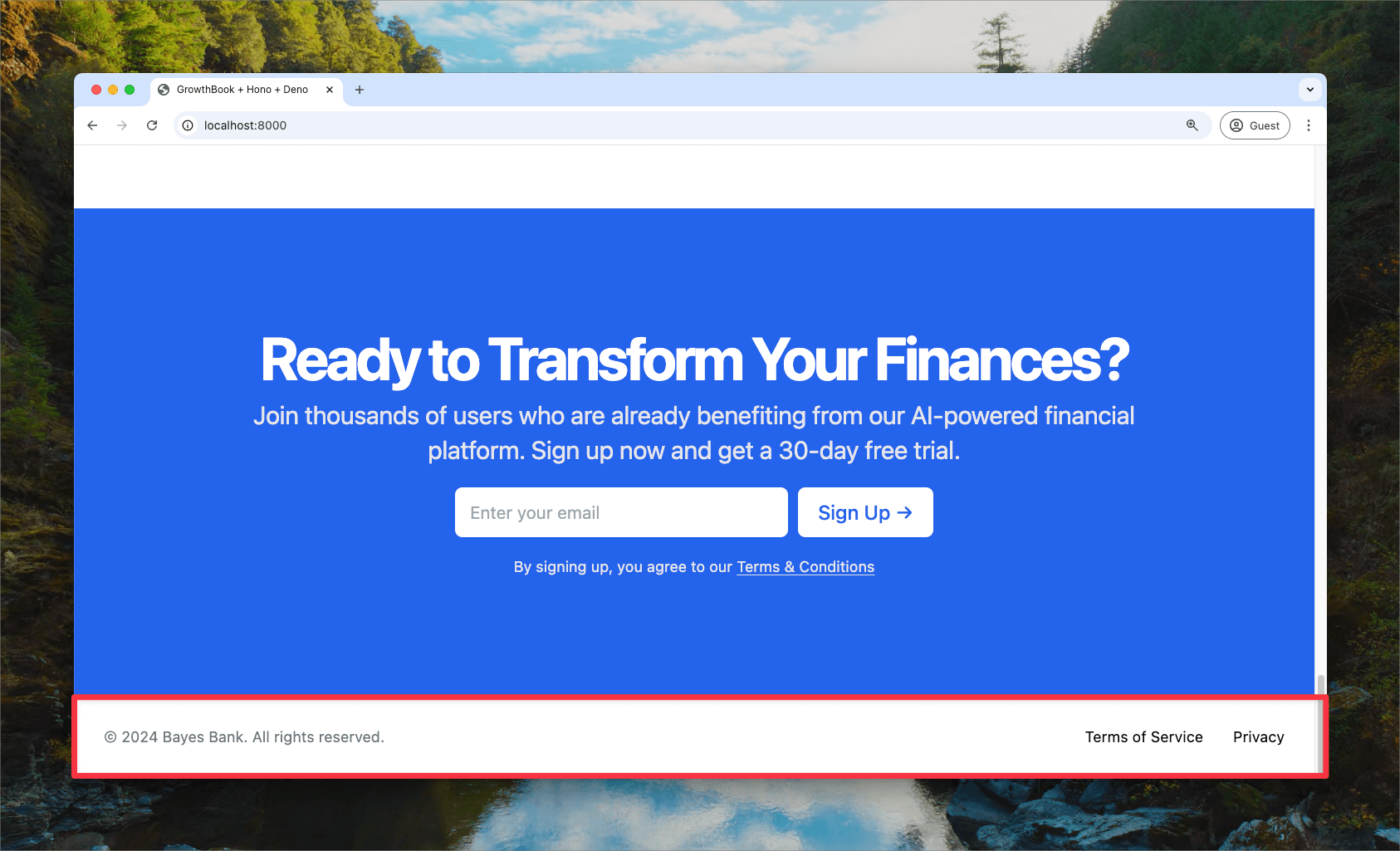
All of these components are available in the [demo repo](https://github.com/growthbook/examples/tree/main/deno-hono/src/components). Here’s the `Footer` component as an example:
```tsx title="/src/components/Footer.tsx" theme={null}
import { Props } from "../../main.tsx";
export const Footer = ({ companyName }: Omit) => {
return (
);
};
```
And here’s the rendered component:
### Main server code
The code generated when initializing Hono instantiates a new app, defines a route handler for the homepage, and starts the server.
```tsx title="main.tsx" theme={null}
import { Hono } from 'hono';
const app = new Hono();
app.get('/', (c) => c.text('Hello Hono!'));
Deno.serve(app.fetch);
```
Now, import the `Navbar` and `Footer` components and build a layout component for reuse:
```tsx title="main.tsx" theme={null}
import type { PropsWithChildren } from "hono/jsx";
import { Navbar } from "./src/components/Navbar.tsx";
import { Footer } from "./src/components/Footer.tsx";
export function Layout({ companyName, children }: PropsWithChildren<{ companyName: string }>) {
return (
Deno + Hono + GrowthBook
{children}
);
}
```
Add `Hero.tsx` and `Copy.tsx` components to define the page content, then create the `Page` component to bring it all together.
```tsx title="main.tsx" theme={null}
const Page = ({ companyName }) => (
);
```
Finally, modify the route to serve this page:
```tsx title="main.tsx" theme={null}
app.get("/", (c) => c.html());
```
Find the final version of the `main.tsx` file in the [demo repo](https://github.com/growthbook/examples/blob/main/deno-hono/main.tsx).
## Integrating GrowthBook
Create a file called `growthbookMiddleware.ts` to use feature flags and A/B tests in the app:
```ts title="growthbookMiddleware.ts" theme={null}
import { GrowthBook } from "@growthbook/growthbook";
import { getCookie, setCookie } from "hono/cookie";
import { createMiddleware } from "hono/factory";
export const growthbookMiddleware = createMiddleware<{
Variables: {
gb: GrowthBook;
};
}>(async (c, next) => {
// Instantiate GrowthBook with your connection details
const gb = new GrowthBook({
apiHost: "https://cdn.growthbook.io", // Update with your API host
clientKey: "YOUR-SDK-KEY",
trackingCallback: (experiment, result) => {
console.log("Experiment Viewed", { experiment, result }); // Update function to send experiment exposure to your analytics platform
},
});
// Get a preexisting cookie (ensures users are kept in the same variant)
let uuid = getCookie(c, "gb_uuid");
// Create the UUID/cookie if it doesn't exist
if (!uuid) {
uuid = crypto.randomUUID();
setCookie(c, "gb_uuid", uuid);
}
// Pass GrowthBook the ID and other attributes as needed
gb.setAttributes({
id: uuid,
// ...
});
// Initialize GrowthBook
await gb.init({ timeout: 1000 });
// Add the instance to the context
c.set("gb", gb);
// Continue the req/response
await next();
// Clean up once the request closes
gb.destroy();
});
```
Add this middleware to your route in `main.tsx`:
```tsx title="main.tsx" theme={null}
import { growthbookMiddleware } from "./growthbookMiddleware.ts";
app.get("/", growthbookMiddleware, (c) => {
const gbInstance = c.var.gb;
return c.html();
});
```
## Using feature flags in the app
Pass `gb` to components to conditionally render elements based on feature flags. For Bayes Bank, we want to test different headlines on the landing page to see if they boost conversions.
Update the text in `Hero.tsx` to be handled by a feature flag:
```tsx title="/src/components/Hero.tsx" theme={null}
export function Hero({ gb }: Props) {
const headline = gb.getFeatureValue("headline", "Revolutionize Your Finances with AI");
return
{headline}
;
}
```
GrowthBook’s `getFeatureValue` method takes the flag’s ID (`headline`) and a fallback value, in case the app can’t reach GrowthBook’s API. Now, different headlines will appear based on how the feature flag is configured in GrowthBook.
### Configuring GrowthBook
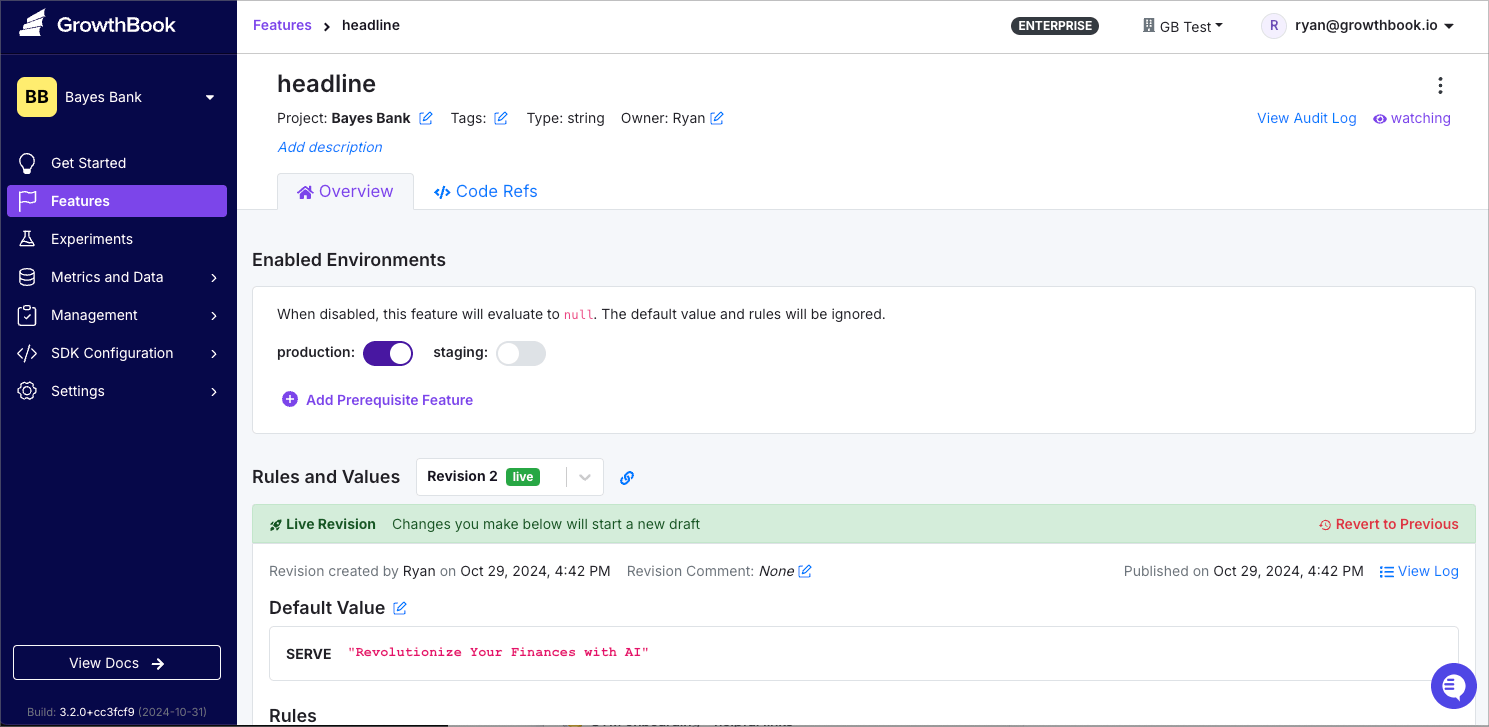
In GrowthBook, create a feature flag called `headline` and set its type to “String” with a default value of “Revolutionize Your Finances with AI.”
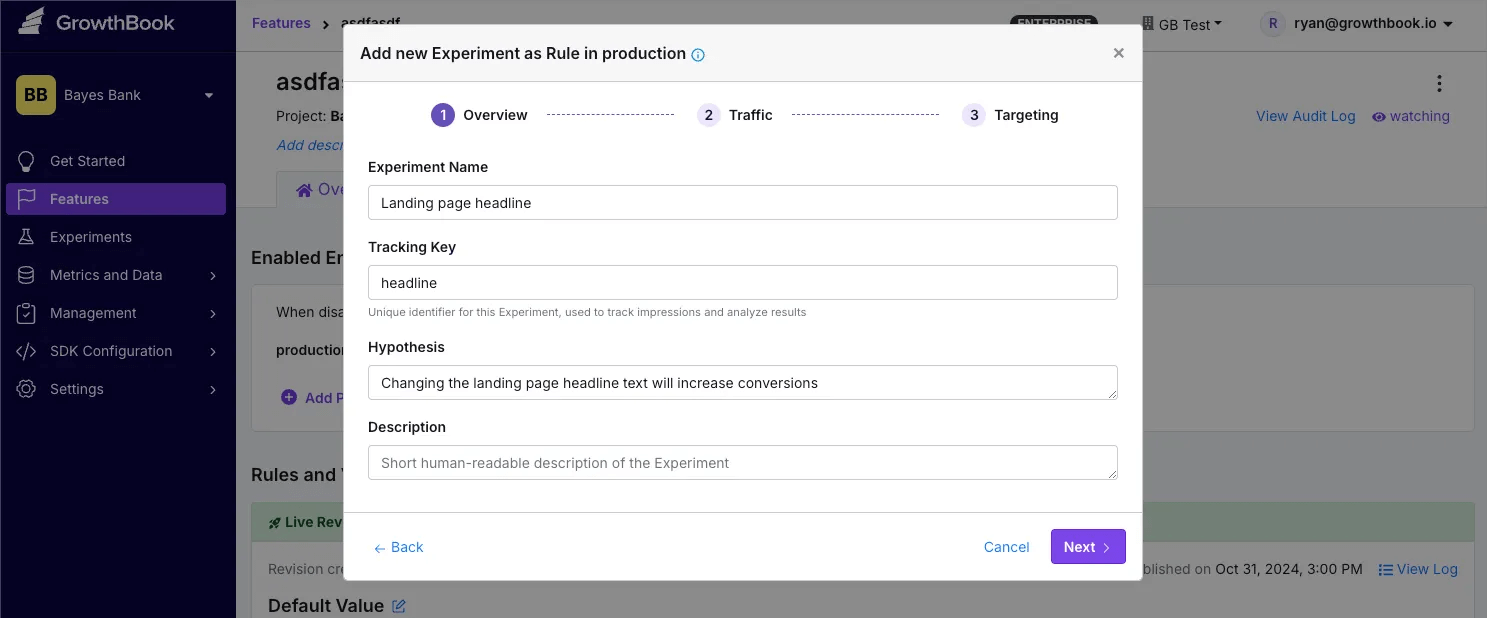
Next, click **Add Rule** → **Experiment** to set up an A/B test.
Set variation `0` to the default value, “Revolutionize Your Finances with AI,” and variation `1` to "Save Money and Grow Your Wealth with AI." Click **Save** to start the experiment 🧪
Below, check out the control and variation, all rendered server side!
## Summary
In this tutorial, we explored how to build a dynamic landing page for **Bayes Bank** using **Deno**, **Hono**, and **GrowthBook**. By leveraging these modern technologies, we created a server-rendered application that incorporates feature flags and A/B testing, enabling us to test different user experiences seamlessly.
With the fundamentals covered, you now have the tools to expand on this project, experiment with additional features, and fine-tune the user experience for Bayes Bank.
## Resources
* [Tutorial codebase](https://github.com/growthbook/examples/tree/main/deno-hono)
 ### What are Deno, Hono, and GrowthBook?
* [**Deno**](https://deno.com/) is a JavaScript and TypeScript runtime developed by Ryan Dahl (creator of Node.js) that simplifies the development process and resolves many limitations from Node.
* [**Hono**](https://hono.dev/) is a fast, lightweight web framework that works like an updated, modernized Express, optimized for Deno and other runtimes.
* [**GrowthBook**](https://growthbook.io/) (that’s us!) is an open-source platform for feature flags and A/B testing. We offer a user-friendly interface for creating and managing flags, running tests, and analyzing results.
In this tutorial, learn how to use these technologies to build a feature-flagged landing page. Here’s a diagram that shows how these technologies fit together:
### What are Deno, Hono, and GrowthBook?
* [**Deno**](https://deno.com/) is a JavaScript and TypeScript runtime developed by Ryan Dahl (creator of Node.js) that simplifies the development process and resolves many limitations from Node.
* [**Hono**](https://hono.dev/) is a fast, lightweight web framework that works like an updated, modernized Express, optimized for Deno and other runtimes.
* [**GrowthBook**](https://growthbook.io/) (that’s us!) is an open-source platform for feature flags and A/B testing. We offer a user-friendly interface for creating and managing flags, running tests, and analyzing results.
In this tutorial, learn how to use these technologies to build a feature-flagged landing page. Here’s a diagram that shows how these technologies fit together:
 ## Project setup
### Initialize Hono
Run the following command to create a new Hono project, selecting **Deno** as your runtime. (Optionally, substitute `my-app` for your project’s name.)
```bash theme={null}
deno run -A npm:create-hono@latest my-app
```
This command creates a new directory with the following files:
* **`README.md`**: Contains basic instructions for starting the server.
* **`deno.json`**: Defines project dependencies and configuration.
* **`main.ts`**: The core file where your application logic will reside.
Let’s take advantage of the fact that [Hono can support JSX](https://hono.dev/docs/guides/jsx) out of the box and rename `main.ts` to `main.tsx`.
### Install dependencies
Next, install **GrowthBook** and **Tailwind CSS**:
```bash theme={null}
deno add jsr:@growthbook/growthbook npm:tailwindcss
```
The `deno add` command registers dependencies via your import map in `deno.json`. The prefix before package names indicates which registry the package comes from.
## Project setup
### Initialize Hono
Run the following command to create a new Hono project, selecting **Deno** as your runtime. (Optionally, substitute `my-app` for your project’s name.)
```bash theme={null}
deno run -A npm:create-hono@latest my-app
```
This command creates a new directory with the following files:
* **`README.md`**: Contains basic instructions for starting the server.
* **`deno.json`**: Defines project dependencies and configuration.
* **`main.ts`**: The core file where your application logic will reside.
Let’s take advantage of the fact that [Hono can support JSX](https://hono.dev/docs/guides/jsx) out of the box and rename `main.ts` to `main.tsx`.
### Install dependencies
Next, install **GrowthBook** and **Tailwind CSS**:
```bash theme={null}
deno add jsr:@growthbook/growthbook npm:tailwindcss
```
The `deno add` command registers dependencies via your import map in `deno.json`. The prefix before package names indicates which registry the package comes from.
 ### Main server code
The code generated when initializing Hono instantiates a new app, defines a route handler for the homepage, and starts the server.
```tsx title="main.tsx" theme={null}
import { Hono } from 'hono';
const app = new Hono();
app.get('/', (c) => c.text('Hello Hono!'));
Deno.serve(app.fetch);
```
Now, import the `Navbar` and `Footer` components and build a layout component for reuse:
```tsx title="main.tsx" theme={null}
import type { PropsWithChildren } from "hono/jsx";
import { Navbar } from "./src/components/Navbar.tsx";
import { Footer } from "./src/components/Footer.tsx";
export function Layout({ companyName, children }: PropsWithChildren<{ companyName: string }>) {
return (
### Main server code
The code generated when initializing Hono instantiates a new app, defines a route handler for the homepage, and starts the server.
```tsx title="main.tsx" theme={null}
import { Hono } from 'hono';
const app = new Hono();
app.get('/', (c) => c.text('Hello Hono!'));
Deno.serve(app.fetch);
```
Now, import the `Navbar` and `Footer` components and build a layout component for reuse:
```tsx title="main.tsx" theme={null}
import type { PropsWithChildren } from "hono/jsx";
import { Navbar } from "./src/components/Navbar.tsx";
import { Footer } from "./src/components/Footer.tsx";
export function Layout({ companyName, children }: PropsWithChildren<{ companyName: string }>) {
return (
 Next, click **Add Rule** → **Experiment** to set up an A/B test.
 Set variation `0` to the default value, “Revolutionize Your Finances with AI,” and variation `1` to "Save Money and Grow Your Wealth with AI." Click **Save** to start the experiment 🧪
Below, check out the control and variation, all rendered server side!
Set variation `0` to the default value, “Revolutionize Your Finances with AI,” and variation `1` to "Save Money and Grow Your Wealth with AI." Click **Save** to start the experiment 🧪
Below, check out the control and variation, all rendered server side!

 ## Summary
In this tutorial, we explored how to build a dynamic landing page for **Bayes Bank** using **Deno**, **Hono**, and **GrowthBook**. By leveraging these modern technologies, we created a server-rendered application that incorporates feature flags and A/B testing, enabling us to test different user experiences seamlessly.
With the fundamentals covered, you now have the tools to expand on this project, experiment with additional features, and fine-tune the user experience for Bayes Bank.
## Resources
* [Tutorial codebase](https://github.com/growthbook/examples/tree/main/deno-hono)
## Summary
In this tutorial, we explored how to build a dynamic landing page for **Bayes Bank** using **Deno**, **Hono**, and **GrowthBook**. By leveraging these modern technologies, we created a server-rendered application that incorporates feature flags and A/B testing, enabling us to test different user experiences seamlessly.
With the fundamentals covered, you now have the tools to expand on this project, experiment with additional features, and fine-tune the user experience for Bayes Bank.
## Resources
* [Tutorial codebase](https://github.com/growthbook/examples/tree/main/deno-hono)