> ## Documentation Index
> Fetch the complete documentation index at: https://docs2.growthbook.io/llms.txt
> Use this file to discover all available pages before exploring further.

# GrowthBook and BigQuery

> This document outlines the steps needed to add your BigQuery database to GrowthBook.

export const CommercialFeature = ({feature, description}) => {
  const commercialFeatures = {
    "adv-presentations": {
      plan: "enterprise",
      displayName: "Adv Presentations"
    },
    "advanced-permissions": {
      plan: "pro",
      displayName: "Advanced Permissions"
    },
    "ai-byok": {
      plan: "enterprise",
      displayName: "Ai Byok"
    },
    "ai-suggestions": {
      plan: "enterprise",
      displayName: "AI Suggestions"
    },
    archetypes: {
      plan: "pro",
      displayName: "Archetypes"
    },
    "audit-logging": {
      plan: "enterprise",
      displayName: "Audit Logging"
    },
    "cloud-proxy": {
      plan: "pro",
      displayName: "Cloud Proxy"
    },
    "code-references": {
      plan: "pro",
      displayName: "Code References"
    },
    "contextual-bandits": {
      plan: "enterprise",
      displayName: "Contextual Bandits"
    },
    "custom-hooks": {
      plan: "enterprise",
      displayName: "Custom Hooks"
    },
    "custom-launch-checklist": {
      plan: "enterprise",
      displayName: "Custom Launch Checklist"
    },
    "custom-markdown": {
      plan: "enterprise",
      displayName: "Custom Markdown"
    },
    "custom-metadata": {
      plan: "enterprise",
      displayName: "Custom Metadata"
    },
    "custom-roles": {
      plan: "enterprise",
      displayName: "Custom Roles"
    },
    dashboards: {
      plan: "enterprise",
      displayName: "Dashboards"
    },
    "decision-framework": {
      plan: "pro",
      displayName: "Decision Framework"
    },
    "encrypt-features-endpoint": {
      plan: "pro",
      displayName: "Encrypt Features Endpoint"
    },
    "environment-inheritance": {
      plan: "enterprise",
      displayName: "Environment Inheritance"
    },
    "events-forwarder": {
      plan: "pro",
      displayName: "Events Forwarder"
    },
    "experiment-impact": {
      plan: "enterprise",
      displayName: "Experiment Impact"
    },
    "feature-configs": {
      plan: "enterprise",
      displayName: "Feature Configs"
    },
    "funnel-metrics": {
      plan: "pro",
      displayName: "Funnel Metrics"
    },
    "hash-secure-attributes": {
      plan: "pro",
      displayName: "Hash Secure Attributes"
    },
    "historical-power": {
      plan: "pro",
      displayName: "Historical Power"
    },
    holdouts: {
      plan: "enterprise",
      displayName: "Holdouts"
    },
    "incremental-refresh": {
      plan: "enterprise",
      displayName: "Incremental Refresh"
    },
    "json-validation": {
      plan: "enterprise",
      displayName: "JSON Validation"
    },
    "large-saved-groups": {
      plan: "enterprise",
      displayName: "Large Saved Groups"
    },
    learnings: {
      plan: "enterprise",
      displayName: "Learnings"
    },
    livechat: {
      plan: "pro",
      displayName: "Livechat"
    },
    "manage-official-resources": {
      plan: "enterprise",
      displayName: "Manage Official Resources"
    },
    "metric-correlations": {
      plan: "enterprise",
      displayName: "Metric Correlations"
    },
    "metric-effects": {
      plan: "enterprise",
      displayName: "Metric Effects"
    },
    "metric-groups": {
      plan: "enterprise",
      displayName: "Metric Groups"
    },
    "metric-populations": {
      plan: "pro",
      displayName: "Metric Populations"
    },
    "metric-slices": {
      plan: "enterprise",
      displayName: "Metric Slices"
    },
    "multi-armed-bandits": {
      plan: "pro",
      displayName: "Multi Armed Bandits"
    },
    "multi-metric-queries": {
      plan: "enterprise",
      displayName: "Multi Metric Queries"
    },
    "multi-org": {
      plan: "enterprise",
      displayName: "Multi Org"
    },
    "multiple-sdk-webhooks": {
      plan: "pro",
      displayName: "Multiple Sdk Webhooks"
    },
    "no-access-role": {
      plan: "enterprise",
      displayName: "No Access Role"
    },
    "override-metrics": {
      plan: "pro",
      displayName: "Override Metrics"
    },
    "pipeline-mode": {
      plan: "enterprise",
      displayName: "Pipeline Mode"
    },
    "post-stratification": {
      plan: "enterprise",
      displayName: "Post Stratification"
    },
    "precomputed-dimensions": {
      plan: "pro",
      displayName: "Precomputed Dimensions"
    },
    "prerequisite-targeting": {
      plan: "enterprise",
      displayName: "Prerequisite Targeting"
    },
    prerequisites: {
      plan: "pro",
      displayName: "Prerequisites"
    },
    "product-analytics-dashboards": {
      plan: "pro",
      displayName: "Product Analytics Dashboards"
    },
    "project-admin-role": {
      plan: "enterprise",
      displayName: "Project Admin Role"
    },
    "quantile-metrics": {
      plan: "pro",
      displayName: "Quantile Metrics"
    },
    "ramp-schedules": {
      plan: "pro",
      displayName: "Ramp Schedules"
    },
    redirects: {
      plan: "pro",
      displayName: "Redirects"
    },
    "regression-adjustment": {
      plan: "pro",
      displayName: "CUPED"
    },
    releases: {
      plan: "enterprise",
      displayName: "Releases"
    },
    "remote-evaluation": {
      plan: "pro",
      displayName: "Remote Evaluation"
    },
    "require-approvals": {
      plan: "enterprise",
      displayName: "Require Approvals"
    },
    "require-project-for-features-setting": {
      plan: "enterprise",
      displayName: "Require Project For Features Setting"
    },
    "require-project-for-sdk-connections-setting": {
      plan: "enterprise",
      displayName: "Require Project For Sdk Connections Setting"
    },
    "retention-metrics": {
      plan: "pro",
      displayName: "Retention Metrics"
    },
    "safe-rollout": {
      plan: "pro",
      displayName: "Safe Rollout"
    },
    saveSqlExplorerQueries: {
      plan: "pro",
      displayName: "Save SQL Explorer Queries"
    },
    "schedule-feature-flag": {
      plan: "pro",
      displayName: "Schedule Feature Flag"
    },
    "scheduled-revisions": {
      plan: "enterprise",
      displayName: "Scheduled Revisions"
    },
    scim: {
      plan: "enterprise",
      displayName: "SCIM"
    },
    "sequential-testing": {
      plan: "pro",
      displayName: "Sequential Testing"
    },
    "share-product-analytics-dashboards": {
      plan: "enterprise",
      displayName: "Share Product Analytics Dashboards"
    },
    simulate: {
      plan: "pro",
      displayName: "Simulate"
    },
    sso: {
      plan: "enterprise",
      displayName: "SSO"
    },
    "sticky-bucketing": {
      plan: "pro",
      displayName: "Sticky Bucketing"
    },
    teams: {
      plan: "enterprise",
      displayName: "Teams"
    },
    templates: {
      plan: "enterprise",
      displayName: "Templates"
    },
    "unlimited-managed-warehouse-usage": {
      plan: "pro",
      displayName: "Unlimited Managed Warehouse Usage"
    },
    "visual-editor": {
      plan: "pro",
      displayName: "Visual Editor"
    }
  };
  const {plan, displayName} = commercialFeatures[feature];
  const isEnterprise = plan === "enterprise";
  const defaultDescription = isEnterprise ? "is available on Enterprise plans." : "is available on Pro and Enterprise plans.";
  const planLabel = isEnterprise ? "Enterprise" : "Pro";
  const containerStyle = isEnterprise ? {
    backgroundColor: "color-mix(in srgb, var(--indigo-a3) 60%, transparent)"
  } : {
    backgroundColor: "color-mix(in srgb, var(--amber-a3) 60%, transparent)"
  };
  const badgeStyle = isEnterprise ? {
    boxShadow: "inset 0 0 0 1px var(--indigo-a8)",
    color: "var(--indigo-a11)"
  } : {
    boxShadow: "inset 0 0 0 1px var(--amber-a8)",
    color: "var(--amber-a11)"
  };
  return <div className="flex items-start gap-2 mb-4 p-3 text-sm leading-[1.4] rounded-lg" style={containerStyle} role="note">
      <span className="inline-flex items-center justify-center px-1.5 h-5 text-xs font-medium rounded-full shrink-0 leading-none" style={badgeStyle}>
        {planLabel}
      </span>
      <div className="flex-1 leading-[1.3]">
        <strong className="font-semibold">{displayName}</strong>{" "}
        {defaultDescription} {description}
      </div>
    </div>;
};

This document outlines the steps needed to add your BigQuery database to GrowthBook.

## 1. Create a service account for GrowthBook

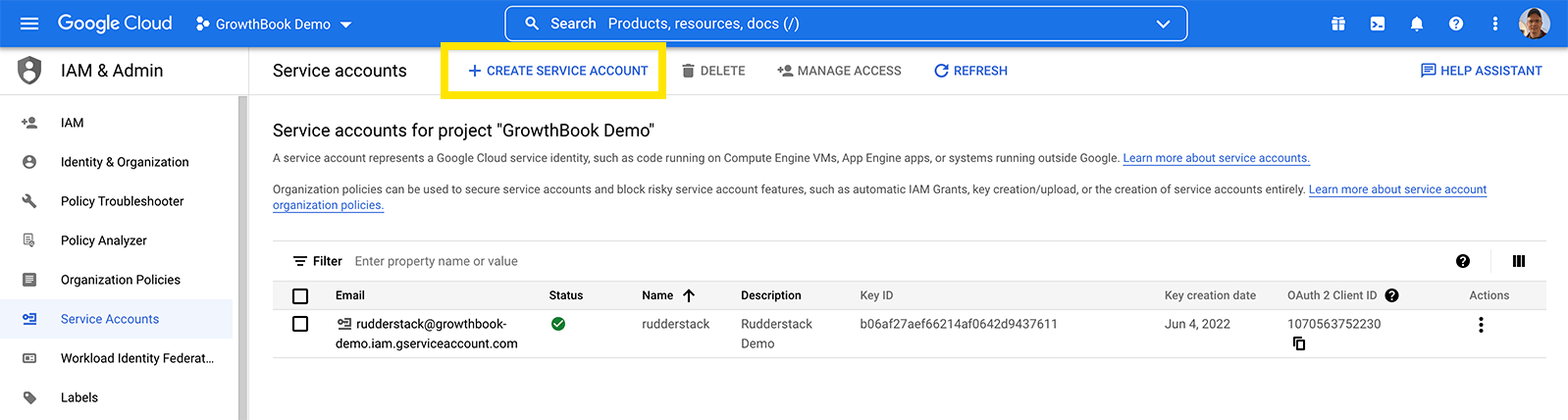
Within your [Google Cloud console account](https://console.cloud.google.com/iam-admin/serviceaccounts), create a service account for GrowthBook to use

<Frame>
  <img src="https://mintcdn.com/growthbook-ea15456d/1rsmujQCDzXz2Vho/static/images/guides/bigquery-1-addserviceaccount-for-gb-highlited.png?fit=max&auto=format&n=1rsmujQCDzXz2Vho&q=85&s=6158a039ae7d85abb1c1d8c1ff070cd6" alt="Create service account button in BigQuery" width="1000" data-path="static/images/guides/bigquery-1-addserviceaccount-for-gb-highlited.png" />
</Frame>

<Frame>
  <img src="https://mintcdn.com/growthbook-ea15456d/1rsmujQCDzXz2Vho/static/images/guides/bigquery-2-addserviceaccount-for-gb3.png?fit=max&auto=format&n=1rsmujQCDzXz2Vho&q=85&s=cfd17144f5fadfd137c5112d195befa1" alt="Create a new service account in BigQuery" width="500" data-path="static/images/guides/bigquery-2-addserviceaccount-for-gb3.png" />
</Frame>

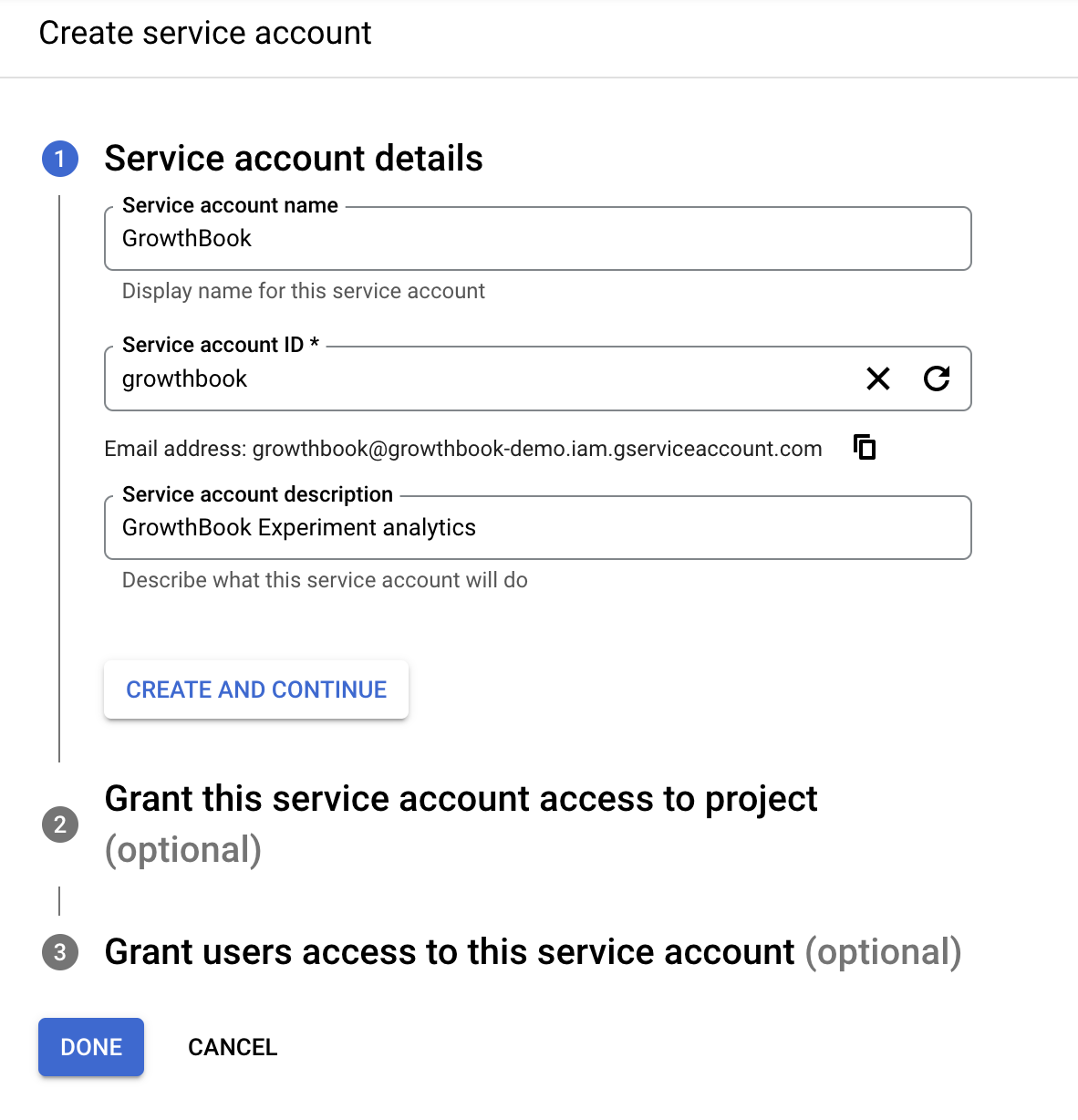
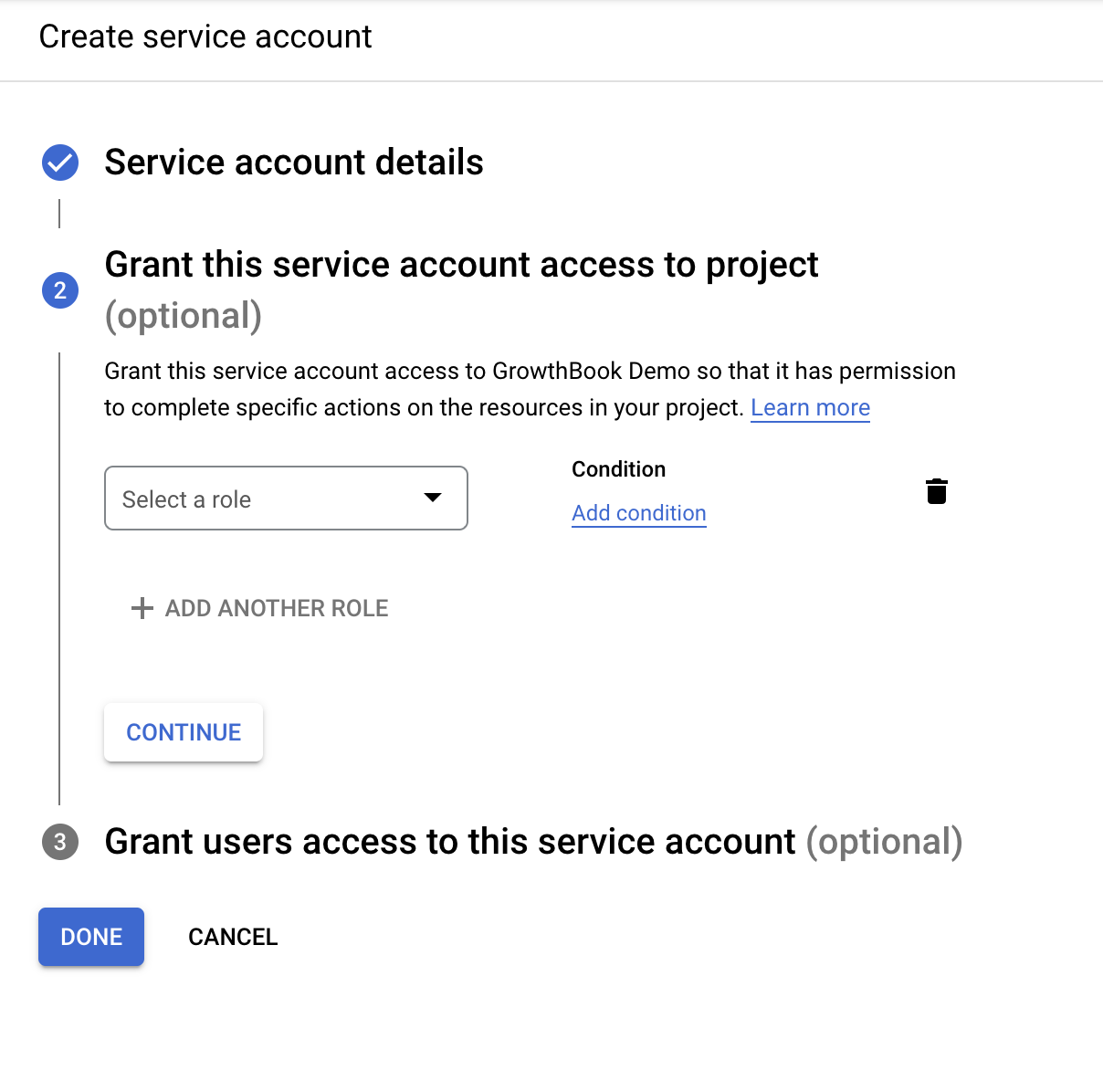
Create a service account name and account ID. On the next page you need to add 3 specific roles:
<Frame>
  <img src="https://mintcdn.com/growthbook-ea15456d/1rsmujQCDzXz2Vho/static/images/guides/bigquery-3-addserviceaccount-for-gb4-roles.png?fit=max&auto=format&n=1rsmujQCDzXz2Vho&q=85&s=8ceb1243a714665238f430e9e5934e8b" alt="Grant roles for service account in BigQuery" width="500" data-path="static/images/guides/bigquery-3-addserviceaccount-for-gb4-roles.png" />
</Frame>

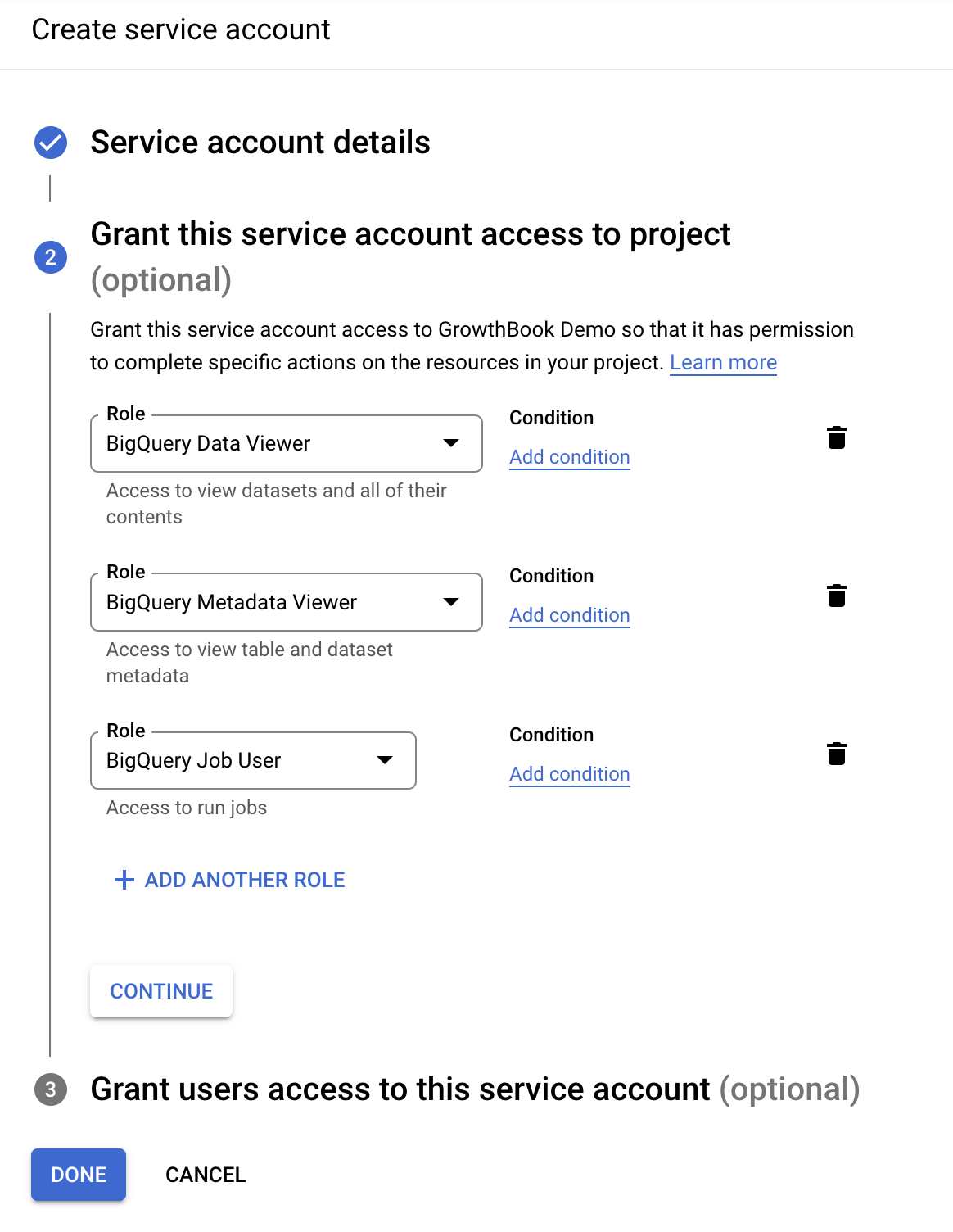
On the Grant page, add the following three permissions roles for read-only access:

* BigQuery Data Viewer
* BigQuery Metadata Viewer
* BigQuery Job User
<Frame>
  <img src="https://mintcdn.com/growthbook-ea15456d/1rsmujQCDzXz2Vho/static/images/guides/bigquery-4-addserviceaccount-for-gb5-roles.png?fit=max&auto=format&n=1rsmujQCDzXz2Vho&q=85&s=10e6b06e2d23e92858dc669f9cea9a94" alt="Additional roles granted for service account" width="500" data-path="static/images/guides/bigquery-4-addserviceaccount-for-gb5-roles.png" />
</Frame>

On the final page when creating a service account, you can skip the optional fields.

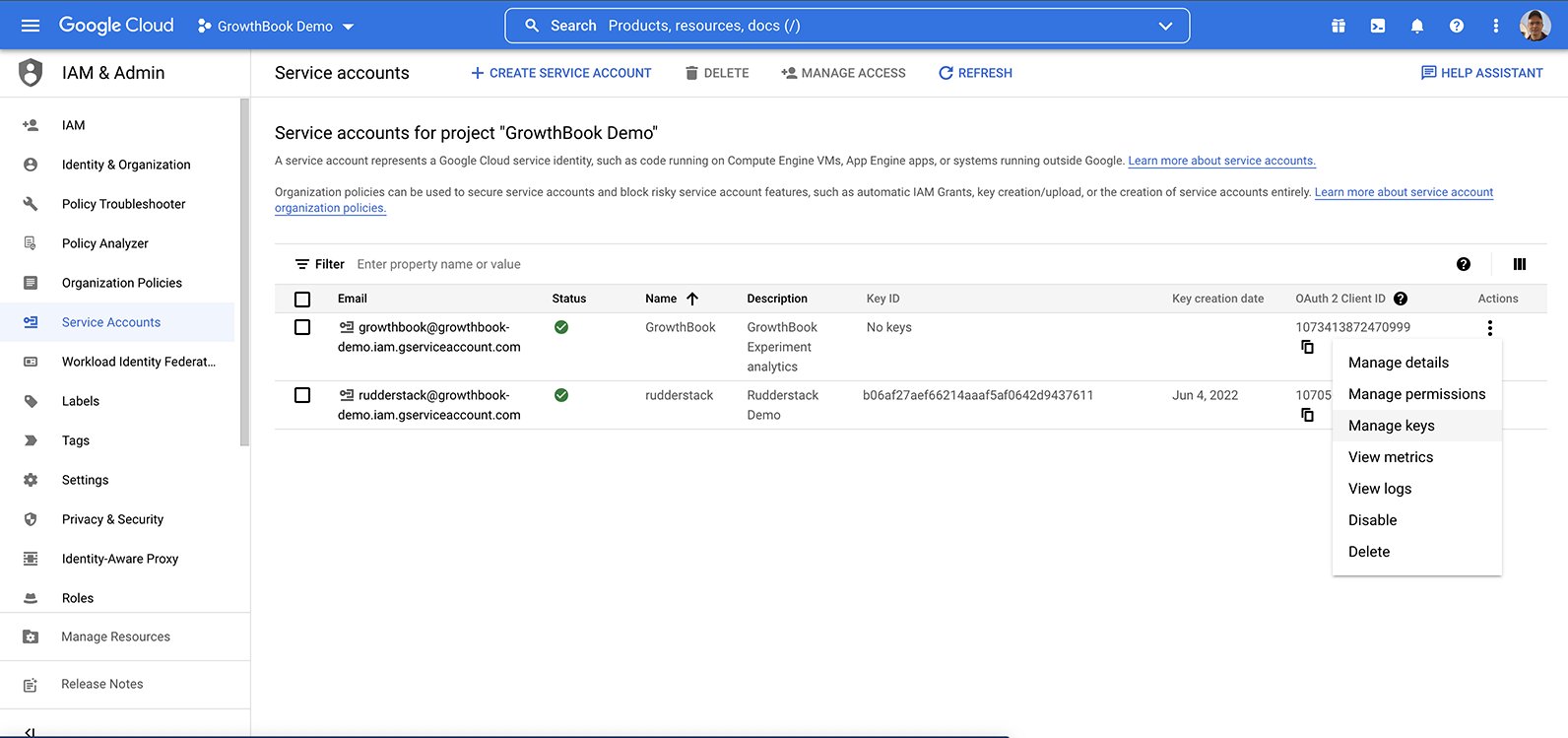
You should see the new service account listed, without a `Key ID`. We need to add an access key to this account so the
credentials can be added to GrowthBook. Click on actions, and select `Manage Keys`.
<Frame>
  <img src="https://mintcdn.com/growthbook-ea15456d/1rsmujQCDzXz2Vho/static/images/guides/bigquery-5-getjson-key.png?fit=max&auto=format&n=1rsmujQCDzXz2Vho&q=85&s=e934c507e54be0d78a0c7616f26f1c3c" alt="New account listed" width="1000" data-path="static/images/guides/bigquery-5-getjson-key.png" />
</Frame>

There are two ways to provide credentials to GrowthBook:

* Auto-discovery from environment variables or GCP metadata (only available when self-hosting)
* Upload a JSON key file for the service account

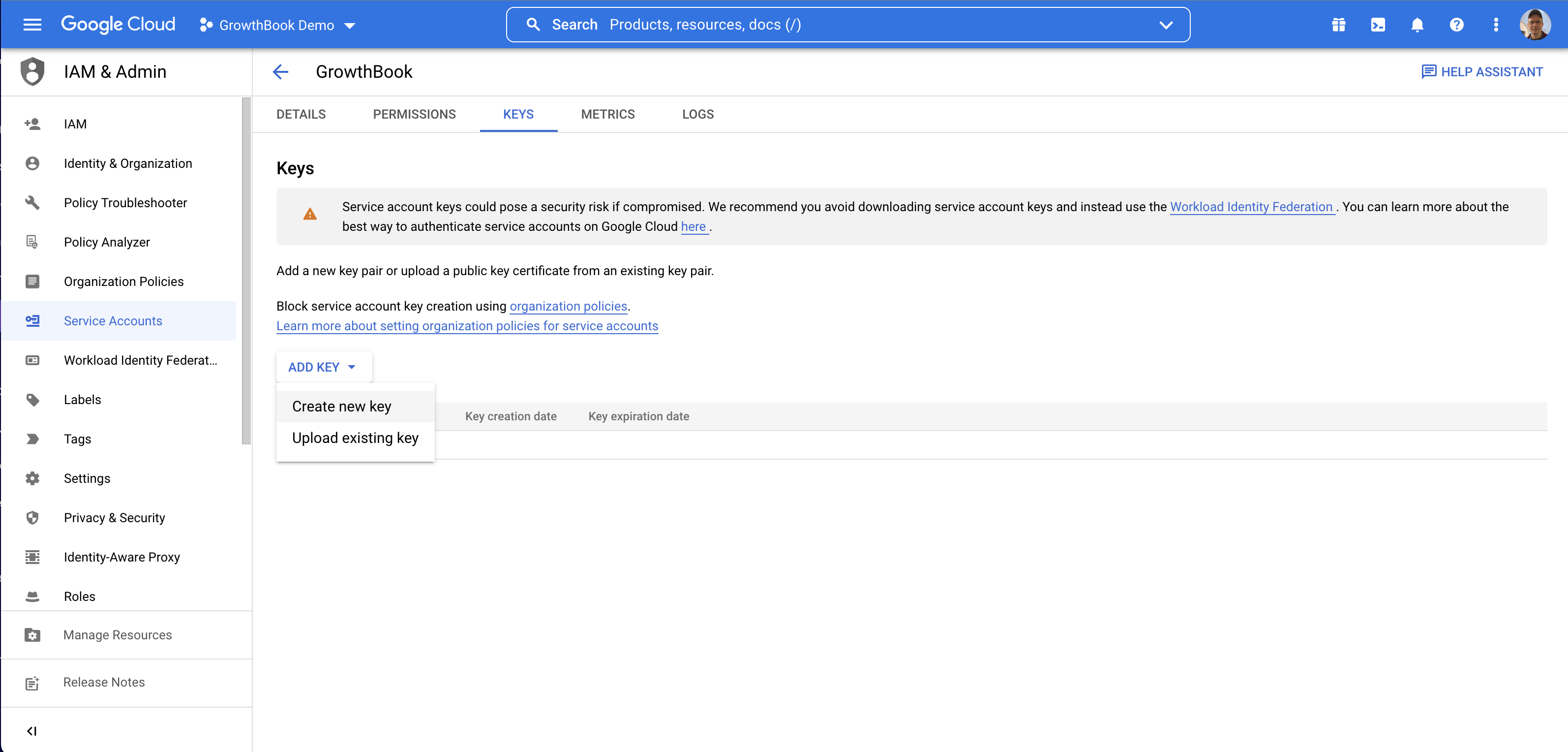
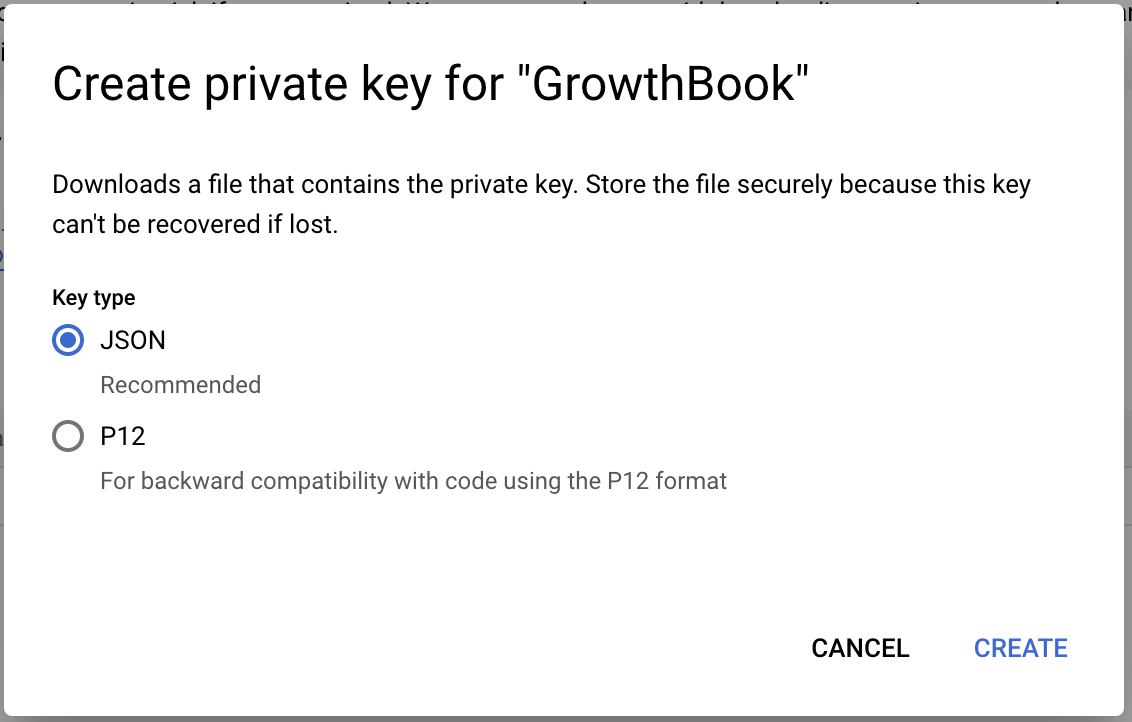
We're going to show how to do the JSON key file method. On the keys page, add a new key, and select JSON.
<Frame>
  <img src="https://mintcdn.com/growthbook-ea15456d/1rsmujQCDzXz2Vho/static/images/guides/bigquery-6-getjson-key2.png?fit=max&auto=format&n=1rsmujQCDzXz2Vho&q=85&s=d347cd0143e414969e6e85c42c46d927" alt="Create new key from dashboard" width="1000" data-path="static/images/guides/bigquery-6-getjson-key2.png" />
</Frame>

<Frame>
  <img src="https://mintcdn.com/growthbook-ea15456d/1rsmujQCDzXz2Vho/static/images/guides/bigquery-6-getjson-key3.png?fit=max&auto=format&n=1rsmujQCDzXz2Vho&q=85&s=42ccb272b40cc3d66c74d3e1de174ca8" alt="Create private key for GrowthBook popup" width="500" data-path="static/images/guides/bigquery-6-getjson-key3.png" />
</Frame>

This will cause the JSON key to be downloaded to your computer.

## 2. Connect GrowthBook to BigQuery

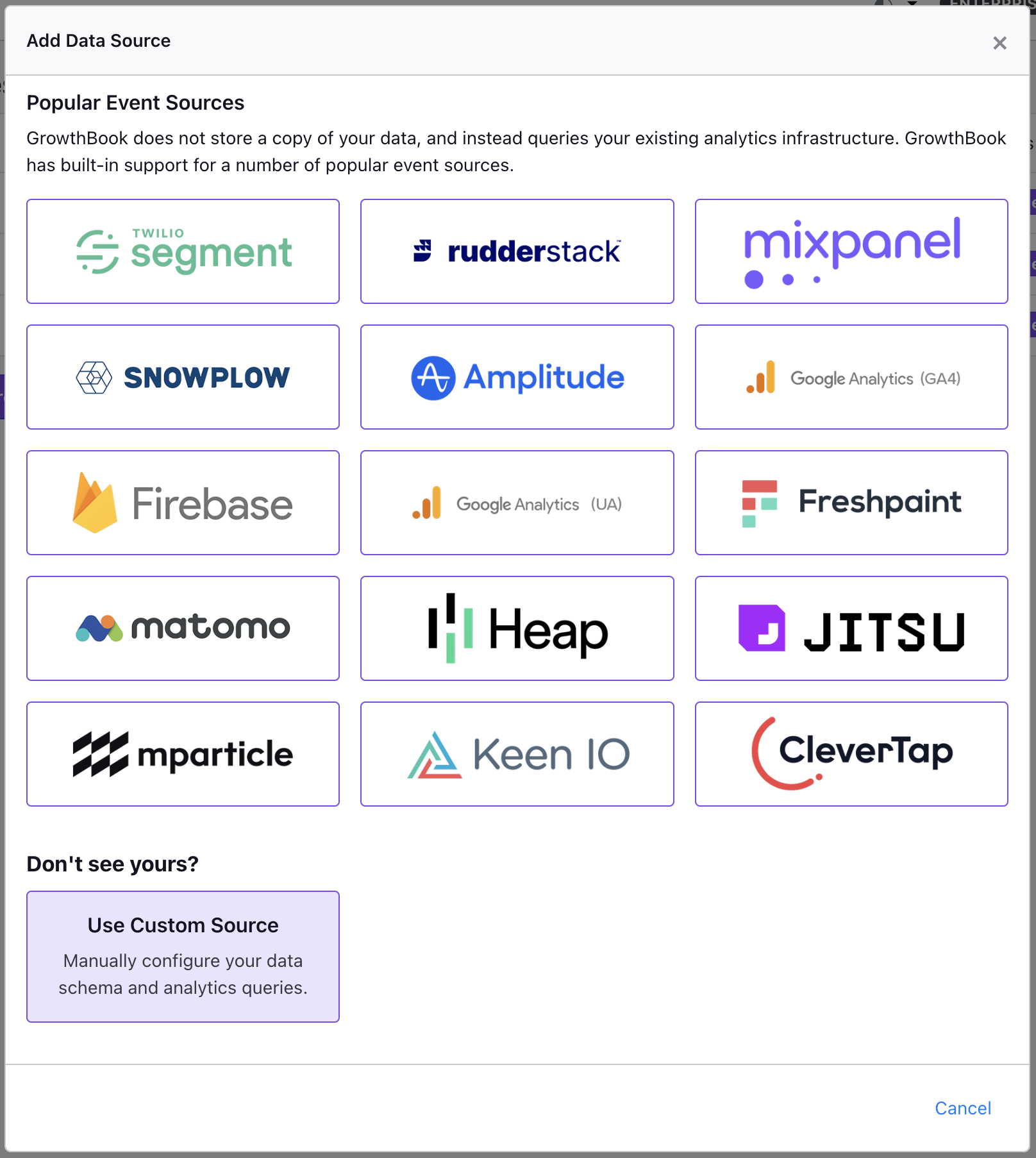
From the Metrics and Data → Data Source page, click on add new data source and select the event tracker you're using. If your event tracker is not listed, or you're using something custom, click on the "Custom" button at the bottom.

Selecting an event tracker here will pre-populate the experiment exposure query which is need to determine which user saw which experiment
variation. Depending on your needs, you may still need to adjust these queries to match your specific schema.
<Frame>
  <img src="https://mintcdn.com/growthbook-ea15456d/1rsmujQCDzXz2Vho/static/images/guides/bigquery-7-add-datasource1.png?fit=max&auto=format&n=1rsmujQCDzXz2Vho&q=85&s=730243b28fb32023da6e0f77131f0982" alt="Add BigQuery to GrowthBook" width="500" data-path="static/images/guides/bigquery-7-add-datasource1.png" />
</Frame>

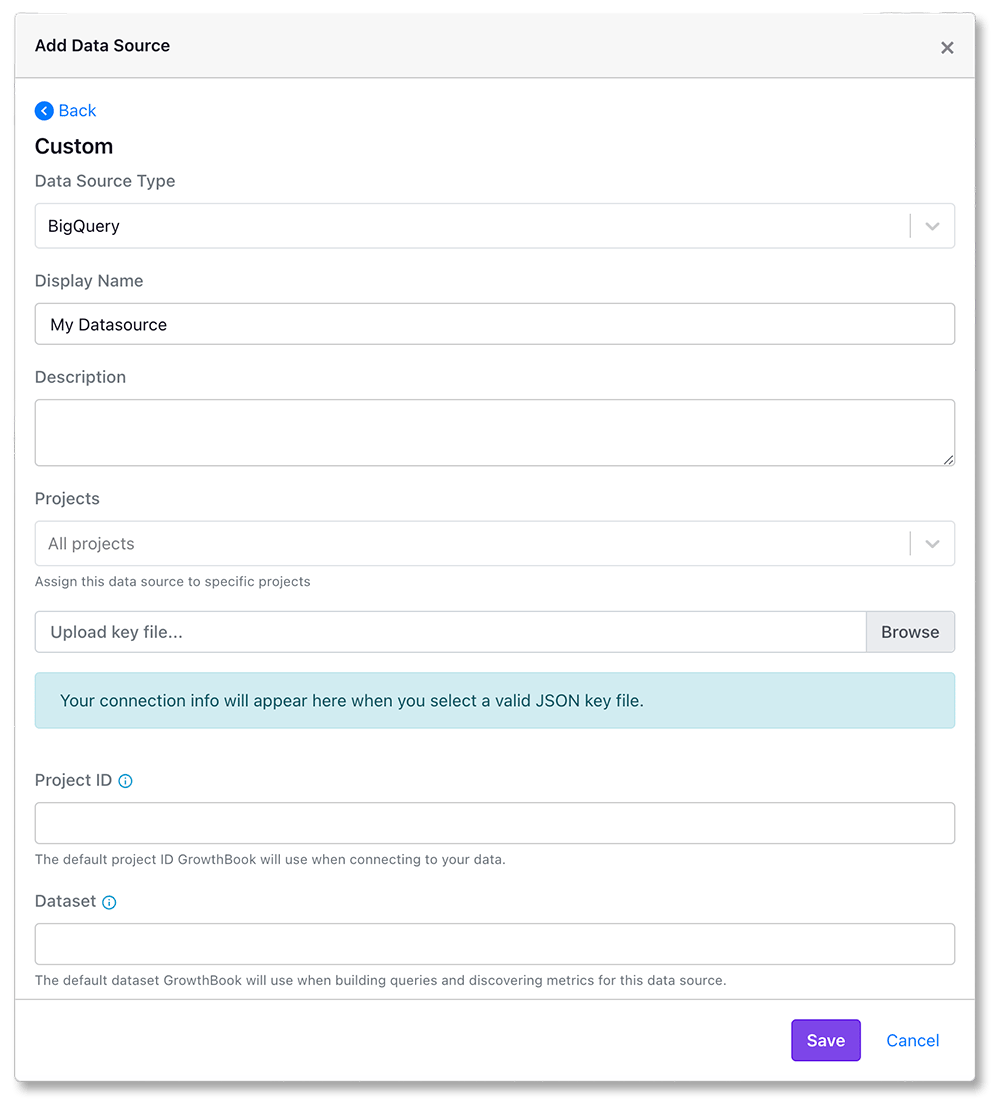
Select BigQuery as the data source type.
<Frame>
  <img src="https://mintcdn.com/growthbook-ea15456d/1rsmujQCDzXz2Vho/static/images/guides/bigquery-7-add-datasource2.png?fit=max&auto=format&n=1rsmujQCDzXz2Vho&q=85&s=b0af85dbbd2b214a2ed264c564c5f7b9" alt="Selecting BigQuery as the data source type." width="500" data-path="static/images/guides/bigquery-7-add-datasource2.png" />
</Frame>

Add the names you'd like to use, and select the JSON key file that was downloaded earlier.

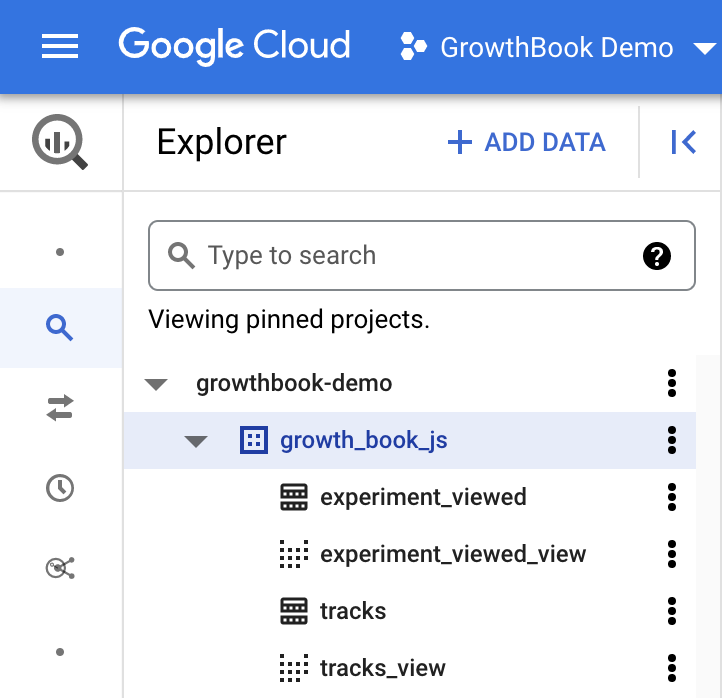
Growthbook will use the `Project Id` and `Dataset` you enter as the default ones when creating queries.
You can get the value for these fields from the [Google Cloud explorer](https://console.cloud.google.com/bigquery).
You will see the top level project id, and when expanded, find the dataset which has your experiment exposure
table (which will be `experiment_viewed` if you use Segment or Rudderstack).
<Frame>
  <img src="https://mintcdn.com/growthbook-ea15456d/1rsmujQCDzXz2Vho/static/images/guides/bigquery-8-getdefault-names.png?fit=max&auto=format&n=1rsmujQCDzXz2Vho&q=85&s=ffdba54b7f100130df3fca5575f922fb" alt="Get default project id and default dataset" width="500" data-path="static/images/guides/bigquery-8-getdefault-names.png" />
</Frame>

When you click save, GrowthBook will test the connection to make sure the credentials are correct. If the connection is successful, you should see a success message on the next page.

## Enabling Data Pipeline Mode

<CommercialFeature feature="pipeline-mode" />

Pipeline mode can reduce query costs if you grant the GrowthBook service account write permissions in your data warehouse.

[More details can be found here.](/app/data-pipeline)

## Monitoring GrowthBook query cost

Whenever we query your BigQuery database we add `{ integration: "growthbook" }` as a label to the query job to make it easy for you to monitor cost or filter GrowthBook query jobs by label for other use cases.

Read more about how to [group by label value for a specific key here.](https://cloud.google.com/billing/docs/how-to/bq-examples#group_by_label_value_for_a_specific_key)

## Troubleshooting

For help debugging missing experiment data in your BigQuery instance, please see our [Google BigQuery (BQ) Troubleshooting Guide](/kb/google-analytics/google-big-query-bq-troubleshooting#initial-sync-delay-for-new-ga4-properties) and our our [Google Analytics (GA4) Troubleshooting Guide](/kb/google-analytics/google-analytics-ga4-troubleshooting)
