> ## Documentation Index
> Fetch the complete documentation index at: https://docs2.growthbook.io/llms.txt
> Use this file to discover all available pages before exploring further.

# Feature Flag Rules

> How rules override a feature's default value — targeting users, rolling out gradually, experimenting — and how to scope, ramp, and schedule them.

export const CommercialFeature = ({feature, description}) => {
  const commercialFeatures = {
    "adv-presentations": {
      plan: "enterprise",
      displayName: "Adv Presentations"
    },
    "advanced-permissions": {
      plan: "pro",
      displayName: "Advanced Permissions"
    },
    "ai-byok": {
      plan: "enterprise",
      displayName: "Ai Byok"
    },
    "ai-suggestions": {
      plan: "enterprise",
      displayName: "AI Suggestions"
    },
    archetypes: {
      plan: "pro",
      displayName: "Archetypes"
    },
    "audit-logging": {
      plan: "enterprise",
      displayName: "Audit Logging"
    },
    "cloud-proxy": {
      plan: "pro",
      displayName: "Cloud Proxy"
    },
    "code-references": {
      plan: "pro",
      displayName: "Code References"
    },
    "contextual-bandits": {
      plan: "enterprise",
      displayName: "Contextual Bandits"
    },
    "custom-hooks": {
      plan: "enterprise",
      displayName: "Custom Hooks"
    },
    "custom-launch-checklist": {
      plan: "enterprise",
      displayName: "Custom Launch Checklist"
    },
    "custom-markdown": {
      plan: "enterprise",
      displayName: "Custom Markdown"
    },
    "custom-metadata": {
      plan: "enterprise",
      displayName: "Custom Metadata"
    },
    "custom-roles": {
      plan: "enterprise",
      displayName: "Custom Roles"
    },
    dashboards: {
      plan: "enterprise",
      displayName: "Dashboards"
    },
    "decision-framework": {
      plan: "pro",
      displayName: "Decision Framework"
    },
    "encrypt-features-endpoint": {
      plan: "pro",
      displayName: "Encrypt Features Endpoint"
    },
    "environment-inheritance": {
      plan: "enterprise",
      displayName: "Environment Inheritance"
    },
    "events-forwarder": {
      plan: "pro",
      displayName: "Events Forwarder"
    },
    "experiment-impact": {
      plan: "enterprise",
      displayName: "Experiment Impact"
    },
    "feature-configs": {
      plan: "enterprise",
      displayName: "Feature Configs"
    },
    "funnel-metrics": {
      plan: "pro",
      displayName: "Funnel Metrics"
    },
    "hash-secure-attributes": {
      plan: "pro",
      displayName: "Hash Secure Attributes"
    },
    "historical-power": {
      plan: "pro",
      displayName: "Historical Power"
    },
    holdouts: {
      plan: "enterprise",
      displayName: "Holdouts"
    },
    "incremental-refresh": {
      plan: "enterprise",
      displayName: "Incremental Refresh"
    },
    "json-validation": {
      plan: "enterprise",
      displayName: "JSON Validation"
    },
    "large-saved-groups": {
      plan: "enterprise",
      displayName: "Large Saved Groups"
    },
    learnings: {
      plan: "enterprise",
      displayName: "Learnings"
    },
    livechat: {
      plan: "pro",
      displayName: "Livechat"
    },
    "manage-official-resources": {
      plan: "enterprise",
      displayName: "Manage Official Resources"
    },
    "metric-correlations": {
      plan: "enterprise",
      displayName: "Metric Correlations"
    },
    "metric-effects": {
      plan: "enterprise",
      displayName: "Metric Effects"
    },
    "metric-groups": {
      plan: "enterprise",
      displayName: "Metric Groups"
    },
    "metric-populations": {
      plan: "pro",
      displayName: "Metric Populations"
    },
    "metric-slices": {
      plan: "enterprise",
      displayName: "Metric Slices"
    },
    "multi-armed-bandits": {
      plan: "pro",
      displayName: "Multi Armed Bandits"
    },
    "multi-metric-queries": {
      plan: "enterprise",
      displayName: "Multi Metric Queries"
    },
    "multi-org": {
      plan: "enterprise",
      displayName: "Multi Org"
    },
    "multiple-sdk-webhooks": {
      plan: "pro",
      displayName: "Multiple Sdk Webhooks"
    },
    "no-access-role": {
      plan: "enterprise",
      displayName: "No Access Role"
    },
    "override-metrics": {
      plan: "pro",
      displayName: "Override Metrics"
    },
    "pipeline-mode": {
      plan: "enterprise",
      displayName: "Pipeline Mode"
    },
    "post-stratification": {
      plan: "enterprise",
      displayName: "Post Stratification"
    },
    "precomputed-dimensions": {
      plan: "pro",
      displayName: "Precomputed Dimensions"
    },
    "prerequisite-targeting": {
      plan: "enterprise",
      displayName: "Prerequisite Targeting"
    },
    prerequisites: {
      plan: "pro",
      displayName: "Prerequisites"
    },
    "product-analytics-dashboards": {
      plan: "pro",
      displayName: "Product Analytics Dashboards"
    },
    "project-admin-role": {
      plan: "enterprise",
      displayName: "Project Admin Role"
    },
    "quantile-metrics": {
      plan: "pro",
      displayName: "Quantile Metrics"
    },
    "ramp-schedules": {
      plan: "pro",
      displayName: "Ramp Schedules"
    },
    redirects: {
      plan: "pro",
      displayName: "Redirects"
    },
    "regression-adjustment": {
      plan: "pro",
      displayName: "CUPED"
    },
    releases: {
      plan: "enterprise",
      displayName: "Releases"
    },
    "remote-evaluation": {
      plan: "pro",
      displayName: "Remote Evaluation"
    },
    "require-approvals": {
      plan: "enterprise",
      displayName: "Require Approvals"
    },
    "require-project-for-features-setting": {
      plan: "enterprise",
      displayName: "Require Project For Features Setting"
    },
    "require-project-for-sdk-connections-setting": {
      plan: "enterprise",
      displayName: "Require Project For Sdk Connections Setting"
    },
    "retention-metrics": {
      plan: "pro",
      displayName: "Retention Metrics"
    },
    "safe-rollout": {
      plan: "pro",
      displayName: "Safe Rollout"
    },
    saveSqlExplorerQueries: {
      plan: "pro",
      displayName: "Save SQL Explorer Queries"
    },
    "schedule-feature-flag": {
      plan: "pro",
      displayName: "Schedule Feature Flag"
    },
    "scheduled-revisions": {
      plan: "enterprise",
      displayName: "Scheduled Revisions"
    },
    scim: {
      plan: "enterprise",
      displayName: "SCIM"
    },
    "sequential-testing": {
      plan: "pro",
      displayName: "Sequential Testing"
    },
    "share-product-analytics-dashboards": {
      plan: "enterprise",
      displayName: "Share Product Analytics Dashboards"
    },
    simulate: {
      plan: "pro",
      displayName: "Simulate"
    },
    sso: {
      plan: "enterprise",
      displayName: "SSO"
    },
    "sticky-bucketing": {
      plan: "pro",
      displayName: "Sticky Bucketing"
    },
    teams: {
      plan: "enterprise",
      displayName: "Teams"
    },
    templates: {
      plan: "enterprise",
      displayName: "Templates"
    },
    "unlimited-managed-warehouse-usage": {
      plan: "pro",
      displayName: "Unlimited Managed Warehouse Usage"
    },
    "visual-editor": {
      plan: "pro",
      displayName: "Visual Editor"
    }
  };
  const {plan, displayName} = commercialFeatures[feature];
  const isEnterprise = plan === "enterprise";
  const defaultDescription = isEnterprise ? "is available on Enterprise plans." : "is available on Pro and Enterprise plans.";
  const planLabel = isEnterprise ? "Enterprise" : "Pro";
  const containerStyle = isEnterprise ? {
    backgroundColor: "color-mix(in srgb, var(--indigo-a3) 60%, transparent)"
  } : {
    backgroundColor: "color-mix(in srgb, var(--amber-a3) 60%, transparent)"
  };
  const badgeStyle = isEnterprise ? {
    boxShadow: "inset 0 0 0 1px var(--indigo-a8)",
    color: "var(--indigo-a11)"
  } : {
    boxShadow: "inset 0 0 0 1px var(--amber-a8)",
    color: "var(--amber-a11)"
  };
  return <div className="flex items-start gap-2 mb-4 p-3 text-sm leading-[1.4] rounded-lg" style={containerStyle} role="note">
      <span className="inline-flex items-center justify-center px-1.5 h-5 text-xs font-medium rounded-full shrink-0 leading-none" style={badgeStyle}>
        {planLabel}
      </span>
      <div className="flex-1 leading-[1.3]">
        <strong className="font-semibold">{displayName}</strong>{" "}
        {defaultDescription} {description}
      </div>
    </div>;
};

Every feature has a [default value](/features/basics#default-values) that applies to all users. **Rules** override that default for the users, environments, and projects you choose.

## How Rules Work

A feature's rules are an ordered list. For each request, GrowthBook evaluates them top to bottom and the **first matching rule wins**. If no rule matches, the default value is used.

<img src="https://mintcdn.com/growthbook-ea15456d/giSZyh24PfnTkKz4/static/images/features/feature-override-rules-2.png?fit=max&auto=format&n=giSZyh24PfnTkKz4&q=85&s=47397509c3e5e3cca31d6c37a832b9dc" alt="Feature rules interface" width="3806" height="1918" data-path="static/images/features/feature-override-rules-2.png" />

Each rule has up to four parts:

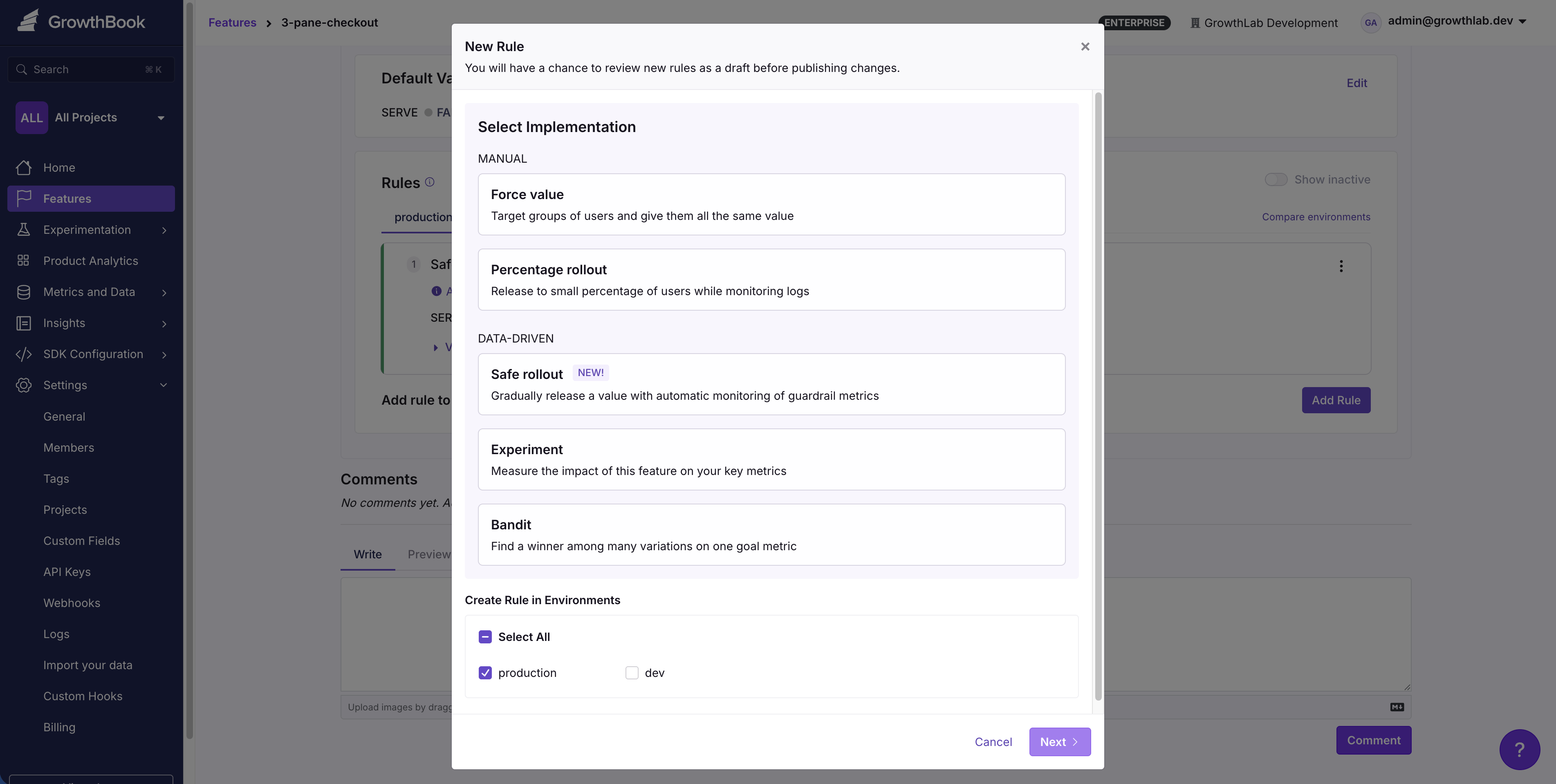
* **Targeting conditions** define *who* the rule applies to. Conditions are evaluated against the [attributes](/features/targeting) you pass into the SDK. A rule with no conditions applies to everyone.
* **What it does** for matching users — serve a value, run an experiment, or run a bandit.
* **Scope** — which [environments](#environments) and, optionally, which [projects](#projects) the rule applies to.
* **Release plan** (optional) — a value-serving rule can [ramp up automatically](#ramp-ups-and-safe-rollouts) over time instead of switching on all at once.
<Tip>
  **Rules can be combined**

  Layer multiple rules on one feature to compose behavior — for example, a forced value for beta testers above a gradual rollout to everyone else.
</Tip>

## Rule Types

|                   | Targeting rule                      | Experiment                        | Bandit                                   |
| ----------------- | ----------------------------------- | --------------------------------- | ---------------------------------------- |
| **Purpose**       | Serve a value to matching users     | Measure which value performs best | Auto-optimize toward the best value      |
| **Randomization** | Optional (percentage rollout)       | Random split                      | Random split, reweighted over time       |
| **Tracking**      | No                                  | Yes                               | Yes                                      |
| **Typical use**   | Enable for a group; gradual release | A/B test a change                 | Maximize a metric across several options |

Gradual ramp-ups and guardrail-monitored "safe" rollouts are **not** separate rule types — they're [release plans](#ramp-ups-and-safe-rollouts) you add to a targeting rule.

### Targeting Rule (forced value or percentage rollout)

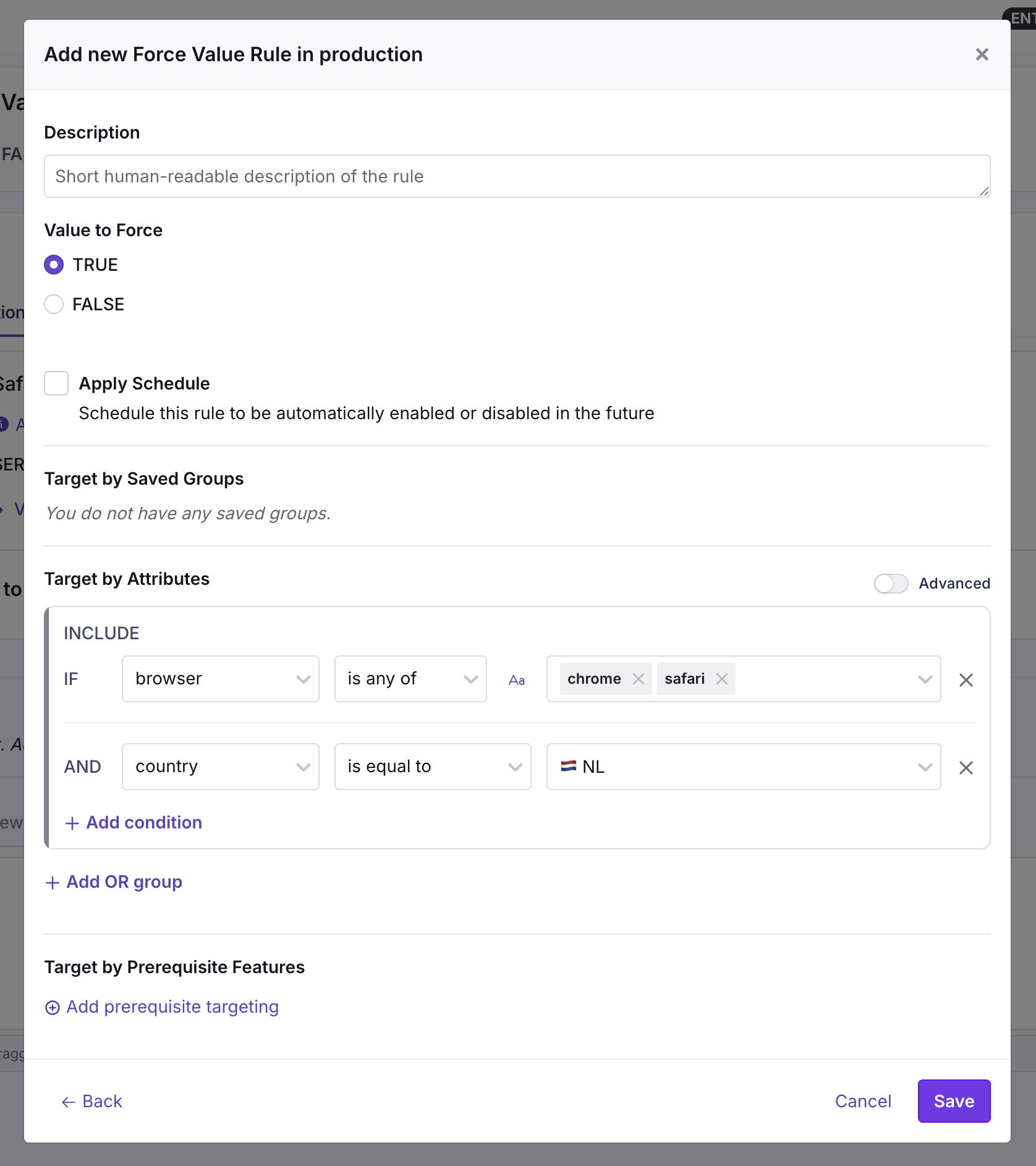
The most common rule serves a single value to the users who match its conditions. In the rule editor it appears as two presets of the same rule:

* **Forced value** — everyone who matches gets the value.
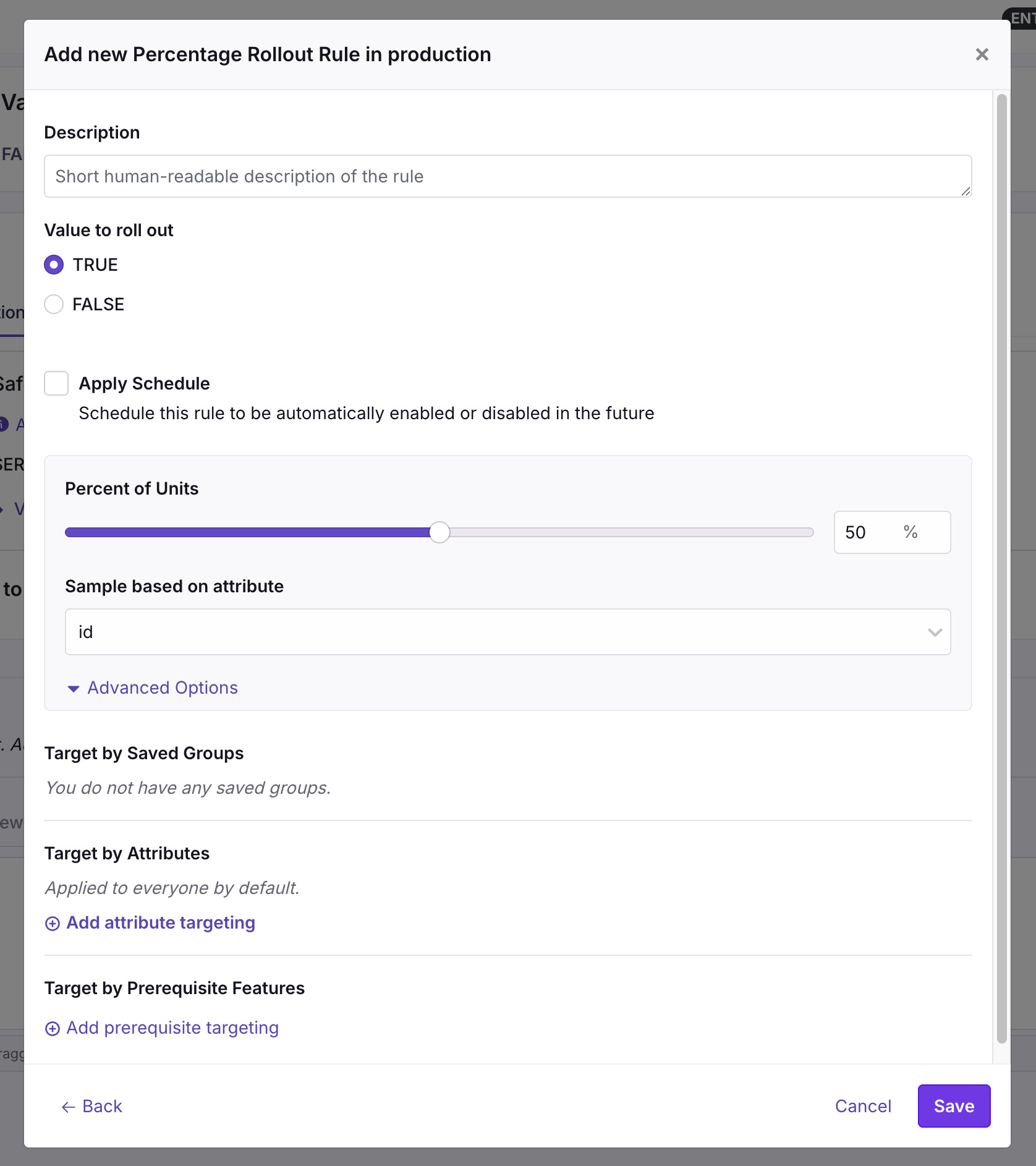
* **Percentage rollout** — a random sample gets the value and the rest fall through to the next rule. A forced value is simply a 100% rollout.

<Frame>
  <img src="https://mintcdn.com/growthbook-ea15456d/giSZyh24PfnTkKz4/static/images/features/feature-force-rule-2.png?fit=max&auto=format&n=giSZyh24PfnTkKz4&q=85&s=36f605dd49b3c66984209688d54fb3fa" alt="Forced value rule UI" width="600" data-path="static/images/features/feature-force-rule-2.png" />
</Frame>

For a percentage rollout, choose a user attribute (e.g., `id` or `company`) to sample on. Users with the same attribute value always get the same experience — choosing `company`, for example, keeps everyone at a company on the same side of the rollout.
<Frame>
  <img src="https://mintcdn.com/growthbook-ea15456d/1rsmujQCDzXz2Vho/static/images/features/feature-rollout-rule-2.png?fit=max&auto=format&n=1rsmujQCDzXz2Vho&q=85&s=65a854e46dcd08f2cd0360e5907a2f36" alt="Percentage rollout UI" width="600" data-path="static/images/features/feature-rollout-rule-2.png" />
</Frame>

Common scenarios:

* Turning a feature on for internal employees or beta testers
* Overriding a value for a single account that reported a bug
* Releasing to 10% of users, then 50%, then 100%

To widen a rollout **automatically** instead of editing the percentage by hand, add a [Ramp-up release plan](#ramp-ups-and-safe-rollouts).

### Experiment

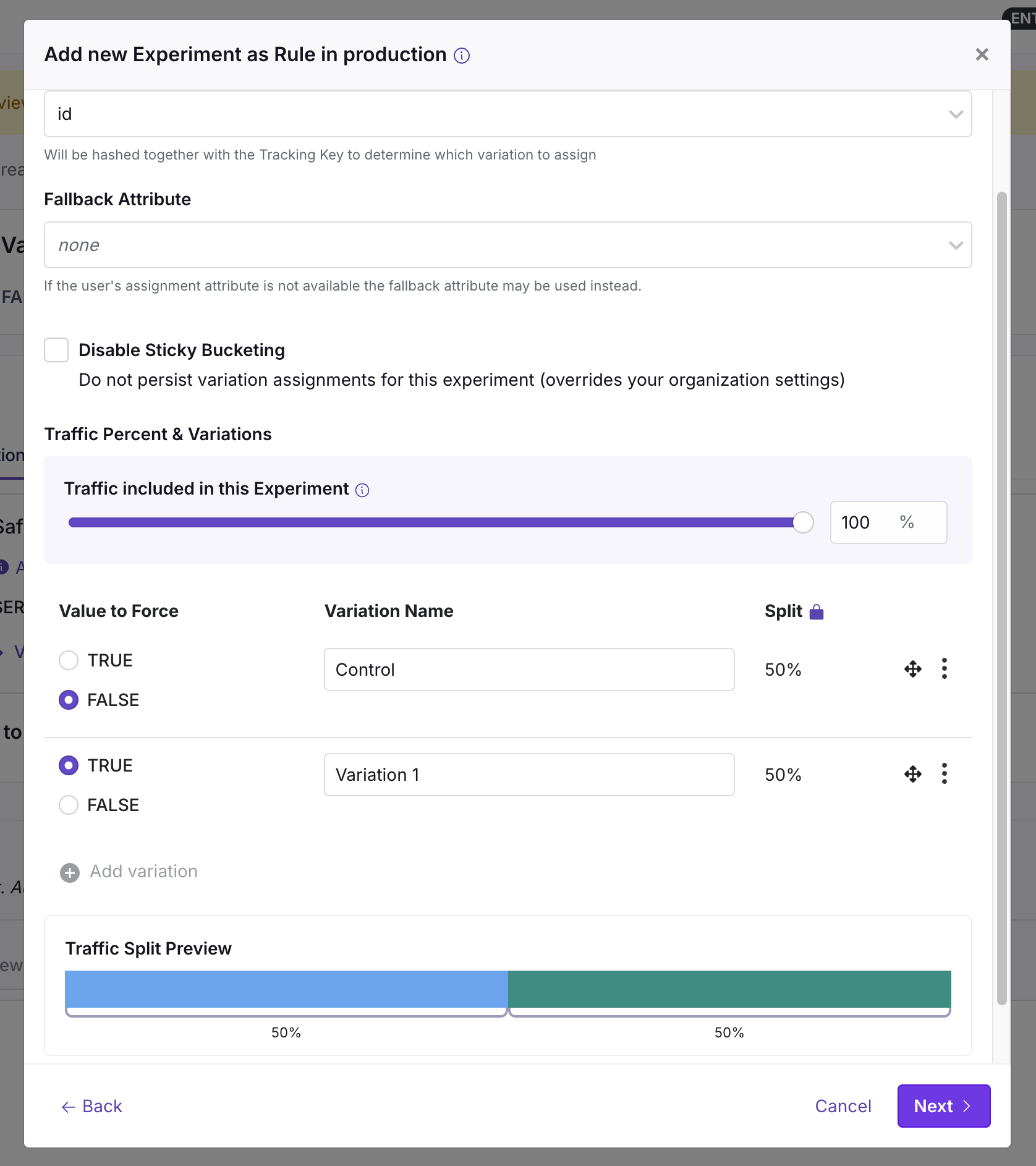
Experiment rules randomly split users into variations, assign each variation a value, and log every assignment through the SDK's `trackingCallback` so you can measure impact in your data warehouse or analytics tool.
<Frame>
  <img src="https://mintcdn.com/growthbook-ea15456d/giSZyh24PfnTkKz4/static/images/features/feature-experiment-rules-2.png?fit=max&auto=format&n=giSZyh24PfnTkKz4&q=85&s=724fb2f5c8680a16d44420836a0371f2" alt="Experiment rule UI" width="600" data-path="static/images/features/feature-experiment-rules-2.png" />
</Frame>

You control both the percentage of users included and the split between variations. For example, including 50% of users with a 40/60 split means 20% of all users see variation A, 30% see variation B, and the remaining 50% fall through to the next rule.

→ [Full experimentation documentation](/feature-flag-experiments)

### Bandit

A [Bandit](/bandits/overview) rule works like an experiment but **automatically shifts traffic toward the better-performing variation** as results come in, rather than holding a fixed split. Use it to optimize toward a metric across several options instead of measuring one change precisely.
<Note>
  **Contextual Bandits**, which choose a variation per user based on their attributes, are in closed beta.
</Note>

## Ramp-ups and Safe Rollouts

<CommercialFeature feature="ramp-schedules" />

A **Ramp Schedule** is a release plan you attach to a value-serving (targeting) rule — not a separate rule type. Choose **Ramp-up** as the rule's release plan to roll out in timed, optionally approval-gated stages that advance on their own (for example, 1% → 5% → 25% → 100%). You widen exposure gradually and can stop early if something looks wrong. This is the modern replacement for manually bumping a rollout percentage.

→ [Ramp Schedules](/features/ramp-schedules)

**Safe Rollout** is the same mechanism with **guardrail monitoring** turned on: GrowthBook runs the ramp as a short A/B test against your guardrail metrics (error rate, latency, conversions, …) and flags regressions so you can roll back. If you've used a standalone "Safe Rollout" rule before, it's now a monitored ramp-up rather than its own rule type.

→ [Safe Rollouts](/features/safe-rollouts)

## Scoping Rules

### Environments

Each rule applies to **all environments or a specific set**, chosen in the rule's environment scope. Because each [SDK connection maps to one environment](/features/environments#environments-and-sdks), this controls where a rule actually takes effect — letting you test a rule in `dev` before enabling it in `production`.

### Projects

A rule can optionally be scoped to specific **projects** within the feature's delivery set — an advanced way to run a rule in only some of the projects a multi-project feature reaches. A rule left unscoped applies to all of them; a rule scoped to a project the feature isn't delivered to won't take effect (the editor flags it).

→ [Delivering a feature to multiple projects](/features/environments#delivering-a-feature-to-multiple-projects)

## Scheduling Rules

<CommercialFeature feature="schedule-feature-flag" />

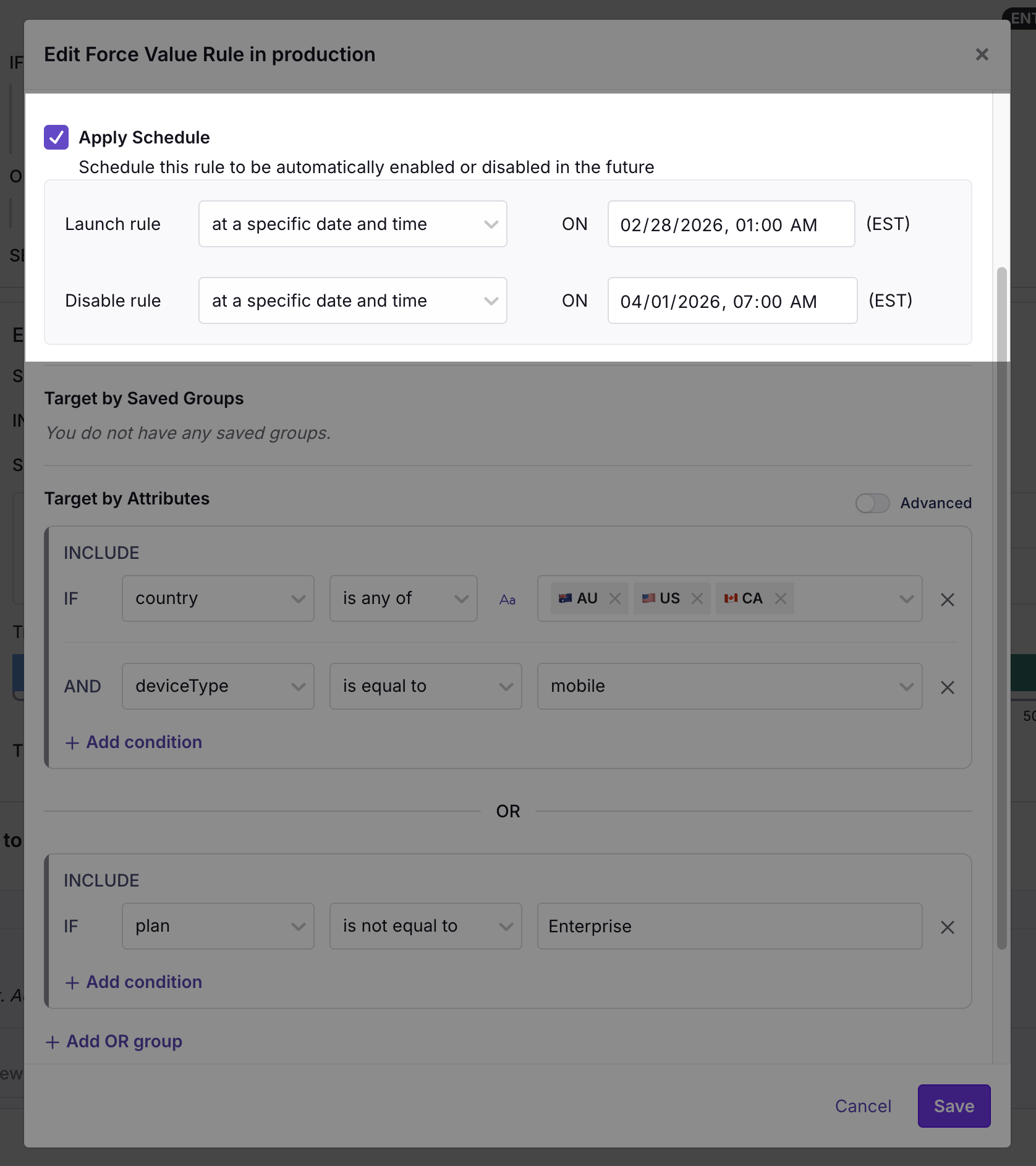
Any rule can be scheduled to turn on or off at a specific date and time — useful for launches, holidays, or special promotions.

<Frame>
  <img src="https://mintcdn.com/growthbook-ea15456d/1rsmujQCDzXz2Vho/static/images/features/feature-scheduling-2.png?fit=max&auto=format&n=1rsmujQCDzXz2Vho&q=85&s=32e660eafa875484b78aa60266955e25" alt="Feature Scheduling" width="600" data-path="static/images/features/feature-scheduling-2.png" />
</Frame>

For a multi-stage rollout that advances automatically, use a [Ramp Schedule](#ramp-ups-and-safe-rollouts) instead.

## Targeting Conditions

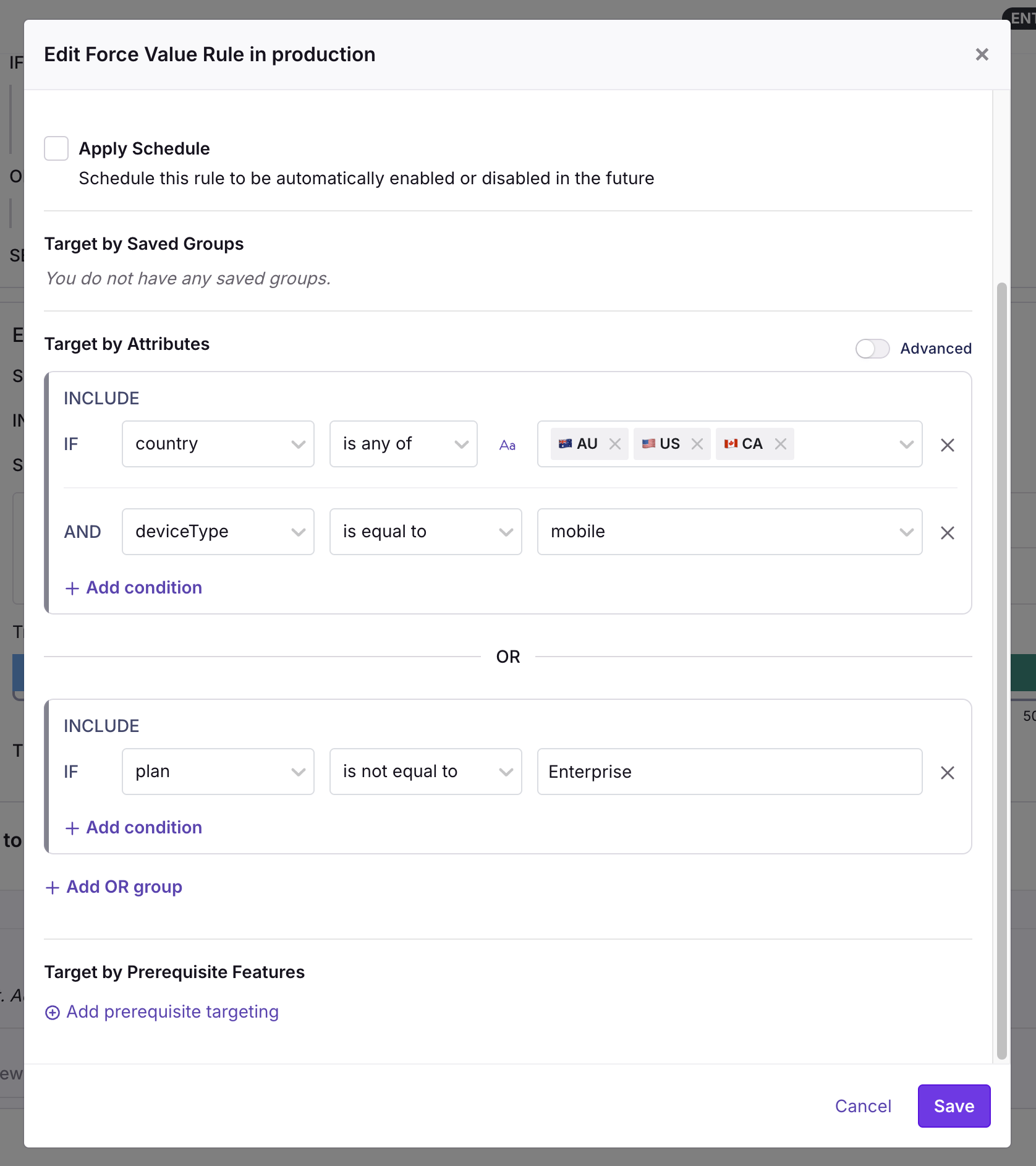
Any rule can include targeting conditions to limit which users it applies to. Conditions you define in GrowthBook are evaluated against the attributes you pass into the SDK.
<Frame>
  <img src="https://mintcdn.com/growthbook-ea15456d/1rsmujQCDzXz2Vho/static/images/features/feature-rule-conditions.png?fit=max&auto=format&n=1rsmujQCDzXz2Vho&q=85&s=5366c21e435b271ed3ad338004959e3d" alt="Rule conditions UI" width="600" data-path="static/images/features/feature-rule-conditions.png" />
</Frame>

→ [Full targeting reference: attributes, conditions, and saved groups](/features/targeting)

## Testing Rules

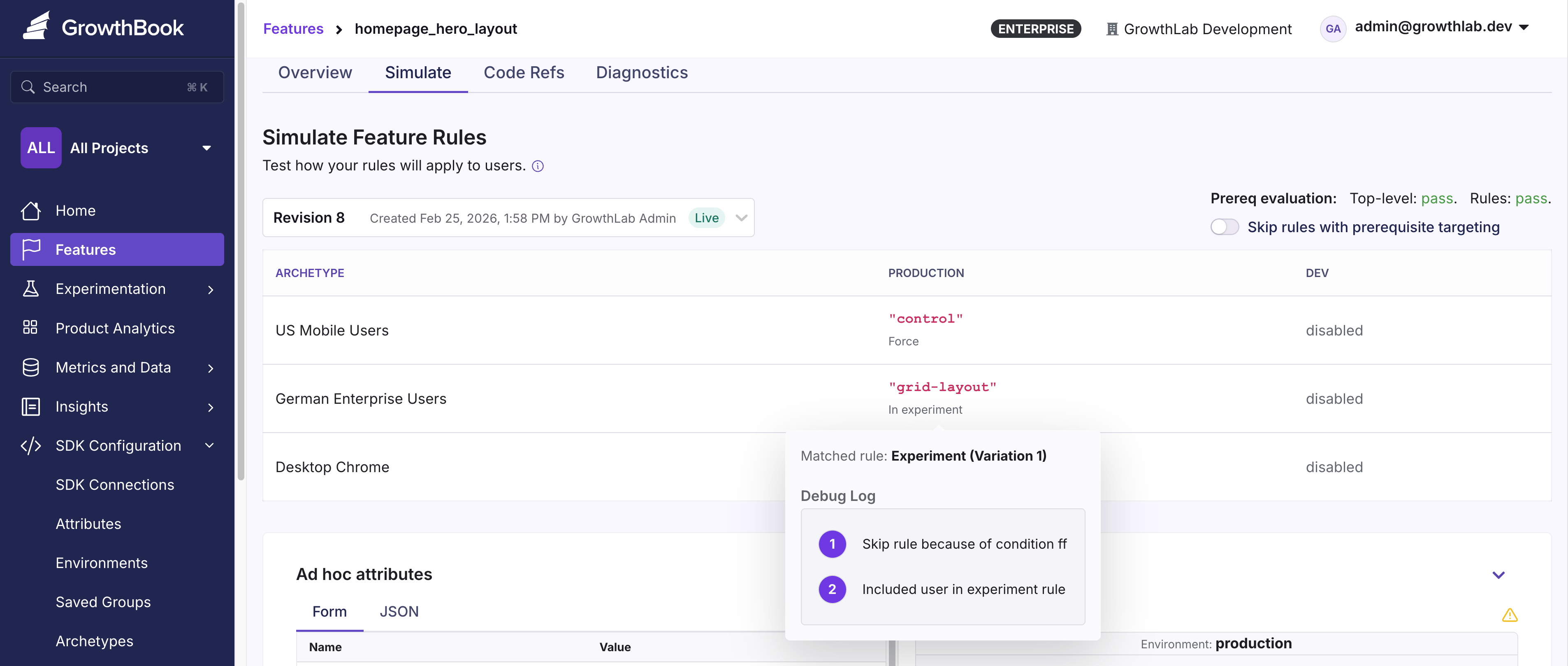
Test your rules directly in GrowthBook on the **Simulation** page. Adjust user attributes and see in real time which rules match and what value the user would receive.

<video autoPlay loop muted style={{width: '100%', height: "auto"}} controls allowFullScreen>
  <source src="https://mintlify.s3.us-west-1.amazonaws.com/growthbook-ea15456d/videos/feature-test-rules.mp4" type="video/mp4" />
</video>

### Archetypes

<CommercialFeature feature="archetypes" />

Archetypes let you save preset user attribute profiles so you can quickly test how rules apply to specific types of users. If you frequently target features to certain groups (e.g., beta testers, enterprise accounts), archetypes let you check the result in one click. They appear at the top of the **Simulation** page. Hover over any value to see debug information.

<img src="https://mintcdn.com/growthbook-ea15456d/giSZyh24PfnTkKz4/static/images/features/feature-archetypes-2.png?fit=max&auto=format&n=giSZyh24PfnTkKz4&q=85&s=de2d6729f26a6d3684d71397942f1bf5" alt="Archetypes" width="3812" height="1618" data-path="static/images/features/feature-archetypes-2.png" />

Create and manage archetypes by navigating to **SDK Configuration** → **Archetypes**.