> ## Documentation Index
> Fetch the complete documentation index at: https://docs2.growthbook.io/llms.txt
> Use this file to discover all available pages before exploring further.

# Environments

> Define multiple environments to control which features are enabled in each.

export const CommercialFeature = ({feature, description}) => {
  const commercialFeatures = {
    "adv-presentations": {
      plan: "enterprise",
      displayName: "Adv Presentations"
    },
    "advanced-permissions": {
      plan: "pro",
      displayName: "Advanced Permissions"
    },
    "ai-byok": {
      plan: "enterprise",
      displayName: "Ai Byok"
    },
    "ai-suggestions": {
      plan: "enterprise",
      displayName: "AI Suggestions"
    },
    archetypes: {
      plan: "pro",
      displayName: "Archetypes"
    },
    "audit-logging": {
      plan: "enterprise",
      displayName: "Audit Logging"
    },
    "cloud-proxy": {
      plan: "pro",
      displayName: "Cloud Proxy"
    },
    "code-references": {
      plan: "pro",
      displayName: "Code References"
    },
    "contextual-bandits": {
      plan: "enterprise",
      displayName: "Contextual Bandits"
    },
    "custom-hooks": {
      plan: "enterprise",
      displayName: "Custom Hooks"
    },
    "custom-launch-checklist": {
      plan: "enterprise",
      displayName: "Custom Launch Checklist"
    },
    "custom-markdown": {
      plan: "enterprise",
      displayName: "Custom Markdown"
    },
    "custom-metadata": {
      plan: "enterprise",
      displayName: "Custom Metadata"
    },
    "custom-roles": {
      plan: "enterprise",
      displayName: "Custom Roles"
    },
    dashboards: {
      plan: "enterprise",
      displayName: "Dashboards"
    },
    "decision-framework": {
      plan: "pro",
      displayName: "Decision Framework"
    },
    "encrypt-features-endpoint": {
      plan: "pro",
      displayName: "Encrypt Features Endpoint"
    },
    "environment-inheritance": {
      plan: "enterprise",
      displayName: "Environment Inheritance"
    },
    "events-forwarder": {
      plan: "pro",
      displayName: "Events Forwarder"
    },
    "experiment-impact": {
      plan: "enterprise",
      displayName: "Experiment Impact"
    },
    "feature-configs": {
      plan: "enterprise",
      displayName: "Feature Configs"
    },
    "funnel-metrics": {
      plan: "pro",
      displayName: "Funnel Metrics"
    },
    "hash-secure-attributes": {
      plan: "pro",
      displayName: "Hash Secure Attributes"
    },
    "historical-power": {
      plan: "pro",
      displayName: "Historical Power"
    },
    holdouts: {
      plan: "enterprise",
      displayName: "Holdouts"
    },
    "incremental-refresh": {
      plan: "enterprise",
      displayName: "Incremental Refresh"
    },
    "json-validation": {
      plan: "enterprise",
      displayName: "JSON Validation"
    },
    "large-saved-groups": {
      plan: "enterprise",
      displayName: "Large Saved Groups"
    },
    learnings: {
      plan: "enterprise",
      displayName: "Learnings"
    },
    livechat: {
      plan: "pro",
      displayName: "Livechat"
    },
    "manage-official-resources": {
      plan: "enterprise",
      displayName: "Manage Official Resources"
    },
    "metric-correlations": {
      plan: "enterprise",
      displayName: "Metric Correlations"
    },
    "metric-effects": {
      plan: "enterprise",
      displayName: "Metric Effects"
    },
    "metric-groups": {
      plan: "enterprise",
      displayName: "Metric Groups"
    },
    "metric-populations": {
      plan: "pro",
      displayName: "Metric Populations"
    },
    "metric-slices": {
      plan: "enterprise",
      displayName: "Metric Slices"
    },
    "multi-armed-bandits": {
      plan: "pro",
      displayName: "Multi Armed Bandits"
    },
    "multi-metric-queries": {
      plan: "enterprise",
      displayName: "Multi Metric Queries"
    },
    "multi-org": {
      plan: "enterprise",
      displayName: "Multi Org"
    },
    "multiple-sdk-webhooks": {
      plan: "pro",
      displayName: "Multiple Sdk Webhooks"
    },
    "no-access-role": {
      plan: "enterprise",
      displayName: "No Access Role"
    },
    "override-metrics": {
      plan: "pro",
      displayName: "Override Metrics"
    },
    "pipeline-mode": {
      plan: "enterprise",
      displayName: "Pipeline Mode"
    },
    "post-stratification": {
      plan: "enterprise",
      displayName: "Post Stratification"
    },
    "precomputed-dimensions": {
      plan: "pro",
      displayName: "Precomputed Dimensions"
    },
    "prerequisite-targeting": {
      plan: "enterprise",
      displayName: "Prerequisite Targeting"
    },
    prerequisites: {
      plan: "pro",
      displayName: "Prerequisites"
    },
    "product-analytics-dashboards": {
      plan: "pro",
      displayName: "Product Analytics Dashboards"
    },
    "project-admin-role": {
      plan: "enterprise",
      displayName: "Project Admin Role"
    },
    "quantile-metrics": {
      plan: "pro",
      displayName: "Quantile Metrics"
    },
    "ramp-schedules": {
      plan: "pro",
      displayName: "Ramp Schedules"
    },
    redirects: {
      plan: "pro",
      displayName: "Redirects"
    },
    "regression-adjustment": {
      plan: "pro",
      displayName: "CUPED"
    },
    releases: {
      plan: "enterprise",
      displayName: "Releases"
    },
    "remote-evaluation": {
      plan: "pro",
      displayName: "Remote Evaluation"
    },
    "require-approvals": {
      plan: "enterprise",
      displayName: "Require Approvals"
    },
    "require-project-for-features-setting": {
      plan: "enterprise",
      displayName: "Require Project For Features Setting"
    },
    "require-project-for-sdk-connections-setting": {
      plan: "enterprise",
      displayName: "Require Project For Sdk Connections Setting"
    },
    "retention-metrics": {
      plan: "pro",
      displayName: "Retention Metrics"
    },
    "safe-rollout": {
      plan: "pro",
      displayName: "Safe Rollout"
    },
    saveSqlExplorerQueries: {
      plan: "pro",
      displayName: "Save SQL Explorer Queries"
    },
    "schedule-feature-flag": {
      plan: "pro",
      displayName: "Schedule Feature Flag"
    },
    "scheduled-revisions": {
      plan: "enterprise",
      displayName: "Scheduled Revisions"
    },
    scim: {
      plan: "enterprise",
      displayName: "SCIM"
    },
    "sequential-testing": {
      plan: "pro",
      displayName: "Sequential Testing"
    },
    "share-product-analytics-dashboards": {
      plan: "enterprise",
      displayName: "Share Product Analytics Dashboards"
    },
    simulate: {
      plan: "pro",
      displayName: "Simulate"
    },
    sso: {
      plan: "enterprise",
      displayName: "SSO"
    },
    "sticky-bucketing": {
      plan: "pro",
      displayName: "Sticky Bucketing"
    },
    teams: {
      plan: "enterprise",
      displayName: "Teams"
    },
    templates: {
      plan: "enterprise",
      displayName: "Templates"
    },
    "unlimited-managed-warehouse-usage": {
      plan: "pro",
      displayName: "Unlimited Managed Warehouse Usage"
    },
    "visual-editor": {
      plan: "pro",
      displayName: "Visual Editor"
    }
  };
  const {plan, displayName} = commercialFeatures[feature];
  const isEnterprise = plan === "enterprise";
  const defaultDescription = isEnterprise ? "is available on Enterprise plans." : "is available on Pro and Enterprise plans.";
  const planLabel = isEnterprise ? "Enterprise" : "Pro";
  const containerStyle = isEnterprise ? {
    backgroundColor: "color-mix(in srgb, var(--indigo-a3) 60%, transparent)"
  } : {
    backgroundColor: "color-mix(in srgb, var(--amber-a3) 60%, transparent)"
  };
  const badgeStyle = isEnterprise ? {
    boxShadow: "inset 0 0 0 1px var(--indigo-a8)",
    color: "var(--indigo-a11)"
  } : {
    boxShadow: "inset 0 0 0 1px var(--amber-a8)",
    color: "var(--amber-a11)"
  };
  return <div className="flex items-start gap-2 mb-4 p-3 text-sm leading-[1.4] rounded-lg" style={containerStyle} role="note">
      <span className="inline-flex items-center justify-center px-1.5 h-5 text-xs font-medium rounded-full shrink-0 leading-none" style={badgeStyle}>
        {planLabel}
      </span>
      <div className="flex-1 leading-[1.3]">
        <strong className="font-semibold">{displayName}</strong>{" "}
        {defaultDescription} {description}
      </div>
    </div>;
};

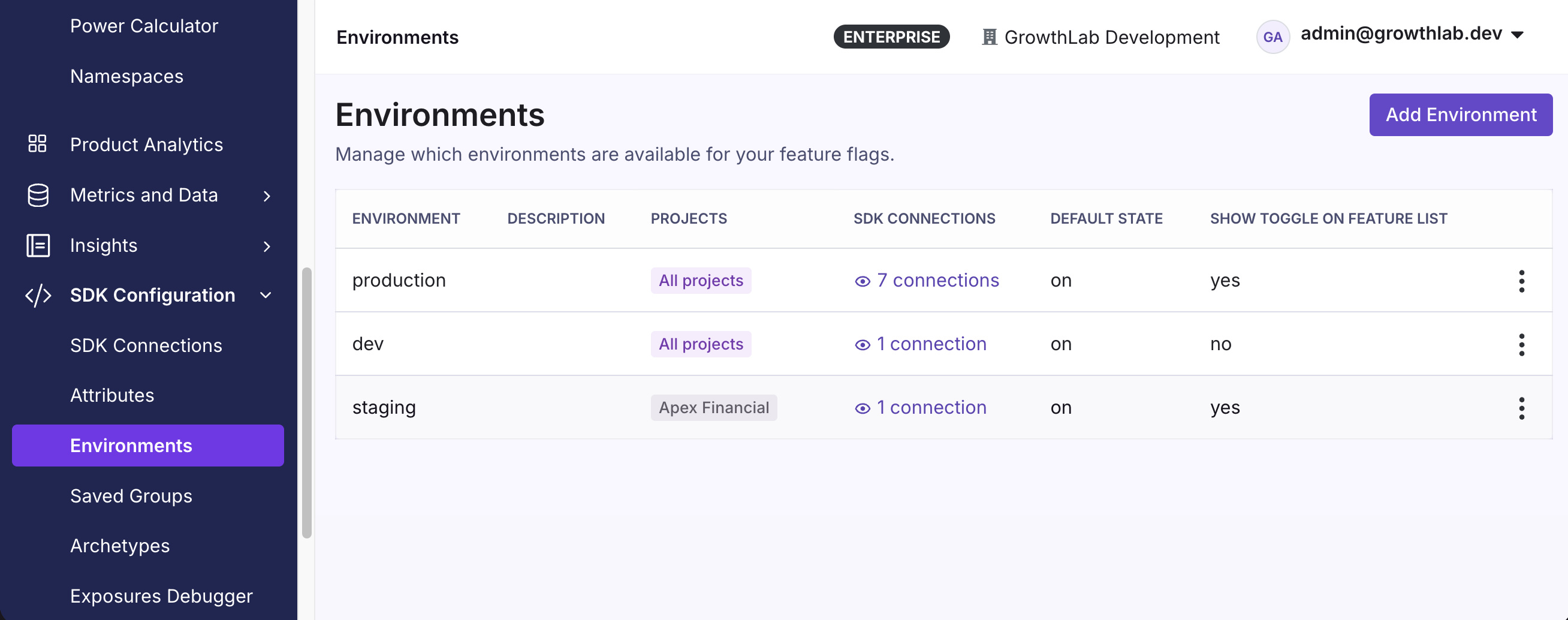
GrowthBook comes with one environment by default (**production**), but you can add as many as you need on the
[Environments page](https://app.growthbook.io/environments) located within the **SDK Configuration** menu.

<Note>
  **Plan availability**

  Free organizations can use the built-in environments (`production`, `dev`, `staging`, and `test`). Creating custom environments beyond these requires a Pro or Enterprise plan. Organizations created before this limit was introduced are unaffected.
</Note>

Feature flags can be enabled and disabled on a per-environment basis. You can also set the default feature state for new environments and scope environments to specific projects.

<Frame>
  <img src="https://mintcdn.com/growthbook-ea15456d/giSZyh24PfnTkKz4/static/images/features/feature-environments-2.png?fit=max&auto=format&n=giSZyh24PfnTkKz4&q=85&s=ab4b6cb7f17b9b331941bfb5a34c49c2" alt="A list of environments" width="800" data-path="static/images/features/feature-environments-2.png" />
</Frame>

When a feature is disabled for an environment, GrowthBook excludes the feature from the API response. The feature evaluates to `null` and ignores all targeting and rules.

<Warning>
  **When a Feature is Off**

  A feature can be enabled for an environment but still act as "off" if its value is `false`, `null`, `0`, or an empty string. In these cases, even though the feature is enabled, it evaluates as "off".
</Warning>

## Environments and SDKs

Each SDK Connection is tied to a specific environment and has its own unique SDK key. When the SDK fetches its configuration, it receives **only the features and rules for that environment**, keeping your production and development environments separate.

To use multiple environments in the same codebase, use environment variables to set a dynamic key (e.g., `GROWTHBOOK_CLIENT_KEY='sdk-abc123'`) and reference the variable in your code.

## Environments vs. Projects

Environments and projects are both ways to organize feature flags, but they serve different purposes.

**Environments** represent *where* your code runs — such as development, staging, and production. A single feature flag exists across all environments, but can be enabled, disabled, or configured differently in each one. Environments map to SDK connections: each SDK key is tied to one environment, so your production app only receives production rules.

**Projects** represent *what* you're working on — such as a product area, team, or application. Projects scope which flags, experiments, metrics, and data sources are visible to a given team. Items in GrowthBook can belong to multiple projects, and items with no project assigned are available globally. Projects also let you customize permissions and even statistical settings per team. Manage projects under **Settings → Projects**. Free organizations include one project; creating additional projects requires a Pro or Enterprise plan (organizations created before this limit was introduced are unaffected).

In practice, you use both together: a feature flag in the "Mobile App" project might be enabled in the dev environment for testing but disabled in production until launch.

|                 | Environments                                 | Projects                                                                                                                                                                       |
| --------------- | -------------------------------------------- | ------------------------------------------------------------------------------------------------------------------------------------------------------------------------------ |
| **Purpose**     | Control *where* a flag is active             | Organize *who* works on what                                                                                                                                                   |
| **Scope**       | One flag, different settings per environment | Flags, metrics, data sources, and experiments per team                                                                                                                         |
| **SDK impact**  | Each SDK connection maps to one environment  | SDK connections can be scoped to a project to reduce payload size.<br /><br />**Note:** features and rules can also target projects to scope *delivery* (advanced — see below) |
| **Permissions** | N/A                                          | Users can have different permission levels per project                                                                                                                         |
| **Example**     | `dev`, `staging`, `production`               | "Mobile App", "Growth", "API"                                                                                                                                                  |

Learn more about [how to use projects](/using/growthbook-best-practices#projects).

<Note>
  **Which axis should I use?**

  For most teams, **environments** are the way to control *where* a flag is active, and projects are mainly for organization and permissions. Projects can *also* scope delivery — targeting a feature or rule to specific projects — but that's an advanced pattern for cross-project delivery, covered next. Reach for environments first.
</Note>

### Delivering a feature to multiple projects

A feature's **project** is its primary owner. To deliver the same feature into other projects without duplicating it, open the feature and use **Targeting Projects** to add projects (or target all projects). The feature is then included in the SDK payload for any connection scoped to its primary project *or* one of its Targeting Projects, and appears when you filter the features list by those projects.

**Ownership and permissions stay with the primary project.** Who can edit and publish the feature is always keyed on its primary project alone. Adding or removing a Targeting Project is just a normal edit of the feature — it neither requires nor grants any permission in that project, so a user who can't edit or publish in a project can still deliver a feature into it.

**Approvals are the exception.** By default, if a Targeting Project has approval requirements of its own, the feature must satisfy them before publishing — so surfacing a feature into a governed project honors that project's review policy. An org-level setting, **Apply approval requirements from Targeting Projects** (in the Approval Flows section of your organization settings), turns this off so only the primary project's approval requirements apply. Either way, only the **primary project's** reviewers can approve; Targeting Projects can raise the review bar but never change who is allowed to review.

Individual **rules** can be scoped further: beneath a rule's environment scope, **Project targeting** limits that rule to specific projects within the feature's delivery set — for example, running a rule only in the projects where it's relevant. A rule left unscoped applies to every project the feature reaches. A rule scoped to a project the feature doesn't deliver to won't take effect, and the rule editor flags it.

## Environment Inheritance

<CommercialFeature feature="environment-inheritance" />

When you create an environment you can specify a parent environment to inherit from.
The new environment initially copies all feature rules from its parent. After creation, the environments
operate independently, meaning changes to feature rules in one environment **won't** affect the other. Think of
it like creating a fork or snapshot of the parent environment.

In the GrowthBook app, you can only inherit rules from the four default environments: `production`, `dev`, `staging`, or `test`. To inherit from a custom-named environment, use the [API endpoint](/api#tag/environments/operation/postEnvironment).

### Common Use Cases

* Adding new environments to an existing setup (e.g., adding "staging" after having "dev" and "production")
* Troubleshooting production issues by creating an isolated test environment to safely diagnose problems
* Creating separate environments on a per-dev or per-PR basis