> ## Documentation Index
> Fetch the complete documentation index at: https://docs2.growthbook.io/llms.txt
> Use this file to discover all available pages before exploring further.
# Feature Flag Experiments
> Run experiments using feature flags
GrowthBook allows you to run experiments using feature flags. This method of running experiments allows any feature to be
released as an A/B test. It is ideal for more complex experiments requiring multiple code changes, or for companies that
want to have an experimentation development culture, and determining the impact on your metrics of any feature or code change.
## Running Experiments with Feature Flags
Feature flag experiments are created with an experiment override rule. This experiment rule will randomly assign
variations to your users based on the configurations you select. When a user is placed in an experiment via an experiment
override rule, the assignment will be tracked in your data warehouse using the `trackingCallback` defined in the SDK
implementation.
Here's what an Experiment rule looks like in the GrowthBook UI:
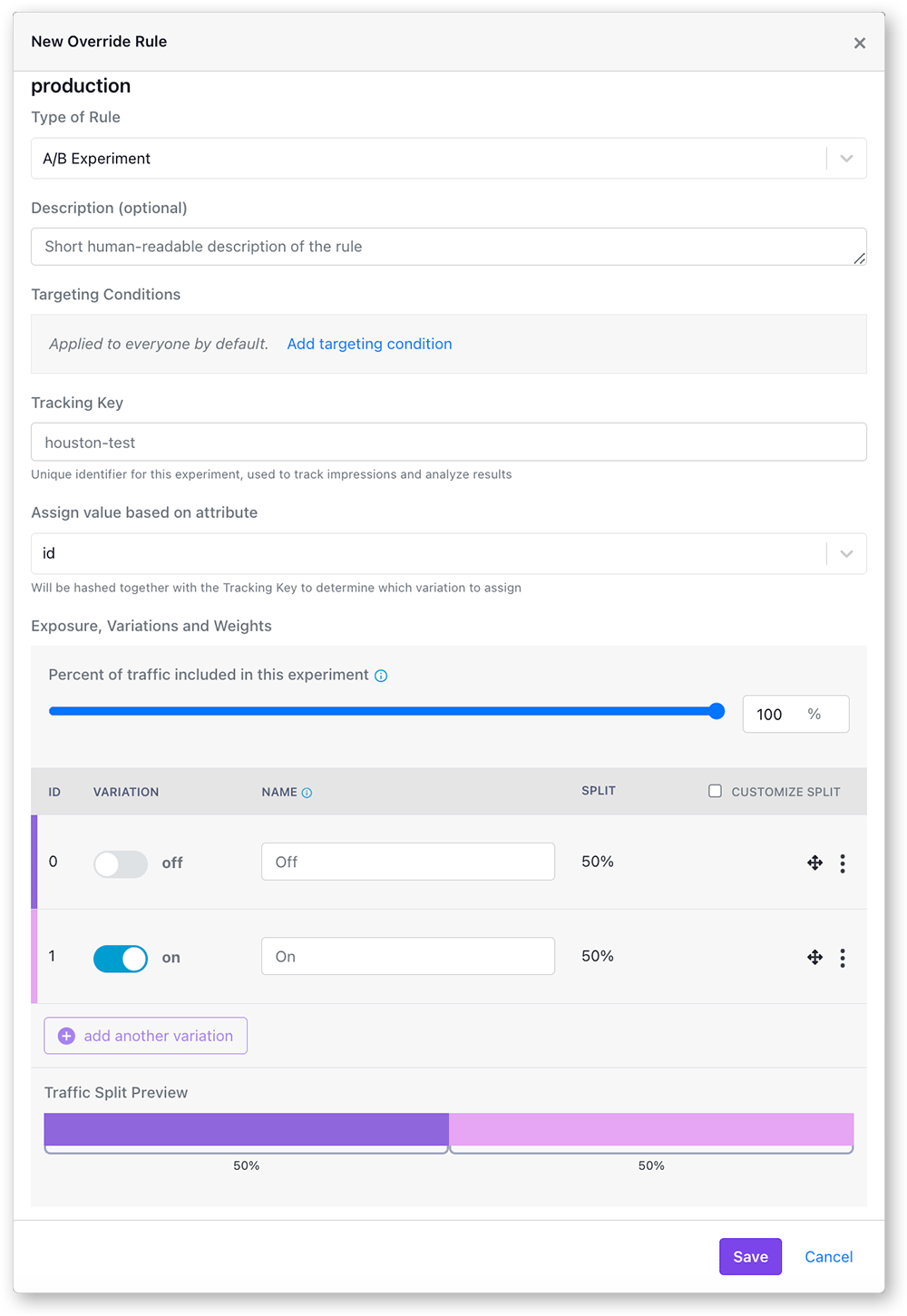 This modal window allows for a great deal of flexibility and customization in how you run your experiments. Let's go through each of the options:
### Experiment Targeting Conditions
Experiment rules can be targeted at specific user or client attributes. Only users who match the targeting condition will
be included in experiment. You can add multiple targeting conditions per rule, and you can add multiple rules per feature,
this gives you great flexibility in targeting and customizing your experiment to specific audiences. You can read more
about [targeting](/features/targeting). By default, all users will be included.
### Tracking Key
The tracking key used to identify this experiment in the SDK. It is used, along with the user hashing attribute in the
persistent hashing algorithm to ensure the users always get randomized into the same treatment group. It is also what is
passed to the tracking callback to be tracked in your data warehouse. By default, the tracking key is the same as the
feature name, but can be any string. We used to use the tracking key as part of the hashing value, but we now instead use a random seed that is generated for each experiment.
### Assign Variations Based on Attribute
The value you select here will be hashed along with experiment seed (set randomly for each experiment but fixed for each phase of the experiment) to determine which variation the user will be assigned.
Only attributes marked as **identifiers** can be used here. In the vast majority of cases, you want to split traffic based
on either a logged-in user id or some sort of anonymous identifier like a device id or session cookie. As long as the user
has the same value for this attribute, they will always get assigned the same variation.
The values available here are defined in the GrowthBook UI under the *SDK Configuration → Attributes*
section. Like all attributes in GrowthBook, the users value for this attribute must be defined in the SDK implementation.
You can read more about targeting attributes [here](/features/targeting).
### Exposure, Variations, and Weights
Here you can choose the overall traffic you want to see the experiment as well as any custom split percentages. If you
assign to less than 100% of the users, the remaining users will skip the rule and fall through to the next matching one
(or the default value) instead.
You may want to run an experiment at a split percentages that weights the control group
in order to de-risk the new feature (say 90% control, 10% new treatment). It is best practice in such cases to keep the splits the
same, and adjust the overall exposure (ie, 20% overall exposure, 50/50 split for the variations).
Multiple variations can be added to an experiment from this section as well, as long as the feature is not a boolean.
The bar at the bottom shows the traffic allocation for this experiment.
Each user will have the experiment's **seed** and **hashing attribute** hashed together to determine which variation they
will be assigned. The algorithm is deterministic, and always returns the same value (a number from 0 to 1) as long as
the inputs are the same. Changing the split percentages mid-experiment risks having a user switch variations, and could
cause multiple exposure warnings. Changing the overall exposure percentage is completely safe.
### Namespaces
If you have multiple experiments that may conflict with each other (e.g. background color and text color), you can
use **namespaces** to make the conflicting experiments mutually exclusive.
Users are randomly assigned a value from 0 to 1 for each namespace. Each experiment in a namespace has a range of values
that it includes. Users are only part of an experiment if their value falls within the experiment's range. As long
as two experiment ranges do not overlap, users will only ever be in at most one of them.
This modal window allows for a great deal of flexibility and customization in how you run your experiments. Let's go through each of the options:
### Experiment Targeting Conditions
Experiment rules can be targeted at specific user or client attributes. Only users who match the targeting condition will
be included in experiment. You can add multiple targeting conditions per rule, and you can add multiple rules per feature,
this gives you great flexibility in targeting and customizing your experiment to specific audiences. You can read more
about [targeting](/features/targeting). By default, all users will be included.
### Tracking Key
The tracking key used to identify this experiment in the SDK. It is used, along with the user hashing attribute in the
persistent hashing algorithm to ensure the users always get randomized into the same treatment group. It is also what is
passed to the tracking callback to be tracked in your data warehouse. By default, the tracking key is the same as the
feature name, but can be any string. We used to use the tracking key as part of the hashing value, but we now instead use a random seed that is generated for each experiment.
### Assign Variations Based on Attribute
The value you select here will be hashed along with experiment seed (set randomly for each experiment but fixed for each phase of the experiment) to determine which variation the user will be assigned.
Only attributes marked as **identifiers** can be used here. In the vast majority of cases, you want to split traffic based
on either a logged-in user id or some sort of anonymous identifier like a device id or session cookie. As long as the user
has the same value for this attribute, they will always get assigned the same variation.
The values available here are defined in the GrowthBook UI under the *SDK Configuration → Attributes*
section. Like all attributes in GrowthBook, the users value for this attribute must be defined in the SDK implementation.
You can read more about targeting attributes [here](/features/targeting).
### Exposure, Variations, and Weights
Here you can choose the overall traffic you want to see the experiment as well as any custom split percentages. If you
assign to less than 100% of the users, the remaining users will skip the rule and fall through to the next matching one
(or the default value) instead.
You may want to run an experiment at a split percentages that weights the control group
in order to de-risk the new feature (say 90% control, 10% new treatment). It is best practice in such cases to keep the splits the
same, and adjust the overall exposure (ie, 20% overall exposure, 50/50 split for the variations).
Multiple variations can be added to an experiment from this section as well, as long as the feature is not a boolean.
The bar at the bottom shows the traffic allocation for this experiment.
Each user will have the experiment's **seed** and **hashing attribute** hashed together to determine which variation they
will be assigned. The algorithm is deterministic, and always returns the same value (a number from 0 to 1) as long as
the inputs are the same. Changing the split percentages mid-experiment risks having a user switch variations, and could
cause multiple exposure warnings. Changing the overall exposure percentage is completely safe.
### Namespaces
If you have multiple experiments that may conflict with each other (e.g. background color and text color), you can
use **namespaces** to make the conflicting experiments mutually exclusive.
Users are randomly assigned a value from 0 to 1 for each namespace. Each experiment in a namespace has a range of values
that it includes. Users are only part of an experiment if their value falls within the experiment's range. As long
as two experiment ranges do not overlap, users will only ever be in at most one of them.
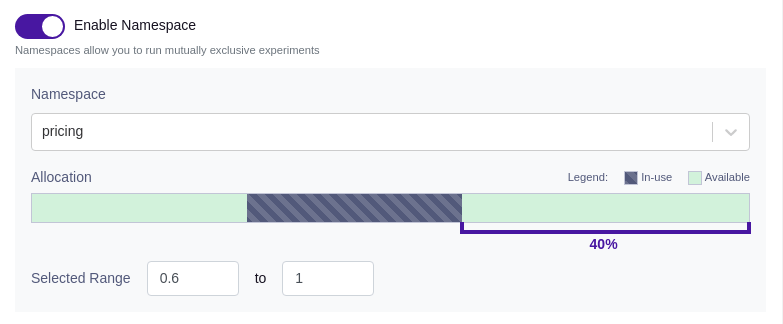 Before you can use namespaces, you must configure them under *Experimentation → Namespaces*. It's essential to ensure that all experiments within a given namespace use the same hash attribute (assignment attribute).
## Experiment Results
Once you have the experiment rule saved and published the feature will start to apply these settings and randomize your
users into the experiment. The results will flow into your data warehouse, as defined by your `trackingCallback`. There is
a link to view experiment results on the bottom of each experiment override rule. Read more about [experiment results](/app/experiment-results).
Before you can use namespaces, you must configure them under *Experimentation → Namespaces*. It's essential to ensure that all experiments within a given namespace use the same hash attribute (assignment attribute).
## Experiment Results
Once you have the experiment rule saved and published the feature will start to apply these settings and randomize your
users into the experiment. The results will flow into your data warehouse, as defined by your `trackingCallback`. There is
a link to view experiment results on the bottom of each experiment override rule. Read more about [experiment results](/app/experiment-results).