> ## Documentation Index
> Fetch the complete documentation index at: https://docs2.growthbook.io/llms.txt
> Use this file to discover all available pages before exploring further.
# Setting up Amplitude as an event tracker
> This document outlines the steps needed to add your Amplitude to GrowthBook.
# Amplitude Event Tracker Setup
## Exposure Tracking
For client side testing, you can fire a custom track event from the GrowthBook SDK's `trackingCallback` function, like so:
```js theme={null}
trackingCallback: (experiment, result) => {
amplitude.track('Experiment Viewed', {experimentId: experiment.key, variantId: result.key});
}
```
You can also use Amplitudes own experiment javascript format:
```js theme={null}
trackingCallback: (experiment, result) => {
amplitude.track('$exposure', {flag_key: experiment.key, variant: result.key});
}
```
You can read more about Amplitude's exposure event [here](https://www.docs.developers.amplitude.com/experiment/general/exposure-tracking/)
## Integrating with Amplitude Data
For GrowthBook to integrate with Amplitude you first must export your Amplitude data to the data warehouse of your choice.
You can read more about it on [Amplitudes help pages](https://www.docs.developers.amplitude.com/data/destinations/).
Currently, Amplitude supports exporting to Redshift, Snowflake, BigQuery, and S3 (and use Athena). Once you have set up a data export to one
of these destinations, you can connect GrowthBook to it.
**No automatic SQL query creation**
GrowthBook won't automatically create SQL queries for Amplitude, but you can follow the general instructions below. If you need any help, [reach out to us](https://slack.growthbook.io) and we can help
## Configuration Settings
Once you have chosen your event tracker and data source type and successfully connected, you will be given an
opportunity to modify your configuration settings. For many applications GrowthBook will have chosen the correct
configuration settings straight out of the box based upon which event tracker you choose. In some instances you may need
to tweak them slightly, or in the case of using a custom datasource, define them more explicitly.
### Identifier Types
These are all the types of identifiers you use to split traffic in an experiment and track metric conversions. Common
examples are `user_id`, `anonymous_id`, `device_id`, and `ip_address`.
### Experiment Assignment Queries
An experiment assignment query returns which users were part of which experiment, what variation they saw, and when they
saw it. Each assignment query is tied to a single identifier type (defined above). You can also have multiple assignment
queries if you store that data in different tables, for example one from your email system and one from your back-end.
The end result of the query should return data like this:
| user\_id | timestamp | experiment\_id | variation\_id |
| -------- | ------------------- | -------------- | ------------- |
| 123 | 2021-08-23-10:53:04 | my-button-test | 0 |
| 456 | 2021-08-23 10:53:06 | my-button-test | 1 |
The above assumes the identifier type you are using is `user_id`. If you are using a different identifier, you would use a different column name.
Here's an example query you might use:
```sql theme={null}
SELECT
user_id,
received_at as timestamp,
experiment_id,
variation_id
FROM
events
WHERE
event_type = 'viewed experiment'
```
Make sure to return the exact column names that GrowthBook is expecting. If your table’s columns use a different name, add an alias in the SELECT list (e.g. `SELECT original_column as new_column`).
#### Duplicate Rows
If a user sees an experiment multiple times, you should return multiple rows in your assignment query, one for each time the user was exposed to the experiment.
This helps us detect when users were exposed to more than one variation, and eventually may be useful in helping build interesting time series.
#### Experiment Dimensions
In addition to the standard 4 columns above, you can also select additional dimension columns. For example, `browser` or `referrer`. These extra columns can be used to drill down into experiment results.
#### Identifier Join Tables
If you have multiple identifier types and want to be able to auto-merge them together during analysis, you also need to define identifier join tables. For example, if your experiment is assigned based on `device_id`, but the conversion metric only has a `user_id` column.
These queries are very simple and just need to return columns for each of the identifier types being joined. For example:
```sql theme={null}
SELECT user_id, device_id FROM logins
```
#### SQL Template Variables
Within your queries, there are several placeholder variables you can use. These will be replaced with strings before being run based on your experiment. This can be useful for giving hints to SQL optimization engines to improve query performance.
The variables are:
* **startDate** - `YYYY-MM-DD HH:mm:ss` of the earliest data that needs to be included
* **startYear** - Just the `YYYY` of the startDate
* **startMonth** - Just the `MM` of the startDate
* **startDay** - Just the `DD` of the startDate
* **startDateUnix** - Unix timestamp of the startDate (seconds since Jan 1, 1970)
* **endDate** - `YYYY-MM-DD HH:mm:ss` of the latest data that needs to be included
* **endYear** - Just the `YYYY` of the endDate
* **endMonth** - Just the `MM` of the endDate
* **endDay** - Just the `DD` of the endDate
* **endDateUnix** - Unix timestamp of the endDate (seconds since Jan 1, 1970)
* **experimentId** - Either a specific experiment id OR `%` if you should include all experiments
For example:
```sql theme={null}
SELECT
user_id,
anonymous_id,
received_at as timestamp,
experiment_id,
variation_id
FROM
experiment_viewed
WHERE
received_at BETWEEN '{{ startDate }}' AND '{{ endDate }}'
AND experiment_id LIKE '{{ experimentId }}'
```
**Note:** The inserted values do not have surrounding quotes, so you must add those yourself (e.g. use `'{{ startDate }}'` instead of just `{{ startDate }}`)
### Jupyter Notebook Query Runner
This setting is only required if you want to export experiment results as a Jupyter Notebook.
There is no one standard way to store credentials or run SQL queries from Jupyter notebooks, so GrowthBook lets you define your own Python function.
It needs to be called `runQuery`, accept a single string argument named `sql`, and return a pandas data frame.
Here's an example for a Postgres (or Redshift) data source:
```python theme={null}
import os
import psycopg2
import pandas as pd
from sqlalchemy import create_engine, text
# Use environment variables or similar for passwords!
password = os.getenv('POSTGRES_PW')
connStr = f'postgresql+psycopg2://user:{password}@localhost'
dbConnection = create_engine(connStr).connect();
def runQuery(sql):
return pd.read_sql(text(sql), dbConnection)
```
**Note:** This python source is stored as plain text in the database. Do not hard-code passwords or sensitive info. Use environment variables (shown above) or another credential store instead.
## Schema Browser
When you connect a supported data source to GrowthBook, we automatically generate metadata that is used by our Schema Browser. The Schema Browser is a user-friendly interface that makes writing queries easier as you can easily explore information about the datasource such as databases, schemas, tables, columns, and data types.
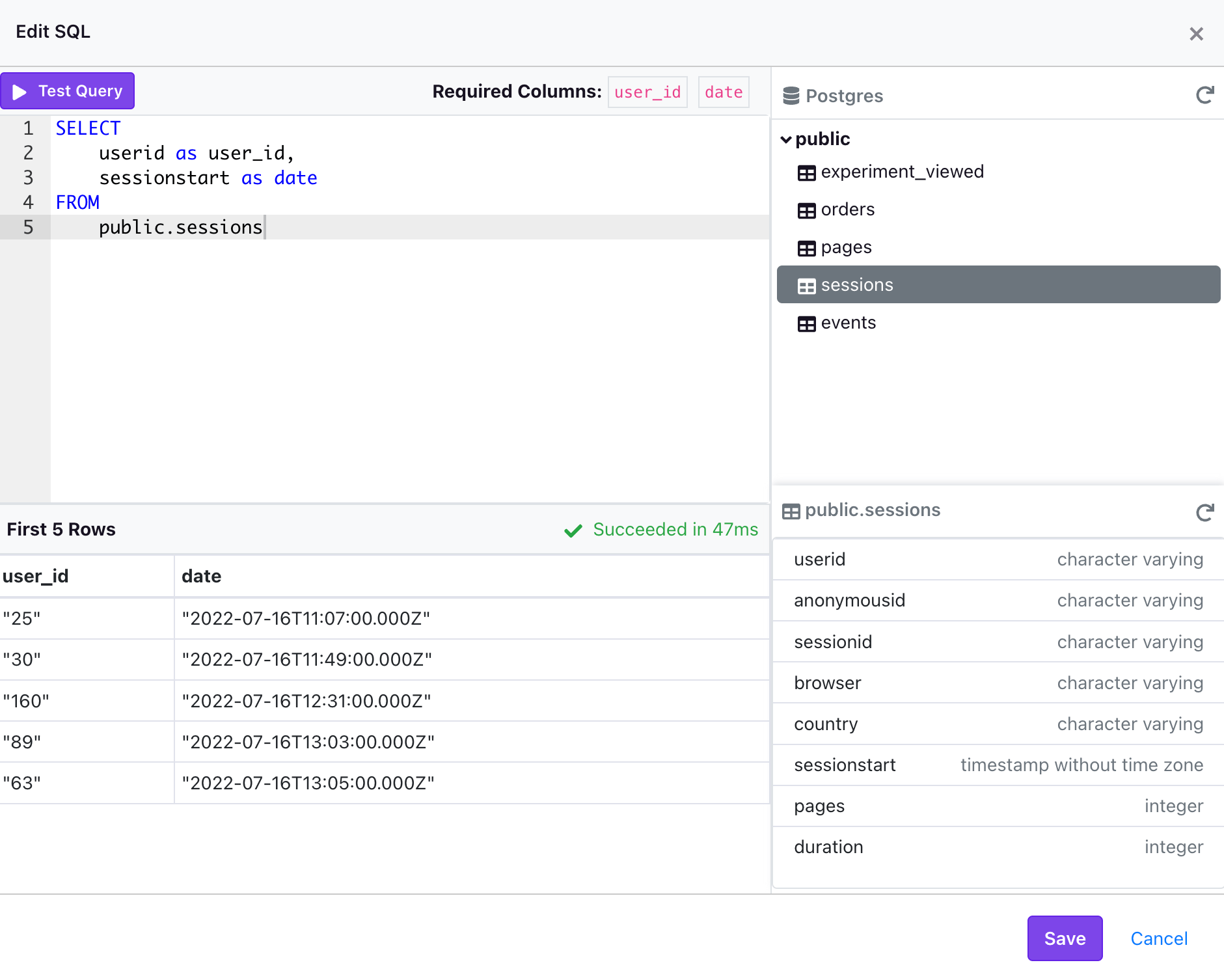 Below are the data sources that currently support the Schema Browser:
* AWS Athena - *Requires a Default Catalog*
* BigQuery - *Requires a Project Name and Default Dataset*
* ClickHouse
* Databricks - *Currently only supported on version 10.2 and above with a Unity Catalog*
* MsSQL/SQL Server
* MySQL/MariaDB
* Postgres
* PrestoDB (and Trino) - *Requires a Default Catalog*
* Redshift
* Snowflake
Below are the data sources that currently support the Schema Browser:
* AWS Athena - *Requires a Default Catalog*
* BigQuery - *Requires a Project Name and Default Dataset*
* ClickHouse
* Databricks - *Currently only supported on version 10.2 and above with a Unity Catalog*
* MsSQL/SQL Server
* MySQL/MariaDB
* Postgres
* PrestoDB (and Trino) - *Requires a Default Catalog*
* Redshift
* Snowflake