> ## Documentation Index
> Fetch the complete documentation index at: https://docs2.growthbook.io/llms.txt
> Use this file to discover all available pages before exploring further.

# User & Team Permissions

> Assign user and team roles in GrowthBook, from no access to Admin, including custom roles and project-scoped permissions.

export const CommercialFeature = ({feature, description}) => {
  const commercialFeatures = {
    "adv-presentations": {
      plan: "enterprise",
      displayName: "Adv Presentations"
    },
    "advanced-permissions": {
      plan: "pro",
      displayName: "Advanced Permissions"
    },
    "ai-byok": {
      plan: "enterprise",
      displayName: "Ai Byok"
    },
    "ai-suggestions": {
      plan: "enterprise",
      displayName: "AI Suggestions"
    },
    archetypes: {
      plan: "pro",
      displayName: "Archetypes"
    },
    "audit-logging": {
      plan: "enterprise",
      displayName: "Audit Logging"
    },
    "cloud-proxy": {
      plan: "pro",
      displayName: "Cloud Proxy"
    },
    "code-references": {
      plan: "pro",
      displayName: "Code References"
    },
    "contextual-bandits": {
      plan: "enterprise",
      displayName: "Contextual Bandits"
    },
    "custom-hooks": {
      plan: "enterprise",
      displayName: "Custom Hooks"
    },
    "custom-launch-checklist": {
      plan: "enterprise",
      displayName: "Custom Launch Checklist"
    },
    "custom-markdown": {
      plan: "enterprise",
      displayName: "Custom Markdown"
    },
    "custom-metadata": {
      plan: "enterprise",
      displayName: "Custom Metadata"
    },
    "custom-roles": {
      plan: "enterprise",
      displayName: "Custom Roles"
    },
    dashboards: {
      plan: "enterprise",
      displayName: "Dashboards"
    },
    "decision-framework": {
      plan: "pro",
      displayName: "Decision Framework"
    },
    "encrypt-features-endpoint": {
      plan: "pro",
      displayName: "Encrypt Features Endpoint"
    },
    "environment-inheritance": {
      plan: "enterprise",
      displayName: "Environment Inheritance"
    },
    "events-forwarder": {
      plan: "pro",
      displayName: "Events Forwarder"
    },
    "experiment-impact": {
      plan: "enterprise",
      displayName: "Experiment Impact"
    },
    "feature-configs": {
      plan: "enterprise",
      displayName: "Feature Configs"
    },
    "funnel-metrics": {
      plan: "pro",
      displayName: "Funnel Metrics"
    },
    "hash-secure-attributes": {
      plan: "pro",
      displayName: "Hash Secure Attributes"
    },
    "historical-power": {
      plan: "pro",
      displayName: "Historical Power"
    },
    holdouts: {
      plan: "enterprise",
      displayName: "Holdouts"
    },
    "incremental-refresh": {
      plan: "enterprise",
      displayName: "Incremental Refresh"
    },
    "json-validation": {
      plan: "enterprise",
      displayName: "JSON Validation"
    },
    "large-saved-groups": {
      plan: "enterprise",
      displayName: "Large Saved Groups"
    },
    learnings: {
      plan: "enterprise",
      displayName: "Learnings"
    },
    livechat: {
      plan: "pro",
      displayName: "Livechat"
    },
    "manage-official-resources": {
      plan: "enterprise",
      displayName: "Manage Official Resources"
    },
    "metric-correlations": {
      plan: "enterprise",
      displayName: "Metric Correlations"
    },
    "metric-effects": {
      plan: "enterprise",
      displayName: "Metric Effects"
    },
    "metric-groups": {
      plan: "enterprise",
      displayName: "Metric Groups"
    },
    "metric-populations": {
      plan: "pro",
      displayName: "Metric Populations"
    },
    "metric-slices": {
      plan: "enterprise",
      displayName: "Metric Slices"
    },
    "multi-armed-bandits": {
      plan: "pro",
      displayName: "Multi Armed Bandits"
    },
    "multi-metric-queries": {
      plan: "enterprise",
      displayName: "Multi Metric Queries"
    },
    "multi-org": {
      plan: "enterprise",
      displayName: "Multi Org"
    },
    "multiple-sdk-webhooks": {
      plan: "pro",
      displayName: "Multiple Sdk Webhooks"
    },
    "no-access-role": {
      plan: "enterprise",
      displayName: "No Access Role"
    },
    "override-metrics": {
      plan: "pro",
      displayName: "Override Metrics"
    },
    "pipeline-mode": {
      plan: "enterprise",
      displayName: "Pipeline Mode"
    },
    "post-stratification": {
      plan: "enterprise",
      displayName: "Post Stratification"
    },
    "precomputed-dimensions": {
      plan: "pro",
      displayName: "Precomputed Dimensions"
    },
    "prerequisite-targeting": {
      plan: "enterprise",
      displayName: "Prerequisite Targeting"
    },
    prerequisites: {
      plan: "pro",
      displayName: "Prerequisites"
    },
    "product-analytics-dashboards": {
      plan: "pro",
      displayName: "Product Analytics Dashboards"
    },
    "project-admin-role": {
      plan: "enterprise",
      displayName: "Project Admin Role"
    },
    "quantile-metrics": {
      plan: "pro",
      displayName: "Quantile Metrics"
    },
    "ramp-schedules": {
      plan: "pro",
      displayName: "Ramp Schedules"
    },
    redirects: {
      plan: "pro",
      displayName: "Redirects"
    },
    "regression-adjustment": {
      plan: "pro",
      displayName: "CUPED"
    },
    releases: {
      plan: "enterprise",
      displayName: "Releases"
    },
    "remote-evaluation": {
      plan: "pro",
      displayName: "Remote Evaluation"
    },
    "require-approvals": {
      plan: "enterprise",
      displayName: "Require Approvals"
    },
    "require-project-for-features-setting": {
      plan: "enterprise",
      displayName: "Require Project For Features Setting"
    },
    "require-project-for-sdk-connections-setting": {
      plan: "enterprise",
      displayName: "Require Project For Sdk Connections Setting"
    },
    "retention-metrics": {
      plan: "pro",
      displayName: "Retention Metrics"
    },
    "safe-rollout": {
      plan: "pro",
      displayName: "Safe Rollout"
    },
    saveSqlExplorerQueries: {
      plan: "pro",
      displayName: "Save SQL Explorer Queries"
    },
    "schedule-feature-flag": {
      plan: "pro",
      displayName: "Schedule Feature Flag"
    },
    "scheduled-revisions": {
      plan: "enterprise",
      displayName: "Scheduled Revisions"
    },
    scim: {
      plan: "enterprise",
      displayName: "SCIM"
    },
    "sequential-testing": {
      plan: "pro",
      displayName: "Sequential Testing"
    },
    "share-product-analytics-dashboards": {
      plan: "enterprise",
      displayName: "Share Product Analytics Dashboards"
    },
    simulate: {
      plan: "pro",
      displayName: "Simulate"
    },
    sso: {
      plan: "enterprise",
      displayName: "SSO"
    },
    "sticky-bucketing": {
      plan: "pro",
      displayName: "Sticky Bucketing"
    },
    teams: {
      plan: "enterprise",
      displayName: "Teams"
    },
    templates: {
      plan: "enterprise",
      displayName: "Templates"
    },
    "unlimited-managed-warehouse-usage": {
      plan: "pro",
      displayName: "Unlimited Managed Warehouse Usage"
    },
    "visual-editor": {
      plan: "pro",
      displayName: "Visual Editor"
    }
  };
  const {plan, displayName} = commercialFeatures[feature];
  const isEnterprise = plan === "enterprise";
  const defaultDescription = isEnterprise ? "is available on Enterprise plans." : "is available on Pro and Enterprise plans.";
  const planLabel = isEnterprise ? "Enterprise" : "Pro";
  const containerStyle = isEnterprise ? {
    backgroundColor: "color-mix(in srgb, var(--indigo-a3) 60%, transparent)"
  } : {
    backgroundColor: "color-mix(in srgb, var(--amber-a3) 60%, transparent)"
  };
  const badgeStyle = isEnterprise ? {
    boxShadow: "inset 0 0 0 1px var(--indigo-a8)",
    color: "var(--indigo-a11)"
  } : {
    boxShadow: "inset 0 0 0 1px var(--amber-a8)",
    color: "var(--amber-a11)"
  };
  return <div className="flex items-start gap-2 mb-4 p-3 text-sm leading-[1.4] rounded-lg" style={containerStyle} role="note">
      <span className="inline-flex items-center justify-center px-1.5 h-5 text-xs font-medium rounded-full shrink-0 leading-none" style={badgeStyle}>
        {planLabel}
      </span>
      <div className="flex-1 leading-[1.3]">
        <strong className="font-semibold">{displayName}</strong>{" "}
        {defaultDescription} {description}
      </div>
    </div>;
};

In the context of GrowthBook, a user, or member, is an individual who has access to your organization's GrowthBook account. Each user is assigned a role that determines the level of access they have within the application. GrowthBook offers a range of roles, from `No Access` to `Admin` and even custom roles, each with a specific set of permissions (see below).
GrowthBook's user permissions system allows organizations to define the level of access each user has within the application. This granular control ensures that users can only access the resources they need to perform their job, enhancing security and privacy.

<Note>
  **Plan availability**

  On the Free plan, members can only be assigned the `Admin` role — assigning any other role (including custom roles) requires a Pro or Enterprise account. Organizations created before this limit was introduced are unaffected, and existing role assignments always keep working.
</Note>

## Adding Users

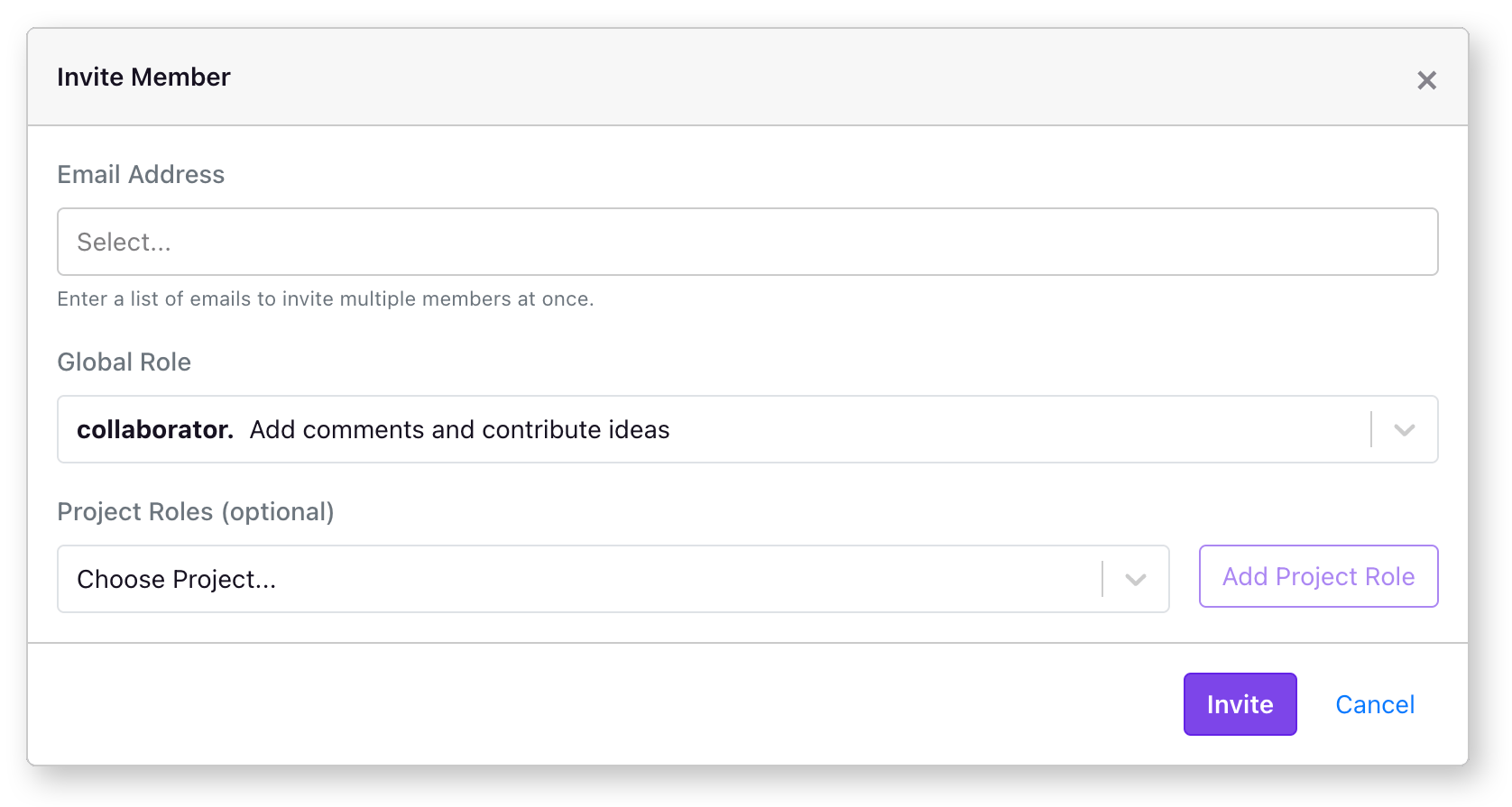
Team members can be added to your GrowthBook account via the `Settings` → `Members` page. From this main page, you'll see an "Invite Member" button on the right. If you do not see this button, you do not have permission to add members to your organization. Clicking on "Invite Member" will open a modal window from which you can choose some options for the new user.

<img src="https://mintcdn.com/growthbook-ea15456d/J3C3juKhu0f7KEr_/static/images/using/invite-member-modal.png?fit=max&auto=format&n=J3C3juKhu0f7KEr_&q=85&s=368f33b81adc35c395bf4ed38561821d" alt="Inviting members modal" width="1676" height="895" data-path="static/images/using/invite-member-modal.png" />

Each GrowthBook user needs an email address, and you can select what global permissions you want to assign (See below for a full list of permission levels).

Inviting a new member to your organization will send an email to that user inviting them to join.

It is possible for a user to join more than one organization. If the user is a member to multiple organizations, they will see a drop-down next to their email address on the top right of the page, where they can select the organization they want to work in.

### Environment Specific Limits
<img src="https://mintcdn.com/growthbook-ea15456d/J3C3juKhu0f7KEr_/static/images/user-permissions-env-specific.png?fit=max&auto=format&n=J3C3juKhu0f7KEr_&q=85&s=011da5ea34c9c6a11cbc809c83147b46" alt="Environment Specific Limits" width="1604" height="1220" data-path="static/images/user-permissions-env-specific.png" />

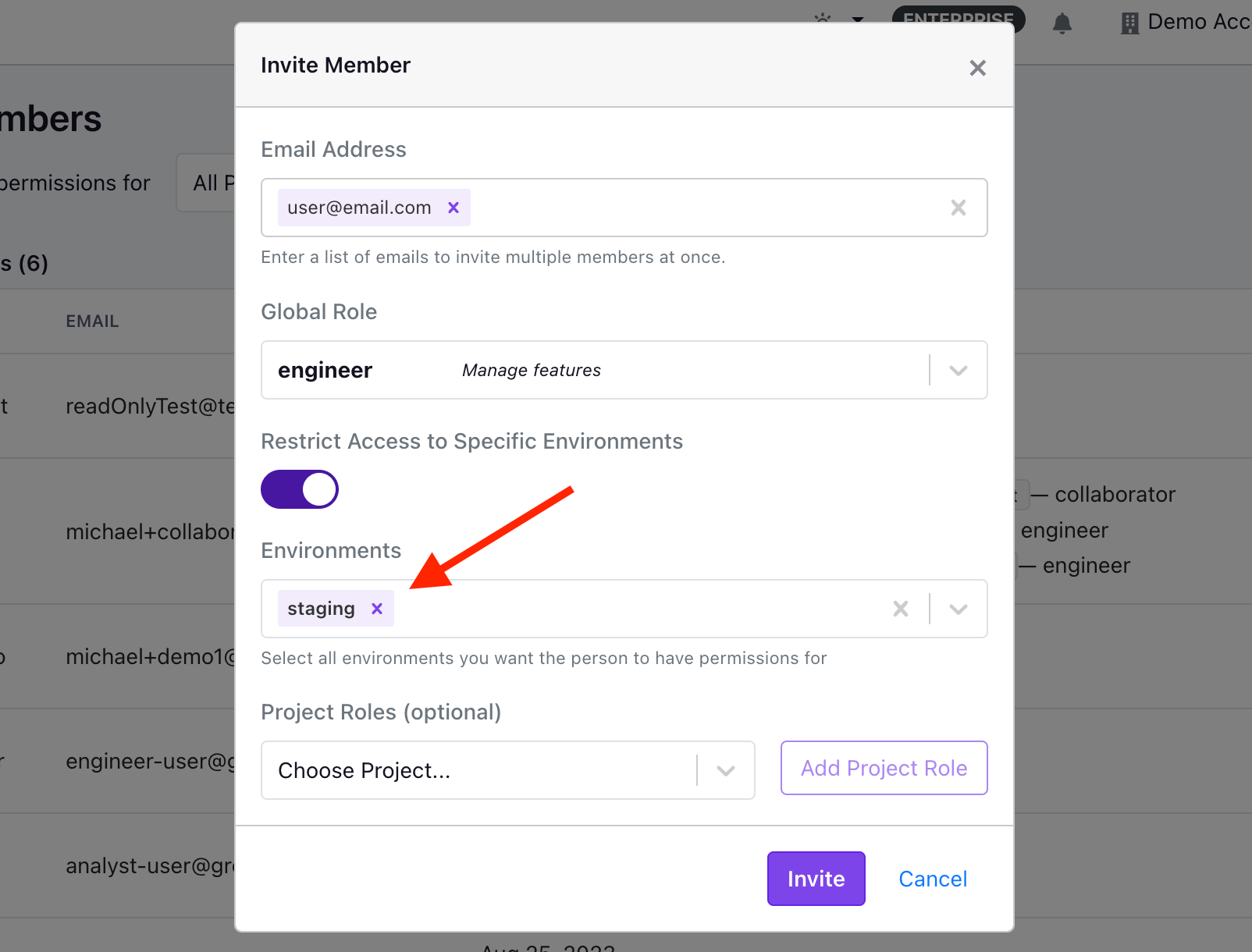
GrowthBook's user permissions also include environment specific limits. This permission level applies only to `Engineer` and `Experimenter` roles in Pro or Enterprise accounts. It allows you to limit the feature flags and experiments a user can manage to specific environments. For example, you can allow an `Engineer` to create and run experiments in a staging environment, but not in production.

### Project Specific Permissions

Besides the global permissions, you can also assign project-specific permissions to users. This allows you to define a user's default role across all projects
and select per-project overrides. For example, a new user could be a `collaborator` by default for all projects, but on the `mobile` project, they could be an `experimenter` so they can manage all feature flags and experiments assigned to that project.

### How permissions are evaluated

GrowthBook first determines whether the action is scoped to a specific project.

**Actions that target a project** (for example, editing a feature flag that belongs to a project) are evaluated using project-specific roles:

* If a project-specific role applies (the user's own, or one from any team they're on), only project-specific roles are used for that project; the global role is ignored. The effective permissions are the union of those project-specific roles (the user gets a permission if any of them grants it).
* Otherwise, the global role applies - itself the union of the user's global role and the global roles of any teams they're on.

Because the global role is ignored whenever a project-specific role applies, a project-specific role can *reduce* access below the global role. For example, a user whose global role is `Engineer` but who has a `Read Only` role on a project is read-only on that project.

**Actions that are not scoped to a project** are evaluated against the global role. This includes organization-level settings and resources that always live at the org level, such as `Dimensions`, `Namespaces`, and `Presentations`.

For organizations without a Pro or Enterprise account, permissions are evaluated solely against the global role.

<Note>
  **Default role for self-registered users**

  If your organization has enabled the setting to allow verified users to automatically join your organization, they will receive the `Collaborator` role by default when they join. However, you can change your organizations' default role at the bottom of the Team page.
</Note>

### Self-registering and Automatic Approvals

If users create an account with a verified email address that matches the domain of your account owner, they will be presented with an option to join your organization. If you have not selected `Automatically approve new verified users` (which is the default), those users will be listed at the bottom of the page under a section called `Pending Members`. From this list, you'll have the option of approving or deleting these self-registered users.

<Frame>
  <img src="https://mintcdn.com/growthbook-ea15456d/J3C3juKhu0f7KEr_/static/images/using/auto-approve-members.png?fit=max&auto=format&n=J3C3juKhu0f7KEr_&q=85&s=9f1ff84dc25ea5a290b9890684815b86" alt="Self-registering and Automatic Approvals Toggle" width="600" data-path="static/images/using/auto-approve-members.png" />
</Frame>

If you are the account owner, you will see a toggle at the top of the members' page that allows you to automatically approve new members who match your domain. This means that instead of being placed in your `pending members` list, they will automatically join your organization.

### Removing Users

To remove a user from your organization, you can click on the three dots next to their name and select `Remove User`. This will remove the user from your organization and revoke their access to all projects and resources within your organization.

## Permissions

Fine-tuning user permissions in an application like GrowthBook ensures a tailored experience, empowering organizations to grant precisely defined access levels. This granular control not only enhances security but also enables teams to collaborate efficiently while safeguarding sensitive features or data.

Organizations using GrowthBook have a number of different ways of defining a user's permission level, depending on the organization's plan.

Regardless of the plan, all organizations can assign a global role when inviting a user which defines their permissions across all projects. If you have a Pro or Enterprise account, you can also assign project-level roles for each user.

For example, you can assign a user the global role of `Collaborator`, allowing them to view features and experiments, add comments, and contribute ideas. You can then assign them an `Experimenter` role for a specific project, which allows them to create and run experiments, but only for that project.

And, for our Enterprise organizations, we offer the ability to create `Teams`, which are groups of users, all of which inherit the roles and permissions of the Team they're on.

The table below lists the roles available in GrowthBook and their associated permissions.

|                             | No Access |   Read Only   |       Collaborator      |               Engineer               |                        Analyst                        |                      Experimenter                     |                     Project Admin                     |                         Admin                         |
| :-------------------------: | :-------: | :-----------: | :---------------------: | :----------------------------------: | :---------------------------------------------------: | :---------------------------------------------------: | :---------------------------------------------------: | :---------------------------------------------------: |
|        Feature Flags        |     -     |      View     |    View<br />Comment    | View<br />Comment<br />Add<br />Edit |                   View<br />Comment                   |          View<br />Comment<br />Add<br />Edit         |          View<br />Comment<br />Add<br />Edit         |          View<br />Comment<br />Add<br />Edit         |
|         Experiments         |     -     |      View     |    View<br />Comment    |      View<br />Comment<br />Edit     | View<br />Comment<br />Add<br />Edit<br />Run Queries | View<br />Comment<br />Add<br />Edit<br />Run Queries | View<br />Comment<br />Add<br />Edit<br />Run Queries | View<br />Comment<br />Add<br />Edit<br />Run Queries |
|           Metrics           |     -     |      View     |           View          |                 View                 |                View<br />Add<br />Edit                |                View<br />Add<br />Edit                |                View<br />Add<br />Edit                |                View<br />Add<br />Edit                |
|          Dimensions         |     -     |      View     |           View          |                 View                 |                View<br />Add<br />Edit                |                View<br />Add<br />Edit                |                View<br />Add<br />Edit                |                View<br />Add<br />Edit                |
|           Segments          |     -     |      View     |           View          |                 View                 |                View<br />Add<br />Edit                |                View<br />Add<br />Edit                |                View<br />Add<br />Edit                |                View<br />Add<br />Edit                |
|         Datasources         |     -     |      View     |           View          |                 View                 |                    View<br />Edit\*                   |                    View<br />Edit\*                   |                    View<br />Edit\*                   |                View<br />Add<br />Edit                |
|            Ideas            |     -     |      View     | View<br />Add<br />Edit |        View<br />Add<br />Edit       |                View<br />Add<br />Edit                |                View<br />Add<br />Edit                |                View<br />Add<br />Edit                |                View<br />Add<br />Edit                |
|       SDK Connections       |     -     | View<br />Add |      View<br />Add      |        View<br />Add<br />Edit       |                View<br />Add<br />Edit                |                View<br />Add<br />Edit                |                View<br />Add<br />Edit                |                View<br />Add<br />Edit                |
|          Attributes         |     -     |      View     |           View          |        View<br />Add<br />Edit       |                          View                         |                View<br />Add<br />Edit                |                View<br />Add<br />Edit                |                View<br />Add<br />Edit                |
|          Namespaces         |     -     |      View     |           View          |        View<br />Add<br />Edit       |                          View                         |                View<br />Add<br />Edit                |                View<br />Add<br />Edit                |                View<br />Add<br />Edit                |
|         Environments        |     -     |      View     |           View          |        View<br />Add<br />Edit       |                          View                         |                View<br />Add<br />Edit                |                View<br />Add<br />Edit                |                View<br />Add<br />Edit                |
|         Saved Groups        |     -     |      View     |           View          |        View<br />Add<br />Edit       |                          View                         |                View<br />Add<br />Edit                |                View<br />Add<br />Edit                |                View<br />Add<br />Edit                |
|             Tags            |     -     |       -       |            -            |        View<br />Add<br />Edit       |                View<br />Add<br />Edit                |                View<br />Add<br />Edit                |                View<br />Add<br />Edit                |                View<br />Add<br />Edit                |
| Product Analytic Dashboards |     -     |      View     |           View          |                 View                 |                View<br />Add<br />Edit                |                          View                         |                          View                         |                View<br />Add<br />Edit                |
|      Slack Integration      |     -     |       -       |            -            |                   -                  |                           -                           |                           -                           |                           -                           |                View<br />Add<br />Edit                |
|       Manage Projects       |     -     |       -       |            -            |                   -                  |                           -                           |                           -                           |                          Yes                          |                          Yes                          |
|         Manage Team         |     -     |       -       |            -            |                   -                  |                           -                           |                           -                           |                           -                           |                          Yes                          |
|         Manage Plan         |     -     |       -       |            -            |                   -                  |                           -                           |                           -                           |                           -                           |                          Yes                          |
|        Manage Billing       |     -     |       -       |            -            |                   -                  |                           -                           |                           -                           |                           -                           |                          Yes                          |

\**Limited to editing a subset of data source settings - identifier types, experiment assignment queries, Jupyter Notebook queries and Data Pipeline settings. Editing datasource name, projects, description, and connection parameters requires Admin permissions.*

### How does the No Access role work?

<CommercialFeature feature="no-access-role" />

In some cases, an organization might want to hide certain projects from a user entirely. This is possible with the `No Access` role. The `No Access` role can either be applied as the user's global role, or it can be a project-specific role.

In the event you want a user to have access to a subset of projects, you can give them a global role of `No Access` and then give project-specific permissions for the projects you want them to be able to view.

If, however, you only want to hide a certain project from a user, you can assign their project-level role of `No Access` which will make it so the user isn't able to view the project.

If you need to apply these rules to many users at once, you can create a Team with the permissions needed, and then add users to that team. Keep in mind how project-level and global roles combine when a user is on one or more teams:

* For a project where the user (or any team they are on) has an **explicit** project-level role, their access to that project is the union of those explicit project-level roles. Global roles are **not** used for that project.
* For a project where no explicit project-level role applies, the user's global role (merged with their teams' global roles) is used instead.

So to hide a specific project from a user, make sure no explicit project-level role grants them access to it: set their own project-level role for that project to `No Access`, and do the same for any team they are on that would otherwise grant access to it.

### How does the Project Admin role work?

<CommercialFeature feature="project-admin-role" />

The Project Admin role provides full access to all features and experiments within a project, similar to the `Experimenter` role. Additionally, Project Admin allows you to manage project settings and change project roles for other members within that project. This makes it ideal for delegating project-level administration without granting full `Admin` permissions.

The Project Admin role can be applied at either the global or project level. When applied globally, the user has Project Admin permissions across all projects. When applied at the project level, the user has Project Admin permissions only for that specific project.

Key differences from the `Admin` role:

* Project Admin can manage project settings and project member roles, but cannot manage organization-wide settings
* Project Admin cannot add or remove users, manage user's global roles, add/remove users to teams, manage billing, or organization-level configurations

<Note>
  **Organization-level resources are not project-specific**

  Within GrowthBook, not all resources are project-specific. For example, `Dimensions`, `Namespaces`, and `Presentations` all live at the organization level. This means that all users, regardless of role, will be able to view these resources.

  If security of these resources is paramount to your organization, we recommend creating a separate organization, and keeping the resources you want to hide in that organization.
</Note>

### Teams

Enterprise organizations using GrowthBook can create Teams with distinct capabilities. When setting up a Team, you have the option to define both a global role and project-level roles, much like how you do for individual users. Once a Team is established, multiple users can be added to it. Any user added to a Team will automatically inherit all permissions assigned to that Team. This feature becomes particularly useful when combined with [GrowthBook's SCIM integration](/integrations/scim), enabling automated user provisioning and de-provisioning.

To create a Team, you can go to `Settings` → `Members` → `Team` via the Sidebar and then select the `Teams` tab at the top of the page. Here, you can create and configure various Teams, before adding members to a Team. When evaluating whether or not a user has permission to perform a certain action, we will merge the user's permissions with the permissions inherited from all the Teams the user is on. So if the user's global role is `Collaborator` but they're on a Team that grants them `Engineer` permissions, that user's permission will then be a merger of the `Collaborator` and `Engineer` roles.

### Custom roles

Enterprise organizations using GrowthBook also have the added flexibility of defining custom roles, which enable organizations to fine-tune a role's permissions. These custom roles can be used just like a standard role and can be applied to users and teams at both the global and project levels. A custom role can also be set as your organization's default role, so if you have auto-join enabled, new members will automatically receive the organization's default role, even if it is a custom role.

When creating a custom role, you can either create a role from scratch or duplicate an existing role and then update the role's description along with the policies, which control the role's permissions.

Once created, the name of a custom role cannot be changed. If you need to change the name, you will need to duplicate the role and set the new name before saving. Once saved, you'll need to update users to use this new role.

#### Policies & Permissions

When creating and editing custom roles, organizations have the ability to select specific policies for each role, where the policy contains the underlying permissions.

Below, we've outlined the current policies and their associated permissions. If your use case is not met with the current policies, please let us know by creating a [Github Issue](https://github.com/growthbook/growthbook/issues).

| Policy Group                              | Policy                      | Description                                                                                                                                                                                   | Permissions                                                                                                                                                                                                                                                                                                          |
| ----------------------------------------- | --------------------------- | --------------------------------------------------------------------------------------------------------------------------------------------------------------------------------------------- | -------------------------------------------------------------------------------------------------------------------------------------------------------------------------------------------------------------------------------------------------------------------------------------------------------------------- |
| **Global**                                | ReadData                    | View all resources - features, metrics, experiments, data sources, etc.                                                                                                                       | readData                                                                                                                                                                                                                                                                                                             |
|                                           | Comments                    | Add comments to any resource                                                                                                                                                                  | readData, addComments                                                                                                                                                                                                                                                                                                |
| **Feature Flags, Configs, and Constants** | FlagsFullAccess             | Perform every lifecycle action listed below for Feature Flags, Configs, and Constants                                                                                                         | readData, createFeatures, createConfigs, createConstants, deleteFeatures, deleteConfigs, deleteConstants, editFeatureDrafts, editConfigDrafts, editConstantDrafts, reviewFeatures, reviewConfigs, reviewConstants, publishFeatures, publishConfigs, publishConstants, revertFeatures, revertConfigs, revertConstants |
|                                           | ↳ FlagsCreate               | Create new Feature Flags, Configs, and Constants. Enabling a new Feature Flag in an environment also requires Publish access to that environment.                                             | readData, createFeatures, createConfigs, createConstants                                                                                                                                                                                                                                                             |
|                                           | ↳ FlagsEditDrafts           | Create and edit drafts, request review, and discard drafts without changing live behavior                                                                                                     | readData, editFeatureDrafts, editConfigDrafts, editConstantDrafts                                                                                                                                                                                                                                                    |
|                                           | ↳ FlagsReview               | Approve a draft or request changes                                                                                                                                                            | readData, reviewFeatures, reviewConfigs, reviewConstants                                                                                                                                                                                                                                                             |
|                                           | ↳ FlagsPublish              | Change live behavior by publishing a draft, saving directly, unarchiving a resource, or toggling an environment. Direct saves also require Edit access.                                       | readData, publishFeatures, publishConfigs, publishConstants                                                                                                                                                                                                                                                          |
|                                           | ↳ FlagsRevert               | Restore a previously published revision                                                                                                                                                       | readData, revertFeatures, revertConfigs, revertConstants                                                                                                                                                                                                                                                             |
|                                           | ↳ FlagsDelete               | Archive a live resource or permanently delete one that is already archived                                                                                                                    | readData, deleteFeatures, deleteConfigs, deleteConstants                                                                                                                                                                                                                                                             |
|                                           | FlagsBypassApprovals        | Publish without an approval, force-publish an out-of-date draft, or unlock a Config. Validation and Custom Hooks still run unless the caller explicitly uses the corresponding REST override. | readData, bypassApprovalFeatures, bypassApprovalConfigs, bypassApprovalConstants                                                                                                                                                                                                                                     |
|                                           | ArchetypesFullAccess        | Create, edit, and delete saved User Archetypes for Feature Flag debugging                                                                                                                     | readData, manageArchetype                                                                                                                                                                                                                                                                                            |
| **Saved Groups**                          | SavedGroupsFullAccess       | Perform every lifecycle action listed below for Saved Groups                                                                                                                                  | readData, createSavedGroups, deleteSavedGroups, editSavedGroupDrafts, reviewSavedGroups, publishSavedGroups, revertSavedGroups                                                                                                                                                                                       |
|                                           | ↳ SavedGroupsCreate         | Create new Saved Groups                                                                                                                                                                       | readData, createSavedGroups                                                                                                                                                                                                                                                                                          |
|                                           | ↳ SavedGroupsEditDrafts     | Create and edit drafts, request review, and discard drafts without changing the live Saved Group                                                                                              | readData, editSavedGroupDrafts                                                                                                                                                                                                                                                                                       |
|                                           | ↳ SavedGroupsReview         | Approve a draft or request changes                                                                                                                                                            | readData, reviewSavedGroups                                                                                                                                                                                                                                                                                          |
|                                           | ↳ SavedGroupsPublish        | Publish a draft, save directly, or unarchive a Saved Group. Direct saves also require Edit access.                                                                                            | readData, publishSavedGroups                                                                                                                                                                                                                                                                                         |
|                                           | ↳ SavedGroupsRevert         | Restore a previously published revision                                                                                                                                                       | readData, revertSavedGroups                                                                                                                                                                                                                                                                                          |
|                                           | ↳ SavedGroupsDelete         | Archive a Saved Group or permanently delete one that is already archived                                                                                                                      | readData, deleteSavedGroups                                                                                                                                                                                                                                                                                          |
|                                           | SavedGroupsBypassApprovals  | Publish without an approval or force-publish an out-of-date draft                                                                                                                             | readData, bypassApprovalSavedGroups                                                                                                                                                                                                                                                                                  |
|                                           | BypassSavedGroupSizeLimit   | Exceed the organization's size limits for a Saved Group                                                                                                                                       | readData, bypassSavedGroupSizeLimit                                                                                                                                                                                                                                                                                  |
| **Experiments**                           | ExperimentsFullAccess       | Create, edit, and delete experiments. Does not include Visual Editor access.                                                                                                                  | readData, createAnalyses, runQueries                                                                                                                                                                                                                                                                                 |
|                                           | ExperimentsPublish          | Start and stop experiments, which changes what is sent to SDKs.                                                                                                                               | readData, runExperiments                                                                                                                                                                                                                                                                                             |
|                                           | VisualEditorFullAccess      | Use the Visual Editor to implement experiment changes.                                                                                                                                        | readData, manageVisualChanges                                                                                                                                                                                                                                                                                        |
|                                           | SuperDeleteReports          | Delete custom reports made by other users. Typically assigned to admins only.                                                                                                                 | readData, superDeleteReport                                                                                                                                                                                                                                                                                          |
|                                           | TemplatesFullAccess         | Create, edit, and delete experiment templates                                                                                                                                                 | readData, manageTemplates                                                                                                                                                                                                                                                                                            |
|                                           | HoldoutsFullAccess          | Create, edit, and delete holdouts                                                                                                                                                             | readData, createAnalyses, runQueries                                                                                                                                                                                                                                                                                 |
| **Metrics and Data**                      | DataSourcesFullAccess       | Create, edit, and delete data sources                                                                                                                                                         | readData, createDatasources, editDatasourceSettings, runQueries                                                                                                                                                                                                                                                      |
|                                           | DataSourceConfiguration     | Edit existing data source configuration settings (identifier types, experiment assignment queries)                                                                                            | readData, editDatasourceSettings, runQueries                                                                                                                                                                                                                                                                         |
|                                           | RunQueries                  | Execute queries against data sources. Required to refresh experiment results. Does not include SQL Explorer access.                                                                           | readData, runQueries                                                                                                                                                                                                                                                                                                 |
|                                           | SqlExplorerFullAccess       | Create, run, edit, and delete SQL Explorer queries                                                                                                                                            | readData, runSqlExplorerQueries                                                                                                                                                                                                                                                                                      |
|                                           | MetricsFullAccess           | Create, edit, and delete regular metrics (does not include Fact Metrics)                                                                                                                      | readData, createMetrics, runQueries, createMetricGroups                                                                                                                                                                                                                                                              |
|                                           | FactTablesFullAccess        | Create, edit, and delete fact tables, metrics, and filters.                                                                                                                                   | readData, manageFactTables, manageFactMetrics, manageFactFilters, runQueries                                                                                                                                                                                                                                         |
|                                           | FactMetricsFullAccess       | Create, edit, and delete fact metrics and filters.                                                                                                                                            | readData, manageFactMetrics, manageFactFilters, runQueries                                                                                                                                                                                                                                                           |
|                                           | DimensionsFullAccess        | Create, edit, and delete dimensions                                                                                                                                                           | readData, createDimensions, runQueries                                                                                                                                                                                                                                                                               |
|                                           | SegmentsFullAccess          | Create, edit, and delete segments                                                                                                                                                             | readData, createSegments, runQueries                                                                                                                                                                                                                                                                                 |
|                                           | ManageOfficialResources     | Create, edit, and delete official resources such as Fact Tables, Metrics, and Segments.                                                                                                       | readData, manageOfficialResources, runQueries                                                                                                                                                                                                                                                                        |
| **Management**                            | IdeasFullAccess             | Create, edit, and delete ideas                                                                                                                                                                | readData, createIdeas                                                                                                                                                                                                                                                                                                |
|                                           | PresentationsFullAccess     | Create, edit, and delete presentations                                                                                                                                                        | readData, createPresentations                                                                                                                                                                                                                                                                                        |
| **Product Analytic Dashboards**           | GeneralDashboardsFullAccess | Create, edit, and delete Product Analytics dashboards.                                                                                                                                        | readData, manageGeneralDashboards                                                                                                                                                                                                                                                                                    |
| **Session Replay**                        | SessionReplayViewAccess     | View and play back recorded user sessions.                                                                                                                                                    | readData, viewSessionReplay                                                                                                                                                                                                                                                                                          |
|                                           | SessionReplayFullAccess     | View, play back, and delete recorded user sessions (single, bulk, and DSR-driven deletions).                                                                                                  | readData, viewSessionReplay, deleteSessionReplay                                                                                                                                                                                                                                                                     |
| **SDK Configuration**                     | SDKConnectionsFullAccess    | Create, edit, and delete SDK Connections                                                                                                                                                      | readData, manageSDKConnections, manageSDKWebhooks                                                                                                                                                                                                                                                                    |
|                                           | AttributesFullAccess        | Create, edit, and delete targeting attributes                                                                                                                                                 | readData, manageTargetingAttributes                                                                                                                                                                                                                                                                                  |
|                                           | EnvironmentsFullAccess      | Create, edit, and delete environments                                                                                                                                                         | readData, manageEnvironments                                                                                                                                                                                                                                                                                         |
|                                           | NamespacesFullAccess        | Create, edit, and delete namespaces                                                                                                                                                           | readData, manageNamespaces                                                                                                                                                                                                                                                                                           |
| **Settings**                              | GeneralSettingsFullAccess   | Edit organization general settings                                                                                                                                                            | readData, organizationSettings                                                                                                                                                                                                                                                                                       |
|                                           | NorthStarMetricFullAccess   | Configure North Star metrics                                                                                                                                                                  | readData, manageNorthStarMetric                                                                                                                                                                                                                                                                                      |
|                                           | TeamManagementFullAccess    | Invite users, delete users, change user roles, add/remove users from teams.                                                                                                                   | readData, manageTeam                                                                                                                                                                                                                                                                                                 |
|                                           | CustomRolesFullAccess       | Create, edit, and delete custom roles                                                                                                                                                         | readData, manageTeam, manageCustomRoles                                                                                                                                                                                                                                                                              |
|                                           | CustomFieldsFullAccess      | Create, edit, and delete custom fields                                                                                                                                                        | readData, manageCustomFields                                                                                                                                                                                                                                                                                         |
|                                           | ProjectsFullAccess          | Create, edit, and delete projects and change project roles for other members. Can be applied at the global or project level.                                                                  | readData, manageProjects, createProjects, deleteProjects                                                                                                                                                                                                                                                             |
|                                           | ProjectAdminAccess          | Manage project settings and change project roles for other members.                                                                                                                           | readData, manageProjects                                                                                                                                                                                                                                                                                             |
|                                           | TagsFullAccess              | Create, edit, and delete tags                                                                                                                                                                 | readData, manageTags                                                                                                                                                                                                                                                                                                 |
|                                           | APIKeysFullAccess           | Create, edit, and delete API secret keys. Not required to create Personal Access Tokens.                                                                                                      | readData, manageApiKeys                                                                                                                                                                                                                                                                                              |
|                                           | IntegrationsFullAccess      | Set up and configure integrations - GitHub, Vercel, etc.                                                                                                                                      | readData, manageIntegrations                                                                                                                                                                                                                                                                                         |
|                                           | EventWebhooksFullAccess     | Create, edit, and delete event-based webhooks. Used for Slack/Discord notifications.                                                                                                          | readData, manageEventWebhooks, viewAuditLog                                                                                                                                                                                                                                                                          |
|                                           | BillingFullAccess           | View and edit license key. View invoices and update billing info.                                                                                                                             | readData, manageBilling                                                                                                                                                                                                                                                                                              |
|                                           | AuditLogsFullAccess         | View and export audit logs                                                                                                                                                                    | readData, viewAuditLog                                                                                                                                                                                                                                                                                               |
|                                           | DecisionCriteriaFullAccess  | Create, edit, and delete decision criteria, part of the experiment decision framework.                                                                                                        | readData, manageDecisionCriteria                                                                                                                                                                                                                                                                                     |
|                                           | CustomHooksFullAccess       | Create, edit, and delete Global, Project, and Config-scoped custom hooks. A hook scoped to a single Feature Flag instead takes edit rights on that flag (FlagsEditDrafts).                    | readData, manageCustomHooks                                                                                                                                                                                                                                                                                          |

#### Choosing individual permissions

You do not have to grant **Full access**. Expand that policy in the role editor
to select only the actions a role needs. For example, a role with **Edit** but
not **Publish** can prepare drafts but cannot change live behavior.

Feature Flags, Configs, and Constants share the same set of policies. Create,
Publish, Revert, and Archive & delete respect a role's environment restrictions.
GrowthBook checks only the environments affected by the action. For example,
archiving a Feature Flag checks the environments where that flag is currently
enabled. Permanently deleting an already archived resource does not require
access to any environment.

Some changes are not environment-specific at all. A Constant's base value and a
Config that is not scoped to particular environments apply everywhere rather
than to any one environment, so there is no environment for GrowthBook to check.
A role with Publish for the Project can publish them regardless of its
environment restrictions.

Moving a resource to another Project requires the relevant permission in both
the current and destination Projects.

#### Deactivating Roles

As we do not support the ability for an organization to delete a standard role, we have introduced the ability for enterprise organizations to deactivate both standard and custom roles. When a role is deactivated, we remove the role from the roles dropdown when adding a new user or updating an existing user's role. If you deactivate a role that is assigned to a user, the user will experience no changes to their permission level. The deactivation of the role simply removes it from the role options.

The only guardrail in place around deactivating roles is that you cannot deactivate your organization's default role.
